• Car enthusiast? Join us on Cars Connected! iOS | Android | Desktop
  • Hint: Use a descriptive title for your new message
    If you're looking for help and want to draw people in who can assist you, use a descriptive subject title when posting your message. In other words, "I need help with my car" could be about anything and can easily be overlooked by people who can help. However, "I need help with my transmission" will draw interest from people who can help with a transmission specific issue. Be as descriptive as you can. Please also post in the appropriate forum. The "Lounge" is for introducing yourself. If you need help with your G70, please post in the G70 section - and so on... This message can be closed by clicking the X in the top right corner.

Apple CarPlay Split screen

Dtamargo

New member
Joined
Nov 29, 2023
Messages
6
Reaction score
0
Points
1
Genesis Model Year
2022
Genesis Model Type
Genesis G70
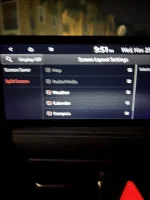
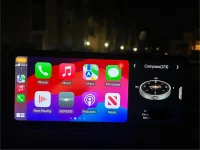
Is there a way to remove the split screen while I’m using Apple CarPlay. Apple CarPlay used to take up the whole screen but I did an update today and now I can’t take off the split screen. Sorry for the blurry picture but if you see it won’t let me unselect Map or Radio/media
 

Attachments

  • IMG_9715.webp
    IMG_9715.webp
    74.9 KB · Views: 10
  • IMG_9714.webp
    IMG_9714.webp
    87.4 KB · Views: 10
Did you press that little side arrow by the compass?
 
I did it just replaces the compass with another little screen that shows the CarPlay logo instead
 
Thanks for that info, @blinkenjim. I was having the same issue with the stubborn split screen.
 
Looking to update and upgrade your Genesis luxury sport automobile? Look no further than right here in our own forum store - where orders are shipped immediately!
Back
Top