• Car enthusiast? Join us on Cars Connected! iOS | Android | Desktop
  • Hint: Use a descriptive title for your new message
    If you're looking for help and want to draw people in who can assist you, use a descriptive subject title when posting your message. In other words, "I need help with my car" could be about anything and can easily be overlooked by people who can help. However, "I need help with my transmission" will draw interest from people who can help with a transmission specific issue. Be as descriptive as you can. Please also post in the appropriate forum. The "Lounge" is for introducing yourself. If you need help with your G70, please post in the G70 section - and so on... This message can be closed by clicking the X in the top right corner.

Browse playlists or albums over bluetooth?

NobodyKnows

New member
Joined
Apr 14, 2020
Messages
22
Reaction score
3
Points
3
Location
Ashburn, VA
Genesis Model Type
Genesis G70
Is the infotainment missing this functionality? I've looked all over and as far as I can tell the controls for bluetooth audio are very limited.
 
Are you using Android or Apple? So you mean like browsing songs on your phone, from the on screen display? Can you do this when connected via cable?

I have read that phone functions are limited when using Bluetooth, but it's not really the car's fault.

I'll have to try mine (Android) to see how they compare.
 
I have an iPhone X, even with it plugged (not using carplay) in I can't browse anything on the phone. I've been in numerous rentals, toyota, chevy, ford, they all have been able to do this so I thought it was odd and maybe I just haven't found it.
 
The feature you are describing, cabled, is not Bluetooth. It's iPod/iPhone integration.

On an Android you have to enable it in the phone before it's allowed.

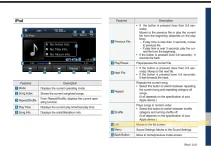
The car has it. Cable up. Then go to media and choose the right option... I forget the name since I run an Android but you'll see it... It's not Bluetooth.
 
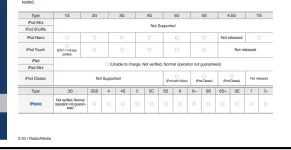
I went and read the manual for you...

If you don't see the screen below you aren't doing it right.
 

Attachments

  • Screenshot_20200428-075955_OneDrive.webp
    Screenshot_20200428-075955_OneDrive.webp
    73.6 KB · Views: 34
  • Screenshot_20200428-075839_OneDrive.webp
    Screenshot_20200428-075839_OneDrive.webp
    24.3 KB · Views: 34
Thanks for digging that out of the manual. The specific feature I've been looking for is browsing over bluetooth. I'm assuming the iPod/iPhone integration only works plugged in. I don't recall seeing that List button either way though but I'll check again. I'm going to feel like a dunce if its there.
 
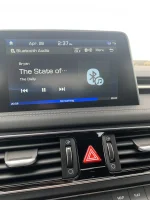
Okay, so I found out I had to disable Carplay in order to get the iPod/iPhone integration to work. Otherwise it would always try to use Carplay which doesn't work without Siri being enabled and I don't enable that. Connected via cable that list button is there. Over bluetooth however it doesn't exist.
 

Attachments

  • IMG_0616.webp
    IMG_0616.webp
    137.1 KB · Views: 17
Has anybody had luck with getting your battery level/signal strength from your phone to show up? I’m using an iPhone 11 Pro and when it’s connected via Bluetooth I don’t get either on the head unit.
 
Looking to update and upgrade your Genesis luxury sport automobile? Look no further than right here in our own forum store - where orders are shipped immediately!
Someone in the mapnsoft thread mentioned it was removed from the home screen a few updates ago but it shows on the phone screen still.
 
Yeah, it's there for an Android.

Edit: double checked the new... It's only there when using the phone, eg on a call. 😕
 
Last edited:
Recently on a trip in a Ford explorer rental. Playlist browsing over Bluetooth was functional on their system so this is 1000% a function missing from the genesis infotainment.
 
Back
Top