

-

-
Hint: Use a descriptive title for your new message
If you're looking for help and want to draw people in who can assist you, use a descriptive subject title when posting your message. In other words, "I need help with my car" could be about anything and can easily be overlooked by people who can help. However, "I need help with my transmission" will draw interest from people who can help with a transmission specific issue. Be as descriptive as you can. Please also post in the appropriate forum. The "Lounge" is for introducing yourself. If you need help with your G70, please post in the G70 section - and so on... This message can be closed by clicking the X in the top right corner.
You are using an out of date browser. It may not display this or other websites correctly.
You should upgrade or use an alternative browser.
You should upgrade or use an alternative browser.
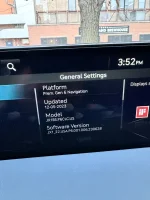
Current software version
- Thread author Brettv123
- Start date
RLMLevinson
Registered Member
- Joined
- Aug 9, 2023
- Messages
- 179
- Reaction score
- 94
- Points
- 28
- Genesis Model Year
- 2023
- Genesis Model Type
- Genesis GV80
+|23Q2|JX1_22.USA.P6.001.007.231101|GN|2023_GV80_USA|1512|1
Last edited:

Speeder
Registered Member
- Joined
- Feb 9, 2019
- Messages
- 1,212
- Reaction score
- 567
- Points
- 113
- Location
- Quinton, NJ
- Genesis Model Year
- 2025
- Genesis Model Type
- Genesis GV80 Coupe
This is what's in mine car.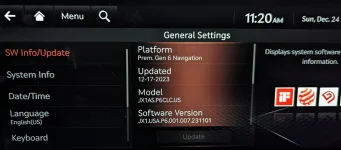
MShneur85
New member
- Joined
- Nov 28, 2025
- Messages
- 1
- Reaction score
- 0
- Points
- 0
- Genesis Model Year
- 2024
- Genesis Model Type
- Genesis GV80
Anyone have an update file? I have the xx. 006.230628 for Genesis gv80 but it doesn't seem to work with android auto wireless. The site is down for downloads, so hop someone in the community can share their file please


SGilbert
Registered Member
- Joined
- Aug 12, 2021
- Messages
- 1,009
- Reaction score
- 494
- Points
- 83
- Location
- South Bend, IN
- Genesis Model Year
- 2021
- Genesis Model Type
- Genesis GV80
My '21 says there is an October '25 update, every time I attempt to download it says it isn't available right now. 

Jhon
2021 GV80 Prestige 2.5 RWD
- Joined
- Feb 5, 2022
- Messages
- 1,841
- Reaction score
- 843
- Points
- 113
- Location
- Southwest Florida
- Genesis Model Year
- 2021
- Genesis Model Type
- Genesis GV80
I was away for the month of October, but since I have been home, I have gotten no notifications that one is ready. I just keep forgetting to manually check when I am in the car. But it is no big deal as I use google maps anyway.My '21 says there is an October '25 update, every time I attempt to download it says it isn't available right now.
I just went to check if I could download them from the web site, and when I went to download them, it said that they are not available right now and will be ready "As quickly as possible" Oh Well.
SGilbert
Registered Member
- Joined
- Aug 12, 2021
- Messages
- 1,009
- Reaction score
- 494
- Points
- 83
- Location
- South Bend, IN
- Genesis Model Year
- 2021
- Genesis Model Type
- Genesis GV80
My mistake; I must have implied I checked in the car.I was away for the month of October, but since I have been home, I have gotten no notifications that one is ready. I just keep forgetting to manually check when I am in the car. But it is no big deal as I use google maps anyway.
I just went to check if I could download them from the web site, and when I went to download them, it said that they are not available right now and will be ready "As quickly as possible" Oh Well.
I gave up Genesis's connections a year and a half ago!
The computer app, Navigation Updater, tells me that there is an update, but not available!
Jhon
2021 GV80 Prestige 2.5 RWD
- Joined
- Feb 5, 2022
- Messages
- 1,841
- Reaction score
- 843
- Points
- 113
- Location
- Southwest Florida
- Genesis Model Year
- 2021
- Genesis Model Type
- Genesis GV80
FYI, I have been checking every few days to see if the October update was available through the software downloader on my computer. Today I was able to download it. When I ran the installer, it first updated the installer and then when I went to download it, it worked. So if you have been getting a message that it was "temporally unavailable", give it a try. I may try to download it through the OTA first.

BillZ
Canadian Prestige 3-row
- Joined
- Aug 14, 2014
- Messages
- 1,075
- Reaction score
- 620
- Points
- 113
- Location
- Ottawa
- Genesis Model Year
- 2021
- Genesis Model Type
- Genesis GV80
Thanks Jhon for letting us know. Just checked and the Canadian download for the 2021 is now available as well.
SGilbert
Registered Member
- Joined
- Aug 12, 2021
- Messages
- 1,009
- Reaction score
- 494
- Points
- 83
- Location
- South Bend, IN
- Genesis Model Year
- 2021
- Genesis Model Type
- Genesis GV80
Jhon,FYI, I have been checking every few days to see if the October update was available through the software downloader on my computer. Today I was able to download it. When I ran the installer, it first updated the installer and then when I went to download it, it worked. So if you have been getting a message that it was "temporally unavailable", give it a try. I may try to download it through the OTA first.
You are my hero!!! Downloading now. Thank you.
BillZ
Canadian Prestige 3-row
- Joined
- Aug 14, 2014
- Messages
- 1,075
- Reaction score
- 620
- Points
- 113
- Location
- Ottawa
- Genesis Model Year
- 2021
- Genesis Model Type
- Genesis GV80
I tried to install the new update and it seems not to be recognized by the car's system. I have previously installed all the prior updates since 2021 without an issue, but this time nothing happened when I plugged in the USB key. I'm wondering if there was a glitch in my download or whether the last update which installed wireless CarPlay has somehow affected how the car reads the drive. I'll try downloading another copy and see what happens and report.
Jhon
2021 GV80 Prestige 2.5 RWD
- Joined
- Feb 5, 2022
- Messages
- 1,841
- Reaction score
- 843
- Points
- 113
- Location
- Southwest Florida
- Genesis Model Year
- 2021
- Genesis Model Type
- Genesis GV80
I tried to install the new update and it seems not to be recognized by the car's system. I have previously installed all the prior updates since 2021 without an issue, but this time nothing happened when I plugged in the USB key. I'm wondering if there was a glitch in my download or whether the last update which installed wireless CarPlay has somehow affected how the car reads the drive. I'll try downloading another copy and see what happens and report.
OK, I went out to my car to see if I could update it with the usb drive.
I plugged the drive in and it said it did not recognize the files on the drive or something like that.
I then went into the SW update section of the setting and found that there was an update for the radio that needed to be finalized.
So I told it to do that and when back into the house for about 5 minutes.
When I came back out the system was rebooting (I left the engine running)
When it finished booting up. it told me the system had been updated with the map version JX1.........251114 October 2025.
So I am thinking two things.
1 That I must have gotten the OTA update but it never fully installed because I did not know it was there and I never finalized it.
2 Because the update was already in my my system, the system rejected the files on the usb drive I tried to use. (This one is a guess)
So if you have not already done so, try going to the software update in the general settings and see if anything is there.
Good luck.
Jhon
2021 GV80 Prestige 2.5 RWD
- Joined
- Feb 5, 2022
- Messages
- 1,841
- Reaction score
- 843
- Points
- 113
- Location
- Southwest Florida
- Genesis Model Year
- 2021
- Genesis Model Type
- Genesis GV80
OK, I just got a email from Genesis telling me the scheduled OTA update was completed.....So I guess it did come over the air. I wonder how long it had been downloaded waiting for me to install it?
Looking to update and upgrade your Genesis luxury sport automobile? Look no further than right here in our own forum store - where orders are shipped immediately!
SGilbert
Registered Member
- Joined
- Aug 12, 2021
- Messages
- 1,009
- Reaction score
- 494
- Points
- 83
- Location
- South Bend, IN
- Genesis Model Year
- 2021
- Genesis Model Type
- Genesis GV80
Arggg!! Twice I have downloaded the update and both times it said the audio file is corrupted and to redownload the file.
The 2nd time, though, the navigation part is downloading, just not the audio part.
Updating now---will edit when (or if) it finishes!
Update (excuse the pun!):
Aside from the car saying the audio file was corrupted, twice, everything was updated.
The 2nd time, though, the navigation part is downloading, just not the audio part.
Updating now---will edit when (or if) it finishes!
Update (excuse the pun!):
Aside from the car saying the audio file was corrupted, twice, everything was updated.
Last edited:
BillZ
Canadian Prestige 3-row
- Joined
- Aug 14, 2014
- Messages
- 1,075
- Reaction score
- 620
- Points
- 113
- Location
- Ottawa
- Genesis Model Year
- 2021
- Genesis Model Type
- Genesis GV80
Success in Canada on my 2021. Although the website instructions tell you not to turn off the car, I didn't even have to start mine. Two pushes on the start button (without depressing the brake pedal) turned on all the systems as usual. The USB key was recognized immediately and the screen offered me the option of starting the update when I turned the vehicle off. I did that and walked away. About an hour later, I received an email saying the update was complete. Sure enough, all systems go with the new update confirmed. My 2021 has never received OTA updates and I don't think any of the Canadian models do, but this was the easiest one yet using the download to the USB key. No wasted gas with long idling, no driving without all systems working all the time. Win, win.
Great products:
- VIN Check
- Add more horsepower!
- Clean your leather!
- Safe Emergency Charging
- Windshield Repair Kit
- Chemical Guys HydroSpeed Ceramic Quick Detailer
- Chemical Guys HydroCharge High-Gloss Hydrophobic SI02 Ceramic Spray Coating
- Get a dash cam!
- Auto Buyers Market
- Read: PSYCHOPATHY
- VIN Check
- Add more horsepower!
- Clean your leather!
- Safe Emergency Charging
- Windshield Repair Kit
- Chemical Guys HydroSpeed Ceramic Quick Detailer
- Chemical Guys HydroCharge High-Gloss Hydrophobic SI02 Ceramic Spray Coating
- Get a dash cam!
- Auto Buyers Market
- Read: PSYCHOPATHY
 | ||||
 |  |  |  |  |
 |  | |||





Featured content
-

-
Thread 'Help us to keep helping you. Your support is essential to our survival.'
- Sal Collaziano
Replies: 32