• Car enthusiast? Join us on Cars Connected! iOS | Android | Desktop
  • Hint: Use a descriptive title for your new message
    If you're looking for help and want to draw people in who can assist you, use a descriptive subject title when posting your message. In other words, "I need help with my car" could be about anything and can easily be overlooked by people who can help. However, "I need help with my transmission" will draw interest from people who can help with a transmission specific issue. Be as descriptive as you can. Please also post in the appropriate forum. The "Lounge" is for introducing yourself. If you need help with your G70, please post in the G70 section - and so on... This message can be closed by clicking the X in the top right corner.

Dashcam Recommendation

Gemstonian

New member
Joined
Feb 25, 2022
Messages
25
Reaction score
2
Points
3
Location
Long Island, NY
Genesis Model Year
2023
Genesis Model Type
Genesis GV70
I am looking for a dashcam that does NOT use WiFi. I have my Android Auto wirelessly connected to my phone via a Motorola MA1 adapter and my phone connects to the WiFi from the adapter while in the car. The Android Auto with this wireless adapter works perfectly and I don't want to mess it up. Are there dashcams that use Bluetooth to connect to a phone app or should I get a "dumb" dashcam that just loop records to a micro-SD card in the dashcam? Any recommendations are appreciated.
 
Here's an excellent resource for all things dash cams:

 
I have Rexing dashcam in all my cars. They all have wifi built-in, but other than trying it once in the beginning just to check out how it works, I never bothered to connect to my phone again. I set it up to record automatically when ign is on, and it turns itself off when power is off. These have capacitors in them that last just long enough to close out the recording and shut itself off properly.

When I need to download videos, I just take the SD card off and plug it into my PC or laptop via a fast USB adapter. Downloading via wifi or BT would be too slow. And my phone is rarely where I want to transfer the video to anyway.

Whatever you do, get High Endurance SD card to survive the very high temp it will experience. Ordinary SD card may not tolerate it.
 
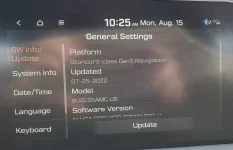
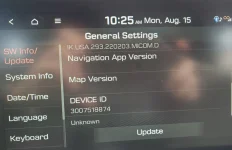
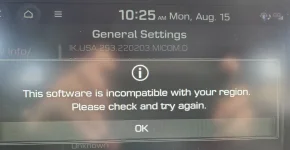
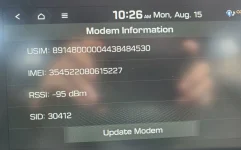
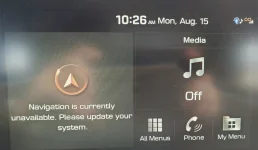
I bought and installed a VIOFO A119 dashcam. It has no wifi and no bluetooth. It does have a built in GPS receiver. Yesterday it worked fine and my Genesis Nav system and Android Auto with my Motorola MA1 wireless adapter all worked perfectly. This morning my Genesis nav is not working.. The screen says 'Navigation is currently unavailable. Please update your system." Sometimes I get an audible alert saying "Lost GPS signal". Also my wireless Android Adapter will not connect to my phone. Yesterday it worked fine. If I plug my phone in with a USB cable then Android Auto works, but the Genesis Nav maps still don't come up. I did download the update off the Genesis update site and that has worked fine, until this morning. I have attached some pics.
 

Attachments

  • 20220815_102513_resized.webp
    20220815_102513_resized.webp
    87.8 KB · Views: 11
  • 20220815_102525_resized.webp
    20220815_102525_resized.webp
    103.1 KB · Views: 8
  • 20220815_102544_resized.webp
    20220815_102544_resized.webp
    141.1 KB · Views: 9
  • 20220815_102618_resized.webp
    20220815_102618_resized.webp
    134.8 KB · Views: 9
  • 20220815_102649_resized.webp
    20220815_102649_resized.webp
    121.7 KB · Views: 9
Looking to update and upgrade your Genesis luxury sport automobile? Look no further than right here in our own forum store - where orders are shipped immediately!
I purchased the Garmin dash cam Mini 2. It has an extremely low profile, and I mounted it just under the front mirror. I did not bother to have it hardwired. I like it so much, that I purchased the second one and have it mounted in the rear window.
 
I purchased the Garmin dash cam Mini 2. It has an extremely low profile, and I mounted it just under the front mirror. I did not bother to have it hardwired. I like it so much, that I purchased the second one and have it mounted in the rear window.
I too installed a Mini 2 near my rearview mirror, great camera. Hardwire was easy but cost a bit extra. Rear window is a great idea too. They use WiFi though, OP can't use WiFi
 
I too installed a Mini 2 near my rearview mirror, great camera. Hardwire was easy but cost a bit extra. Rear window is a great idea too. They use WiFi though, OP can't use WiFi
I just run the longer USB cord into the back seat charging port under the air vents
 
I just run the longer USB cord into the back seat charging port under the air vents
Haha that works eh. Since I park in a surface lot I wanted it to have the ability to record if it detects motion so went with the hardwire option
 
Back
Top