• Car enthusiast? Join us on Cars Connected! iOS | Android | Desktop
  • Hint: Use a descriptive title for your new message
    If you're looking for help and want to draw people in who can assist you, use a descriptive subject title when posting your message. In other words, "I need help with my car" could be about anything and can easily be overlooked by people who can help. However, "I need help with my transmission" will draw interest from people who can help with a transmission specific issue. Be as descriptive as you can. Please also post in the appropriate forum. The "Lounge" is for introducing yourself. If you need help with your G70, please post in the G70 section - and so on... This message can be closed by clicking the X in the top right corner.

Display Audio Software Update?

SuperCyclone20

Registered Member
Joined
May 14, 2019
Messages
32
Reaction score
16
Points
8
Genesis Model Type
No Genesis Yet!
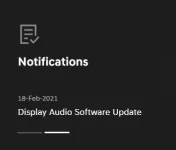
The following is displayed on update.genesis.com
1618339304112.webp
Does anyone know what this is for? When you dig in deeper it looks like it has to be installed via USB? But also the software version displayed online appears to be much older than what is already on my 2019 G70 (not exactly sure how they number their updates though).
 
Did you ever try and update this? Curious if you get it to work.

I set in to update and 2hrs later still no luck. I figured I'd update to see if it could help to actually get my Genesis Connected Services Activated and now I'm worried there are other issues (with the head unit maybe?). No matter what I do with the USB I get the same error that says:

Insert the device that contains the update file(s) and try again.

I have formatted the USB to Fat32
Extracted file and copied DAUDIO
Extracted file direct to USB
I've moved every file in a folder out of the folder

I have tried multiple USB drives and even put music files on them first to make sure they do read - they do at least read as music/media files in that way. I'm lost and customer support I have found to be pathetically worthless with open cases (I call them weekly to go over my Connected Services issue - same $h*t, different week).
 
Did you ever try and update this? Curious if you get it to work.

I set in to update and 2hrs later still no luck. I figured I'd update to see if it could help to actually get my Genesis Connected Services Activated and now I'm worried there are other issues (with the head unit maybe?). No matter what I do with the USB I get the same error that says:

Insert the device that contains the update file(s) and try again.

I have formatted the USB to Fat32
Extracted file and copied DAUDIO
Extracted file direct to USB
I've moved every file in a folder out of the folder

I have tried multiple USB drives and even put music files on them first to make sure they do read - they do at least read as music/media files in that way. I'm lost and customer support I have found to be pathetically worthless with open cases (I call them weekly to go over my Connected Services issue - same $h*t, different week).
I just downloaded the file but haven’t installed it. I assume that I should use the usb port where I presently have a jump drive with my MP3 files.
 
I just downloaded the file but haven’t installed it. I assume that I should use the usb port where I presently have a jump drive with my MP3 files.
That was what I tried but never got it to recognize any update files. Recognized a USB with music on it but nothing I tried worked for that update and the downloaded files.

Now planning to try the full navigation update assuming it also has this software update (or newer) included. Hoping to complete it this weekend and that it also fixes my Connected Services issue. If not, I've got an appointment for next Friday to see if whole head unit needs replaced. Took Genesis Engineers 2mos to decide the next best step was scheduling an appointment...never asked me to even try updating anything on a new car from 2020 with 2019 software. 🙄
 
It's the SD card to update. Pretty sure the updates are sequential... So just get the latest and you'll get that too.
 
Did anyone find solution on this . I have DAUDIO only on my USB and it still does not recognize it .
 
Did anyone find solution on this . I have DAUDIO only on my USB and it still does not recognize it .
I ended up doing the full on Map update as my 2020 still had the 2019 versions of stuff. I know it commits you to the full navigation update, which is controversial about being an improvement or not, but for me it made the most sense as I assumed it updated everything (modem, software, etc). The DAUDIO file via USB was never recognized for me either so I did the SD method for the full maps update.

Unfortunately, it did not fix my connected services activation issue and now I have a dealer appointment for Friday where it sounds like I may need a whole new head unit. 😟
 
According to the post and my own interpretation I don't think you need it.

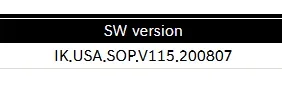
After the most recent NAV update, which DOES update the software, I have IK.USA.SOP.V123.210329. The DAAUDIO file says it'll update you to V115.200807.

My simplistic model of the world says V123 is better than V115.

1620759235680.webp
 
According to the post and my own interpretation I don't think you need it.

After the most recent NAV update, which DOES update the software, I have IK.USA.SOP.V123.210329. The DAAUDIO file says it'll update you to V115.200807.

My simplistic model of the world says V123 is better than V115.

View attachment 36363
Completely agree but I think people may be looking to update everything as much as possible without going to the new Nav interface...especially if they just purchased the car and had really old software. That was my original goal but never got it to read from the USB.

After the dealer told me they would be doing a complete update anyways to try and get my connected services activated, I decided I may as well see if I can save the trip and do it myself but just deal with the SiriusXM issues post-update.
______________________________

Help support this site so it can continue supporting you!
 
What version of the software did you have installed when you inserted the USB with the DAUDIO file?

B
 
What version of the software did you have installed when you inserted the USB with the DAUDIO file?

B

I was all the way back here...

IK.USA.SOP.V108.190720.STD_H
 
I think lots of confusion lay around the USB vs SD intention. My 2020 G70 2.0 does not have an SD port but 2 USB's.
I've attempted to update the Display and Nav but receive the same errors as above; 'Please retry' from the middle armrest and from under the center console the system cycles through WAV files on the USB from the update but never updates.
I have to head into the dealership to order a 2nd key so I'll inquire about this and try to remember to update here-
 
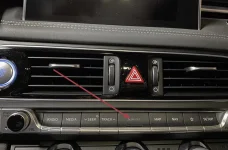
This is where the SD card is located. Pull this out and up.
 

Attachments

  • 7623E845-8B3D-4D93-AAB9-00A44D5BB8F6.webp
    7623E845-8B3D-4D93-AAB9-00A44D5BB8F6.webp
    185.7 KB · Views: 29
Display Audio Update is for the G70s that did not came with factory navigation, these don't come with SD card slots so the update is done via USB.

If your 2018-2021 G70 has an SD card slot then you have factory navigation, therefore you don't need this update.
 
Display Audio Update is for the G70s that did not came with factory navigation, these don't come with SD card slots so the update is done via USB.

If your 2018-2021 G70 has an SD card slot then you have factory navigation, therefore you don't need this update.
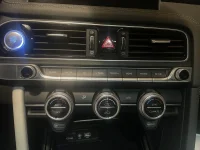
You are correct, but they said that they were trying to update the display and NAV. That’s why I posted the photo.
 
Looking to update and upgrade your Genesis luxury sport automobile? Look no further than right here in our own forum store - where orders are shipped immediately!
You apparent don’t have factory nav since your “keys” differ from mine.
 
Back
Top