• Car enthusiast? Join us on Cars Connected! iOS | Android | Desktop
  • Hint: Use a descriptive title for your new message
    If you're looking for help and want to draw people in who can assist you, use a descriptive subject title when posting your message. In other words, "I need help with my car" could be about anything and can easily be overlooked by people who can help. However, "I need help with my transmission" will draw interest from people who can help with a transmission specific issue. Be as descriptive as you can. Please also post in the appropriate forum. The "Lounge" is for introducing yourself. If you need help with your G70, please post in the G70 section - and so on... This message can be closed by clicking the X in the top right corner.

GV60 CarPlay with Google Maps - Conflicting Directions

PhilScot

New member
Joined
Nov 16, 2025
Messages
2
Reaction score
3
Points
3
Genesis Model Year
2025
Genesis Model Type
Genesis GV60
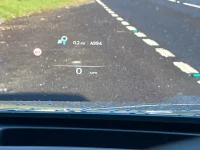
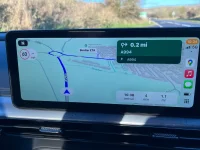
Has anyone else been using Google Maps over wireless CarPlay and come across a case where the main infotainment (centeral) display and the head up display (HUD) give different turn instructions?

At one local (Fife, Scotland) 5 way roundabout the centeral display shows correctly to take the 4th exit while the HUD shows to take the first exit. Interestingly approaching the roundabout from a different road it again shows the correct information on the centeral display and to take the first exit on the HUD.

My assessment is that the turn information is either sent incorrectly from Google Maps or misinterpreted by the GV60 software. The fact the HUD shows the first exit in both cases suggests the selected exit for the HUD is a default value that has not been updated from the mapping software. Can't say whether this is a fault in the GV60 software or Google Maps.

Navigating the same roundabout with Apple Maps shows the correct information on both displays.

For context, I am using Google Maps on wireless CarPlay. With GV60 software JW.EUR.cclC.002.015.250925 and Google Maps 25.46.1.830474450. Full details of the roundabout available
 

Attachments

  • Google_Map_Error_-_Display.webp
    Google_Map_Error_-_Display.webp
    140.2 KB · Views: 3
  • Google_Map_Error_-_HUD.webp
    Google_Map_Error_-_HUD.webp
    108.3 KB · Views: 3
Yes, I've been using Google Maps with CarPlay wirelessly of late, and no, I haven't noticed any conflicting directions, but then again I can't really see the HUD when I'm wearing polarized sunglasses, which is most of the time.
 
I wear tinted sunglasses. I also own and sometimes use polarized sunglasses as well. Both are same quality from Oakley. I actually prefer the more accurate view of the tinted sunglasses.
 
You can get excellent non-polarized sunglasses from Flying Eyes Optics.


These were originally designed for pilots, who need non-polarized glasses to see the cockpit instruments. The glasses are super light and flexibie,, they are the most comfortable glasses I have ever owned. And the GV60 HUD is perfectly visible when wearing them.
 
You can get excellent non-polarized sunglasses from Flying Eyes Optics.


These were originally designed for pilots, who need non-polarized glasses to see the cockpit instruments. The glasses are super light and flexibie,, they are the most comfortable glasses I have ever owned. And the GV60 HUD is perfectly visible when wearing them.
Thanks, but I'll stick with my $18 Foster Grant Driving Glasses.
Until recent cataract surgery I wore glasses for 72 years and these do the job from my experience.
 
Looking to update and upgrade your Genesis luxury sport automobile? Look no further than right here in our own forum store - where orders are shipped immediately!
Just realized that our car doesn't display Google Maps turn-by-turn directions in the central display or the HUD - probably because it's a '23 and runs an older NAV system...
 
Just realized that our car doesn't display Google Maps turn-by-turn directions in the central display or the HUD - probably because it's a '23 and runs an older NAV system...
That doesn't sound right to me - I have a '23 ADV, and Google Map (AAuto) can show turns in the HUD (I think map/directions has to be turned on in HUD settings, maybe?) and/or show the map on main (left) screen (behind speedometer)
 
That doesn't sound right to me - I have a '23 ADV, and Google Map (AAuto) can show turns in the HUD (I think map/directions has to be turned on in HUD settings, maybe?) and/or show the map on main (left) screen (behind speedometer)
Interesting.

I’m running in Apple CarPlay, and the driver’s display shows a message that turn-by-turn directions aren’t available to display from the chosen navigation app…(Google Maps)
 
the driver’s display shows a message that turn-by-turn directions aren’t available to display from the chosen navigation app…(Google Maps)
It will work if you use Apple Maps, and also I think A Better Route Planner. Maybe Waze also. Google hasn't done the work to make it happen on the iOS platform.

I switched from Google Maps to Apple Maps about 5-6 years ago (before I had the GV60), never looked back. When it launched Apple Maps wasn't very good, but it is way improved now.
 
I used Google Maps for many, many years. But times change, Apple kept plugging away at it, and now I think Apple Maps is better, though I still tend to use Google Maps on the desktop (in the web browser). You might want to consider giving Apple Maps another shot - ESPECIALLY since on the GV60 that gives you the extra display in the cluster screen and the HUD, which I think is just wonderful.
 
Back
Top