• Car enthusiast? Join us on Cars Connected! iOS | Android | Desktop
  • Hint: Use a descriptive title for your new message
    If you're looking for help and want to draw people in who can assist you, use a descriptive subject title when posting your message. In other words, "I need help with my car" could be about anything and can easily be overlooked by people who can help. However, "I need help with my transmission" will draw interest from people who can help with a transmission specific issue. Be as descriptive as you can. Please also post in the appropriate forum. The "Lounge" is for introducing yourself. If you need help with your G70, please post in the G70 section - and so on... This message can be closed by clicking the X in the top right corner.

has anyone been able to get the Apple CarPlay Directions to show up on HUD?

salage

New member
Joined
Aug 26, 2020
Messages
26
Reaction score
4
Points
3
Location
CT, USA
Genesis Model Type
Genesis G70
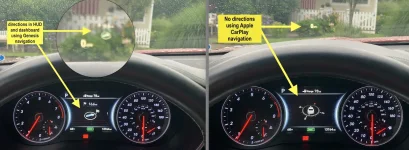
I have a 2019 G70 with the heads up display. It's a great feature, especially when using the car's own navigation system - the HUD shows arrows/directions in my line of sight. I noticed that whenever i have my iPhone plugged in and start navigation on any mapping app (Apple Maps, Google Maps, Waze), the car detects this and shuts down its own navigation.

I can use the dashboard screen to view the Apple CarPlay map, however, the HUD navigation is turned off. I have not found way to either keep both Genesis and iPhone navigation active at the same time or get the Apple CarPlay navigation directions to show up in HUD

has anyone else experienced this and is there a fix? Or am I stuck to using ONLY the genesis mapping if I want to see the directions in the HUD?

thank you!

Adrian
 

Attachments

  • Genesis HUD for directions.webp
    Genesis HUD for directions.webp
    132.8 KB · Views: 26
Looking to update and upgrade your Genesis luxury sport automobile? Look no further than right here in our own forum store - where orders are shipped immediately!
I have a 2019 G70 with the heads up display. It's a great feature, especially when using the car's own navigation system - the HUD shows arrows/directions in my line of sight. I noticed that whenever i have my iPhone plugged in and start navigation on any mapping app (Apple Maps, Google Maps, Waze), the car detects this and shuts down its own navigation.

I can use the dashboard screen to view the Apple CarPlay map, however, the HUD navigation is turned off. I have not found way to either keep both Genesis and iPhone navigation active at the same time or get the Apple CarPlay navigation directions to show up in HUD

has anyone else experienced this and is there a fix? Or am I stuck to using ONLY the genesis mapping if I want to see the directions in the HUD?

thank you!

Adrian
No can do. HUD only works with the native navigation
 
No can do. HUD only works with the native navigation
thank you for the quick reply.. and sorry to hear that it's only for the native navigation
any way to stop it from turning off the Genesis navigation is ON and apple carplay navigation is also on? I like having the directions on the car's screen and HUD but would really like Waze or Apple Maps to tell me about upcoming hazards, police speed checks, etc.
 
Back
Top





