• Car enthusiast? Join us on Cars Connected! iOS | Android | Desktop
  • Hint: Use a descriptive title for your new message
    If you're looking for help and want to draw people in who can assist you, use a descriptive subject title when posting your message. In other words, "I need help with my car" could be about anything and can easily be overlooked by people who can help. However, "I need help with my transmission" will draw interest from people who can help with a transmission specific issue. Be as descriptive as you can. Please also post in the appropriate forum. The "Lounge" is for introducing yourself. If you need help with your G70, please post in the G70 section - and so on... This message can be closed by clicking the X in the top right corner.

Media info in gauge cluster screen

ajung

New member
Joined
May 16, 2020
Messages
2
Reaction score
0
Points
1
Genesis Model Type
Genesis G70
So I own a 2019 3.3T Sport (every option available) and got a 2020 2.0 loaner and noticed when I change songs I get a notification of the new song in the gauge cluster screen. Is this a new feature of the 2020s or just an option I might have turned off? I’ve been looking around but can’t find any info on this. Has anyone else noticed this or have any idea on how to “turn on” this option?

Here’s a photo of what my loaner does when changing songs/stations. I would love it if my G70 was able to do the same...
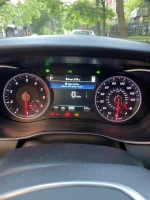
64FDC3AE-33DE-4D26-B93C-4C99F68881FD.webp
 
Mine doesnt have this either. 2019 3.3T Sport as Well.
 
It’s an option to check on or off but I can’t remember where it is.... it’s labeled under media change notification iirc
 
Mine does it and I never recall setting it. It just happened or was delivered in that setting.
 
Interesting, I'll have to go mess with my settings now.

Not to take away from the original post but how do you guys get the speed limit to show up in the gauge cluster? I have a 2019 3.3t sport.
 
Interesting, I'll have to go mess with my settings now.

Not to take away from the original post but how do you guys get the speed limit to show up in the gauge cluster? I have a 2019 3.3t sport.
Did you figure it out?
 
Looking to update and upgrade your Genesis luxury sport automobile? Look no further than right here in our own forum store - where orders are shipped immediately!
I have a 2020, never seen an option to show the speed limit nor music on the gauge cluster. :unsure:
 
Speed limit is on my 2019 in center display. Again, its an option you can toggle on or off in the settings. Running 13.5 software, its been there since I got my car on version 12.5
______________________________

Help support this site so it can continue supporting you!
 
Speed limit is on my 2019 in center display. Again, its an option you can toggle on or off in the settings. Running 13.5 software, its been there since I got my car on version 12.5
Is it available even when you're not using the built in GPS for navigation?
 
Speed limit is on my 2019 in center display. Again, its an option you can toggle on or off in the settings. Running 13.5 software, its been there since I got my car on version 12.5
I've gone through every setting and don't see anything. Do you have HUD on yours?
 
No I don’t have a HUD.

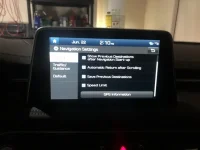
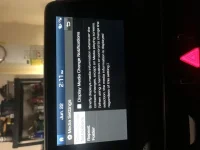
Im not 100% sure if I got the right setting for the speed limit info, it’s 110 out right now and my car is baking in my garage

2458C1E8-C28A-4A50-9FE0-FE8CA1A614BE.webp
76F43468-891C-4978-977F-9D18B87DAC48.webp
 
No I don’t have a HUD.

Im not 100% sure if I got the right setting for the speed limit info, it’s 110 out right now and my car is baking in my garage

View attachment 30277
View attachment 30278
Yea, just played around with the settings. Those two options seem right. I have the media change notification enabled already, so I assume it only works with ACP and not AA, which sucks.
 
Interesting. I have that setting checked but still am not getting media info in the gauge screen.
 
Interesting. I have that setting checked but still am not getting media info in the gauge screen.
it should show no matter what, I dont know whats going on. If you notice the wording on the setting, it says that it should always display media changes even toggled off, if you use a button to change a song, station or mode yourself. The setting only affects it showing every single time a new song comes on. Thats how mine works. Setting is toggled off, but I still get notifications in my center display. Id honestly rather have it completely off because I know what song is playing usually within the first couple beats, or by easily glancing over to my nav if Im that curious
 
Back
Top