• Car enthusiast? Join us on Cars Connected! iOS | Android | Desktop
  • Hint: Use a descriptive title for your new message
    If you're looking for help and want to draw people in who can assist you, use a descriptive subject title when posting your message. In other words, "I need help with my car" could be about anything and can easily be overlooked by people who can help. However, "I need help with my transmission" will draw interest from people who can help with a transmission specific issue. Be as descriptive as you can. Please also post in the appropriate forum. The "Lounge" is for introducing yourself. If you need help with your G70, please post in the G70 section - and so on... This message can be closed by clicking the X in the top right corner.

Need some help programing garage door opener

shuvo_2000

Registered Member
Joined
Jun 30, 2021
Messages
122
Reaction score
55
Points
28
Genesis Model Type
Genesis GV70
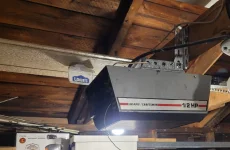
Hi Guys, I followed the videos and the manual however, I am not able to get passed the 2nd part when I press the button on the homelink and it flashes amber and then press and hold the button on the existing garage opener. The homelink never goes green and keeps flashing amber. My opener is quite old. The ceiling unit does have a learn button but from what I understand, that is step 3 after the learning from the existing remote.

Any help would be highly helpful. Thanks!
 

Attachments

  • 20211016_215039.webp
    20211016_215039.webp
    134.7 KB · Views: 16
  • 20211016_215124.webp
    20211016_215124.webp
    84.1 KB · Views: 16
Are you holding the transmitter very close to the rear view mirror?
 
Are you holding the transmitter very close to the rear view mirror?
Yes. I tried to hold it very close. Also I tried it from the sunshade area.
 
Hmmm, nothing to help you out other to say my Genie opener is 20+ years old and it copied it ok. Don’t remember any issues when I programmed it for I just followed the manual and it worked. My homelink did forget the code after about 10 months and I had to reprogram. Not sure what caused that?
 
Looking to update and upgrade your Genesis luxury sport automobile? Look no further than right here in our own forum store - where orders are shipped immediately!
1634441387184.webp
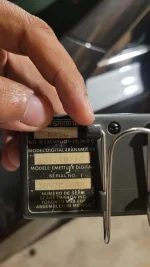
This is from the homelink website. Is the transmitter frequency an issue?
 
I tried installing a brand new battery. But that didn't make any difference. any recommendation?
 
I’m having the exact same problem as the OP.
 
FINALLY SUCCESS!!! lol

So this is what I did.

  1. I parked the car in front of the garage instead of inside (don't think this made any difference but mentioning in case someone believes in voodoo magic lol j/k)....
  2. Reset the homelink by pressing and holding the outer 2 buttons till the green light flashed
  3. Pressed the left (1) button once so the flashing started amber
  4. Here instead pressing and holding the button on the garage door remote, I kept pressing and releasing the button and moving it around. The homelink went green when the remote was near my crotch (sorry I wish I were kidding but I am just stating the facts here)
  5. At this point the homelink started working as intended.
Since my garage opener is really old, I don't have the 2-way functionality of status indicator as some has mentioned here.

Hope this helps someone who is struggling.
 
FINALLY SUCCESS!!! lol

So this is what I did.

  1. I parked the car in front of the garage instead of inside (don't think this made any difference but mentioning in case someone believes in voodoo magic lol j/k)....
  2. Reset the homelink by pressing and holding the outer 2 buttons till the green light flashed
  3. Pressed the left (1) button once so the flashing started amber
  4. Here instead pressing and holding the button on the garage door remote, I kept pressing and releasing the button and moving it around. The homelink went green when the remote was near my crotch (sorry I wish I were kidding but I am just stating the facts here)
  5. At this point the homelink started working as intended.
Since my garage opener is really old, I don't have the 2-way functionality of status indicator as some has mentioned here.

Hope this helps someone who is struggling.
Finally got mine to work! Your advice was very helpful, especially the part about putting the remote in the general proximity of one’s crotch (for some strange reason).
 
I have a 22 yr old Chamberlain and unfortunately this did not work for me. However, found this website and this did work. Have to follow the steps exactly. Only diff, I pressed and held the two outer buttons first to get green flashing light in order to reset everything.

______________________________

Help support this site so it can continue supporting you!
 
FINALLY SUCCESS!!! lol

So this is what I did.

  1. I parked the car in front of the garage instead of inside (don't think this made any difference but mentioning in case someone believes in voodoo magic lol j/k)....
  2. Reset the homelink by pressing and holding the outer 2 buttons till the green light flashed
  3. Pressed the left (1) button once so the flashing started amber
  4. Here instead pressing and holding the button on the garage door remote, I kept pressing and releasing the button and moving it around. The homelink went green when the remote was near my crotch (sorry I wish I were kidding but I am just stating the facts here)
  5. At this point the homelink started working as intended.
Since my garage opener is really old, I don't have the 2-way functionality of status indicator as some has mentioned here.

Hope this helps someone who is struggling.
This totally worked for me, finally. Thank you!
 
Hi Guys, I followed the videos and the manual however, I am not able to get passed the 2nd part when I press the button on the homelink and it flashes amber and then press and hold the button on the existing garage opener. The homelink never goes green and keeps flashing amber. My opener is quite old. The ceiling unit does have a learn button but from what I understand, that is step 3 after the learning from the existing remote.

Any help would be highly helpful. Thanks!
Please see attached quick start page 19
 

Attachments

Back
Top





