• Car enthusiast? Join us on Cars Connected! iOS | Android | Desktop
  • Hint: Use a descriptive title for your new message
    If you're looking for help and want to draw people in who can assist you, use a descriptive subject title when posting your message. In other words, "I need help with my car" could be about anything and can easily be overlooked by people who can help. However, "I need help with my transmission" will draw interest from people who can help with a transmission specific issue. Be as descriptive as you can. Please also post in the appropriate forum. The "Lounge" is for introducing yourself. If you need help with your G70, please post in the G70 section - and so on... This message can be closed by clicking the X in the top right corner.

Replace navigation widget on home screen

50jae

Registered Member
Joined
Feb 1, 2017
Messages
438
Reaction score
418
Points
63
Location
PA
Genesis Model Type
Genesis G70
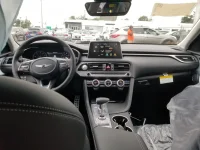
I saw this screen during one of my test drives, and I want to replace my navigation widget which I don't use with the climate widget. I poured over the multimedia system manual but it doesn't tell me how I can do this... anyone have any tips? Thanks in advance. 20181006_124142 (1).webp
 
Based on the image, set Auto off, Sync on, AC on, and maybe hit the image button.
Otherwise check the seperate infotainment manual.
 
You already have a physical Climate button. Is that not enough/better?
 
You already have a physical Climate button. Is that not enough/better?

It's similar to wanting to configure widgets on the home screen on your phone, I want to see the climate info without the need to press an extra button as I am already setting up the heated seats, heated steering, android auto, and drive mode. I know just changing the temp will show the popup at the top so this can be considered a first world problem but it looks configurable, so just trying to find that option. Pressing long on the navigation doesn't seem to work, and I've gone over the multimedia/navigation manual twice without success.

I think Beefer asked this before and I'm not sure if he got to change it.
 
Try simple drag and drop of your widget.
 
That's how the vehicles come from the factory, it's what they show when the SD card for the navigation isn't in them.
 
Any updates on this? I would also like to see what my vent settings are without having to push any climate control button/knob.

Also, I don't have an SD plugged in on mine.
 
Any updates on this? I would also like to see what my vent settings are without having to push any climate control button/knob.

Also, I don't have an SD plugged in on mine.
You have to have an SD card plugged in...otherwise you wouldn't have NAV.
 
Looking to update and upgrade your Genesis luxury sport automobile? Look no further than right here in our own forum store - where orders are shipped immediately!
Just take the card out and it'll look like the picture.
 
I never really found the climate info useful. Telling me that my A/C is on and blowing in my face is like asking someone if it's raining outside.
 
There is more to hvac info other than whether ac is on or not.
 
I wish the G80 had a home screen like that. on the G80 you are locked to viewing the maps or the carplay screen. a home screen with widgets would be great, my 2015 RCF had it, my wife's Camry has it. even the POS base model Sonata I had as a loaner last week had it.
 
Back
Top





