• Car enthusiast? Join us on Cars Connected! iOS | Android | Desktop
  • Hint: Use a descriptive title for your new message
    If you're looking for help and want to draw people in who can assist you, use a descriptive subject title when posting your message. In other words, "I need help with my car" could be about anything and can easily be overlooked by people who can help. However, "I need help with my transmission" will draw interest from people who can help with a transmission specific issue. Be as descriptive as you can. Please also post in the appropriate forum. The "Lounge" is for introducing yourself. If you need help with your G70, please post in the G70 section - and so on... This message can be closed by clicking the X in the top right corner.

Update on Genesis app (iOS) showing incorrect window status

rbres

Getting familiar with the group...
Joined
Feb 4, 2017
Messages
135
Reaction score
17
Points
18
Location
ca
Genesis Model Type
Genesis G70
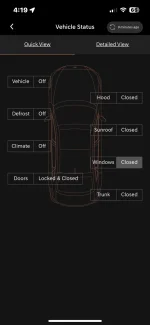
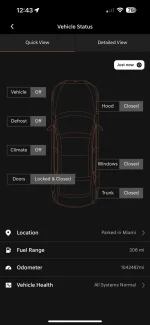
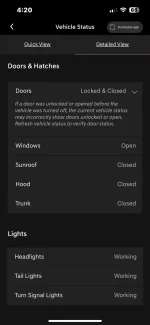
Latest app update now gives you more details on car status such as windows, doors, climate, air pressure etc. I just noticed mine now says under “quick view” that my windows are CLOSED but under “detailed view” that one or more is OPEN? (Pics attached). It appears though that the word “closed” is shaded in quick view which may mean only one is open? Not sure but I’m 100% sure that all 4 windows are closed. Normally if you have one open or even slightly cracked open you’ll get a visible and audible warning on the dash when shutting engine off which did NOT happen. Only thing I can remotely think of is ever since I got my car I recall that if I happen to double-check that all windows are indeed closed and press auto close from driver window control, my front passenger one clicks a tiny bit more than the others and almost sounds like the window moves maybe a millimeter. Never really bothered me as I rarely open that window so ignored it. Could the app think it’s still open? Regardless I’m not going to bring in and have them tell me I need this or that and rip apart my door. Just seeing if anyone else is getting false status readings on any others functions, which I recall hearing about in previous posts too.
 

Attachments

  • IMG_1239.webp
    IMG_1239.webp
    39.2 KB · Views: 22
  • IMG_1238.webp
    IMG_1238.webp
    33 KB · Views: 23
Ditto. Same observation
 
Canada still has the f'in old look and version. Wtf
 
I am away on business with my car GV70 parked & locked at the airport and suddenly after 3 days I get a notification on the app that my windows are open...how is that possible?....yet there is no way to send a close request????
 
Canada STILL doesn't even have this damn update. Wtf are they doing ffs
 
Now it’s the opposite. I left all windows and sunroof open to air out car after conditioning leather seats and the app says everything is “closed”. Plus there’s a badge saying I have a notification and will not disappear after checking 5X with no outstanding notifications. Should just delete the crappy app altogether.
 
Looking to update and upgrade your Genesis luxury sport automobile? Look no further than right here in our own forum store - where orders are shipped immediately!
I also have a badge (red dot on app icon) that persists after a remote start and clearing the resulting success notification. It is getting a bit annoying looking at it every time I use my Iphone for something else...

Enjoy,
CarGuy55
 
I also have a badge (red dot on app icon) that persists after a remote start and clearing the resulting success notification. It is getting a bit annoying looking at it every time I use my Iphone for something else...

Enjoy,
CarGuy55
That’s when mine stayed on too after a remote lock. I just turned off “badge” notification for the app in iOS settings since I was also sick of seeing it. Wondering though if anyone can do me a favor & leave a window or 2/sunroof open and check app thereafter to see if they also get false reading of all windows/sunroof “closed”. But at least when I turn off the car it beeps alerting me that they’re open which is more important. It’s just the app that’s buggy I assume. Learning to just ignore that for now. Thanks
 
Looks like the latest app update today eliminated the “window” and “sunroof” open/closed status altogether under vehicle status. Guess it was too buggy. Interesting change by Genesis.
______________________________

Help support this site so it can continue supporting you!
 
Mine shows the windows closed but no sunroof status.
Anybody else have crazy odometer reading mine shows 1,042,487 miles when in reality, I have just over 18,000 miles.
IMG_5196.webp
 
Just checked mine and the mileage is correct. It doesn't include window information though. You may be on an older version of the software (or maybe I am). I'm on version 3.0.8 Prod (whatever that means) on a Samsung phone.
 
Last edited:
Just checked mine and the mileage is correct. It doesn't include window information though. You may be on an older version of the software (or maybe I am). I'm on version 3.0.8 Prod (whatever that means) on a Samsung phone.
I’m on 3.0.8 as well on an iPhone 15 Pro Max. Odometer reading be crazy for a while now.
 
Still waiting on an answer from Genesis as to why windows and sunroof info on vehicle status screen disappeared with last month’s update. A new update this week didn’t fix it either. That weird mileage thing is a glitch and shows up randomly once in a while. Their customer service is horrible. I’ve been waiting nearly a year for them to fix a couple of other glitches on their owners website and iPhone app.
 
Back
Top