• Car enthusiast? Join us on Cars Connected! iOS | Android | Desktop
  • Hint: Use a descriptive title for your new message
    If you're looking for help and want to draw people in who can assist you, use a descriptive subject title when posting your message. In other words, "I need help with my car" could be about anything and can easily be overlooked by people who can help. However, "I need help with my transmission" will draw interest from people who can help with a transmission specific issue. Be as descriptive as you can. Please also post in the appropriate forum. The "Lounge" is for introducing yourself. If you need help with your G70, please post in the G70 section - and so on... This message can be closed by clicking the X in the top right corner.

Are the Genesis Connected Services free?

p.s. I'm not actually pissed or anything, I just find it hilariously bad. It's impossible to sum it all up, but it's all over the place. Such a mess for a "premium brand". I'm just glad they executed the luxury car experience itself. All they had to do was just build a simple iOS App which integrates the features that can only be implemented in the app (i.e. remote capabilities, locating your car, alerts and etc).

You know... car stuff. What car companies do. Don't try and create your own Google Assistant for god's sake. 😆
 
p.s.s. If anyone could please explain to me the point of the "Downloads Center," I'd really appreciate it. There's literally only one app there.
 
Yes that is quite a rant. And a lot of opinion. On the other hand what you have presented as factso many incorrect facts that it’s hard for me to believe we are using the same app.
 
Definitely a lot of opinions (not intended to be taken as facts). But which statements of fact did I get wrong? Note I’m referring to the Genesis Assistant app on iPhone. I’ll correct them.
 
And the alert capabilities require to you install an app in the car itself (inside of the car's touch screen interface).

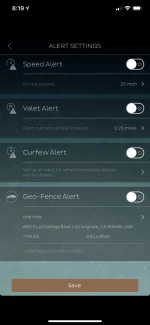
So many many places to start. Are you using the US iOS app? Do you have the screen below on your app ? Nothing to install in the car. Lots more once we are sure we are on the same page.

17874
 
Once you install the alerts app, you cannot control it from your phone. You cannot control it from the car. You can only control it through the web interface. And, again, all requests take roughly 30s-1min to run.

Mind = blown. </nerd-rant>

You can control the alert settings in the app, I use it all the time when I valet or drop off at dealer. Press the hamburger menu icon top left and go to alert settings.


While agree with some of what you said, I don’t agree with all. My app takes less than a second to load, car finder works find on my app though depending on when I am it can take a while to locate the car, which is the result IMO of bad Ntenna placement on the CDMA module, enhanced by having metallic based tint on my windows and pano glass, because if I open the car door it’s nearly instantaneous.

I don’t really find the interface to be any more clunky than the Lexus or OnStar, BMW apps. IMO, MBZ has the best app in this regard and also one for the most expensive. Hardly free for 3 years.

The watch part of the Genesis app is what I use for remote start, it is simple and straight forward. Press the crown, press the Genesis app press the start button, enter pin. Done. 5 seconds tops and i can do it while I am walking to my car.
 
p.s.s. If anyone could please explain to me the point of the "Downloads Center," I'd really appreciate it. There's literally only one app there.


Near as I can tell other than for the alert settings, it is place for possible future OTA apps. Probably similar to Lexus or MBZ that have yelp, npr, sports, stocks, FB places, movie tickets, Fandango, etc. and other useless app integration.
 
When you open it, you are presented front-and center with: a calendar, "points of interest search" app

Actually I find this one of the most useful features. It syncs with my iPhone calendar. I add locations to my calendar entry and then they prelioad and pop right up in the app. Just touch the location in the app and it sends it to the car. Pretty simple and slick IMO. Nothing to enter.
 
Actually I find this one of the most useful features. It syncs with my iPhone calendar. I add locations to my calendar entry and then they prelioad and pop right up in the app. Just touch the location in the app and it sends it to the car. Pretty simple and slick IMO. Nothing to enter.


I actually hate the calendar sync because I get multiple alerts, one fro the calendar, one from the outlook app which also syncs to the calendar and I am required to use for work, and then the genesis app.

And while I can turn off notifications from calendar, if I do so with the Genesis app I don’t get the confirmation notifies if I lock or remote start. So I still end up with 2 alerts for every calendar events.
 
I actually hate the calendar sync because I get multiple alerts, one fro the calendar, one from the outlook app which also syncs to the calendar and I am required to use for work, and then the genesis app.

And while I can turn off notifications from calendar, if I do so with the Genesis app I don’t get the confirmation notifies if I lock or remote start. So I still end up with 2 alerts for every calendar events.

I suppose you could stop the app from syncing with the calendar. I do like the locations in the app. It tells you when to leave to get there on time.
______________________________

Help support this site so it can continue supporting you!
 
I suppose you could stop the app from syncing with the calendar. I do like the locations in the app. It tells you when to leave to get there on time.

yeah I like that to which is why I keep the sync, but I hate the duplicate alerts
 
p.s.s. If anyone could please explain to me the point of the "Downloads Center," I'd really appreciate it. There's literally only one app there.
It's called, "Built for the future!"
I wish the Genesis Techs had used a little bit bigger and bolder font. At least have used black font.
 
Ok, so addressing each point. I really was being honest, however: I was also honestly frustrated. Note that I had just come back from a 1hr drive back from the dealer in Friday evening traffic (usually much worse) after finally waiting 2mo to get this fixed in my moderately expensive newly purchased car.


Alerts:
So many many places to start. Are you using the US iOS app? Do you have the screen below on your app ? Nothing to install in the car. Lots more once we are sure we are on the same page.
You can control the alert settings in the app, I use it all the time when I valet or drop off at dealer. Press the hamburger menu icon top left and go to alert settings.

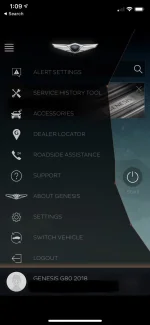
Yes! This. Thanks for pointing this out. I checked again and now I can find it ("Alert Settings" at the top of the hamburger menu when open). I couldn't find it before and didn't realize it was there. I honestly did do a thorough search for it and, either I was completely blind to it and clearly wasn't thorough enough (very possible) or it didn't appear within the app. The second theory is only plausible because I already had installed the app installed and logged in well before Blue Link was finally fixed 2mo later on my car (after they replaced the "I-Box" unit) and also installed the app in the car's Blue Link apps area as well. And it's possible that they don't surface the feature unless they think/know that you have the capability to use it.

That said @Mcc and @Mr. Incredible -- I read above that the app on the car itself apparently isn't required (i.e. the one you download through "Download Center" under Blue Link section) so just curious: Do you guys have that installed on your car as well or no? (With Alert Settings still showing in the iPhone app)?


Latency issues: Commands
The watch part of the Genesis app is what I use for remote start, it is simple and straight forward. Press the crown, press the Genesis app press the start button, enter pin. Done. 5 seconds tops and i can do it while I am walking to my car.

I have a Series 4 and use the watch app as well, which is nice. Unfortunately when i used it, it stalled and I had to restart my watch to get the app to unfreeze (since closing it in the task switcher didn't get it to start responding again). Also, when I was at the car lot yesterday to pick up my car after they fixed the head unit on my car and got Blue Link working, I also tried the horn + starting the car remotely. It still took >30s for it to respond (not just the notification in the app, but for the car to begin honking or to start up). And that was in the middle of San Jose which should have a great signal (I have Verizon and had full signal there, and I presume Blue Link uses Verizon now too with '18 G80's).

While it's still slow where I live, I will say I'm impressed it works at all... it has 1 or 2 bars and I can watch the icon say "Data ↑↓" but it still happens roughly 30s later. I'm probably going to still try to get a range extender off eBay (per my comment quoted here) just to see if that helps at all. It'll still be a win for me regardless of if Blue Link in my case isn't actually over Verizon since that's who I use normally anyway (regardless of using WiFi calling). Worst case, resell it on eBay and take the hit on shipping 😁


Latency Issues: App Load Time
While agree with some of what you said, I don’t agree with all. My app takes less than a second to load...

I have an iPhone X (which is a pretty fast phone by modern standards) and very fast internet. I've actually tested the iPhone's own Internet connectivity over WiFi (since it can very from device to device) seconds after making the screen recording below and it was in excess of >100Mbps (screenshot here and below), so at least I know that's not the issue. It could be a geographical issue (e.g. SF is far away from their servers) or maybe their servers are slow. I'm pretty sure it's not the app itself (even though I've called it "bloated"), because it hangs on the login screen after the app has already loaded, not on loading the app itself prior to the login screen.
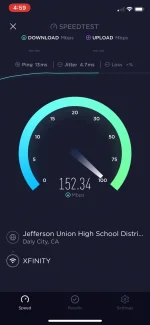
17880


Here's a demo of how long it takes to load (I only modified it to remove the PII):


So for me, it still takes roughly 5-6 seconds to load. Not a huge deal, of course 😄


Calendar/PoI Functionality:
Actually I find this one of the most useful features. It syncs with my iPhone calendar. I add locations to my calendar entry and then they prelioad and pop right up in the app. Just touch the location in the app and it sends it to the car. Pretty simple and slick IMO. Nothing to enter.

This is where we enter the realm of opinion, for sure. I think it's only useful if you plan on using your built in navigation, which I never do. That way you have very easy and quick access to navigate to meetings and etc in your calendar as well as add new PoI's remotely, which is convenient. However, if you're a CarPlay user like me, that's very much a secondary feature IMHO (maybe a good failsafe/backup) and more critical functionality would be remote functions, as far as the app is concerned.

Things are very easy for me when it comes to navigation (thanks of course in part to @Mr. Incredible's suggestion to get a mount for the phone). For example, if I'm walking up to my car, I may already have researched where I'm going on Google Maps, so it'll already be on my phone (or sent to my phone via Google Map's app) or it'll be already in my calendar via Apple's calendar + Maps integration. I just drop my phone into the mount and be on my way. Seconds later, it'll pop up on screen and not only will Google Maps (or Apple Maps, or Waze, etc) be directing me to my destination (a far superior suite of navigation apps, again, opinion) but it'll all be integrated into Apple's slick CarPlay interface, with my music, podcasts and etc.

So, that's just the thought process in my head when I form the opinion of calendar/PoI's being less important; I just lean on different apps and have different habits. In my case, I just use apps that are more specialized for their purpose.

Also:
I suppose you could stop the app from syncing with the calendar. I do like the locations in the app. It tells you when to leave to get there on time.

Siri does a fantastic job of this already, actually. If you already use Apple's Calendar app (I do, and technically all my calendars are actually on Google Calendar and just point my Apple Calendar app at that) and if you drop in addresses, not only will Siri tell you when to leave, but the maps app will pop right up and, of course, if you plug it into your car via USB (see link to mount setup above so no fumbling with wires), then CarPlay comes up and you are instantly already setup, no synchronization, etc.

Not only that, but Google Maps has a notification that stays on my screen starting at roughly 7-8am telling me how long traffic will be into work and it adjust the notifications dynamically somehow to update the estimate as traffic wanes when I decide to head out.


Inaccuracies:
Ok, so I've shamefully crossed out the incorrect stuff in my previous rant post and warned innocent bystanders of the incoming rant. Did I miss anything?
 
Last edited:
That said @Mcc and @Mr. Incredible -- I read above that the app on the car itself apparently isn't required (i.e. the one you download through "Download Center" under Blue Link section) so just curious: Do you guys have that installed on your car as well or no? (With Alert Settings still showing in the iPhone app)?

I guess I am not completely understanding your setup. First, what and where is the “Download Center” ? Under what Blue Link section? Do you have a screen shot?
I have nothing installed on my car and am not even aware that there is something that could even be installed on my car.
 
I'll take that as a no 😀

From memory (since I don't want to go into the rain to get to my car): In your car, there's probably a dedicated "Blue Link" button. Under there go to "Apps" then there's a "Download Center" icon that you can tap or scroll/click to. That shows the one and only app, "Alert Center" (or similar). That's the app I'm referring to that you'd install on your car, which would download over your Blue Link's cell connection (or allegedly over the WiFi connection you setup).

Re: WiFi. Apparently you can configure your car to connect to your WiFi and, if I'm not mistaken, it's sole purpose is literally just to download this one app. Please... prove me wrong! 😂 (at least right now in Feb 2019)

 
Re: WiFi. Apparently you can configure your car to connect to your WiFi and, if I'm not mistaken, it's sole purpose is literally just to download this one app. Please... prove me wrong! 😂 (at least right now in Feb 2019)
It has no other user function that I can tell. I'm guessing it is for future use so a tech can get into the electronics from anywhere to do diagnostics or change setup. At work we had machines built in Austria and the techs there could get into them if we wanted them to do something.
 
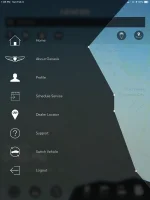
Well, this explains my “Alert Settings” confusion. I made the grave mistake of assuming that the iPad and iPhone apps would be consistent (at least in terms of features, not just design and slow login time).

Comparison of the same hamburger menu in iPad vs. iPhone respectively.
1788617888
 
Looking to update and upgrade your Genesis luxury sport automobile? Look no further than right here in our own forum store - where orders are shipped immediately!
Well, this explains my “Alert Settings” confusion. I made the grave mistake of assuming that the iPad and iPhone apps would be consistent (at least in terms of features, not just design and slow login time).

Comparison of the same hamburger menu in iPad vs. iPhone respectively.
View attachment 17886View attachment 17888
I think features are consistent. What features are present in onethat are not present in the other?
 
I think features are consistent. What features are present in onethat are not present in the other?

Alert settings.

Well, this explains my “Alert Settings” confusion.

On iPad, where do you go to configure these? I poked around and couldn’t find it. I only made a big stink about it because I assumed the capabilities on the iPad app would be the same as on the iPhone app (intuitively, as you also pointed out “I think the features are consistent”) and therefore it doesn’t exist at all on either (when in fact these ARE present on iPhone). The features I cannot find on iPad are:
  • Speed alert
  • Valet alert
  • Curfew alert
  • Geo-fence alert
Obviously not a big deal, though. I guess if it is there on iPad, it’s not as easy to find.
 
You are right. I guess I never had a need to get to settings on my iPad. You can’t configure setting on the. Apple Watch either but as you said, no big deal.
 
Back
Top