• Car enthusiast? Join us on Cars Connected! iOS | Android | Desktop
  • Hint: Use a descriptive title for your new message
    If you're looking for help and want to draw people in who can assist you, use a descriptive subject title when posting your message. In other words, "I need help with my car" could be about anything and can easily be overlooked by people who can help. However, "I need help with my transmission" will draw interest from people who can help with a transmission specific issue. Be as descriptive as you can. Please also post in the appropriate forum. The "Lounge" is for introducing yourself. If you need help with your G70, please post in the G70 section - and so on... This message can be closed by clicking the X in the top right corner.

USB does not work

SeriousBlack

New member
Joined
Feb 22, 2020
Messages
11
Reaction score
3
Points
3
Genesis Model Type
Genesis G70
From day 1 the usb port does not read my USB flash drive, and USB is not able to be selected on screen. My flash drives work in all our other cars as well as car rentals in Europe. According to dealer suggestions my file extensions are correct. Went to dealer again and we tried my drive in another 2020 G70 and flash drive was not read in USB port. It was suggested by dealer I use my phone Instead. I told him the USB is supposed to work in a new car for which I've paid.
 
Of course you're using the front USB reader. (I struggled with that for a few hours when I first got my car).

Do any other USB drives work in your car? Does your phone work?
 
Of course you're using the front USB reader. (I struggled with that for a few hours when I first got my car).

Do any other USB drives work in your car? Does your phone work?
Yes, I trying to use the front USB port to play my Zip Drive.. My phone works in the car to make calls. I don't have music in my phone, and I've charged it in the port in the console.
 
What are the files encoded as?
My files are M4A as was specified by my dealer. They work in my husbands' cadillac, a volvo and a few cars we've rented in Europe as well as friends with various makes of auto with whom he shares his vast collection of music.
 
Yes, I trying to use the front USB port to play my Zip Drive.. My phone works in the car to make calls. I don't have music in my phone, and I've charged it in the port in the console.
Have you tried putting them in the opposite ports?
 
Have you tried putting them in the opposite ports?
Yes, have tried both. Dealer also tried in a new 2020 G70 the other day. Didn't work. I have a 2019 G70 Elite.
 
Looking to update and upgrade your Genesis luxury sport automobile? Look no further than right here in our own forum store - where orders are shipped immediately!
Yes, I trying to use the front USB port to play my Zip Drive.. My phone works in the car to make calls. I don't have music in my phone, and I've charged it in the port in the console.
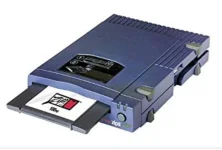
When you say Zip Drive, do you mean an actual "Zip Drive" like the one in the attached photo?

I know you said it works on other cars, but can you try copying a few of the folders (keep the file structure) to a USB flash drive, and try that?

USB flash drives can be bought in large capacities these days and it might be worth moving to that format. They are a lot smaller.

I think I have a few M4A music files I can copy to a flash drive, to test.
 

Attachments

  • Screenshot_20200223-103642_Google.webp
    Screenshot_20200223-103642_Google.webp
    25.5 KB · Views: 4
When you say Zip Drive, do you mean an actual "Zip Drive" like the one in the attached photo?

I know you said it works on other cars, but can you try copying a few of the folders (keep the file structure) to a USB flash drive, and try that?

USB flash drives can be bought in large capacities these days and it might be worth moving to that format. They are a lot smaller.

I think I have a few M4A music files I can copy to a flash drive, to test.
As I said in my original post, all my music files are on a USB Flash Drive
 
As I said in my original post, all my music files are on a USB Flash Drive
Should work unless there is something different on your. From the DIS manual:
About USB
Connect the USB device after turning on the
engine. The USB device may become damaged
if it is already connected when the ignition is
turned on.
• Files that are not standard format files will
not be played.
• For MP3/WMA fi les, only music files with
compression rates between 8 Kbps ~ 320
Kbps can be played.
• Heed caution to static electricity when
connecting/disconnecting external USB
devices.
• Encoded MP3 Players will not be recognized
when connected as an external device.
• When connecting an external USB device,
the device may not properly recognize the
USB is in some states.
• Only USB devices formatted as FAT 12/16/32
are supported, and NTFS file system is not
supported.
• Some USB devices may not be supported
due to compatibility issues.
• Avoid contact between the USB connector
with bodily parts/foreign objects.
 
Is your usb drive formatted as FAT32? OR NTFS? Try a different empty usb stick. Format it as FAT32 and copy a couple of songs to it, and try playing them in the car.
 
Should work unless there is something different on your. From the DIS manual:
About USB
Connect the USB device after turning on the
engine. The USB device may become damaged
if it is already connected when the ignition is
turned on.
• Files that are not standard format files will
not be played.
• For MP3/WMA fi les, only music files with
compression rates between 8 Kbps ~ 320
Kbps can be played.
• Heed caution to static electricity when
connecting/disconnecting external USB
devices.
• Encoded MP3 Players will not be recognized
when connected as an external device.
• When connecting an external USB device,
the device may not properly recognize the
USB is in some states.
• Only USB devices formatted as FAT 12/16/32
are supported, and NTFS file system is not
supported.
• Some USB devices may not be supported
due to compatibility issues.
• Avoid contact between the USB connector
with bodily parts/foreign objects.
I followed the manual to use USB as it directed. ..........many times and also with my Genesis salesman. My USB is formatted as FAT 32 and scanned with no errors. File ext.'s are M4A . On Friday, my Genesis salesman, said he was going to reach out for his area rep. to ask him about this. I love the car, but this is really baffling and very annoying.
 
Is your usb drive formatted as FAT32? OR NTFS? Try a different empty usb stick. Format it as FAT32 and copy a couple of songs to it, and try playing them in the car.
My USB is FAT 32. But, I'm willing to try anything at this point and will follow your suggestion
 
If so temporarily load android Auto or CarPlay one or the other to test the compatibility of the USB input. Won't hurt. Let's see if anything works on that USB.
Will try and let you know
 
Anyone check the manual to see if M4a is supported? Supported formats are listed.
 
Anyone check the manual to see if M4a is supported? Supported formats are listed.
From the manual:
There are no music files which can be played. Only MP3, WMA file formats are supported. Please use only the supported
music file formats
 
From the manual:
There are no music files which can be played. Only MP3, WMA file formats are supported. Please use only the supported
music file formats

There's a list of all the supported formats and bit rates. For example, FLAC is supported but not at all bit rates.
 
Back
Top