• Car enthusiast? Join us on Cars Connected! iOS | Android | Desktop
  • Hint: Use a descriptive title for your new message
    If you're looking for help and want to draw people in who can assist you, use a descriptive subject title when posting your message. In other words, "I need help with my car" could be about anything and can easily be overlooked by people who can help. However, "I need help with my transmission" will draw interest from people who can help with a transmission specific issue. Be as descriptive as you can. Please also post in the appropriate forum. The "Lounge" is for introducing yourself. If you need help with your G70, please post in the G70 section - and so on... This message can be closed by clicking the X in the top right corner.

Heads-Up display missing Speed Limit sign display

siegs7

New member
Joined
Dec 21, 2021
Messages
11
Reaction score
1
Points
3
Genesis Model Year
2024
Genesis Model Type
Genesis GV70 EV
I took my car to the dealer to address a different issue with the Navigation. They wiped out the system and re-loaded the latest/greatest firmware and fixed my original issue, but broke the Speed Limit Sign display in the Heads-Up.

Does anyone know how to fix getting the Speed Limit Sign recognition to display in the Heads-Up display? I have confirmed that the Heads-Up display content is checked to display everything and did a reset of the unit by holding down "Map" and "Setup" buttons for 10 seconds with no luck.
 
Last edited:
My 2019 does not always display the sign. I think it has to do with whether or not it has the data for it. There could also be a setting in the dash for it, I know you can change some of what is displayed.
 
My 2019 does not always display the sign. I think it has to do with whether or not it has the data for it. There could also be a setting in the dash for it, I know you can change some of what is displayed.
Mine has always worked. I have gone through the settings and disabled/re-enabled the Heads-Up display and all of the display content and it still will not work.
This happened once before and I fixed it by reinstalling an older version of the firmware, then reinstalling the latest/greatest firmware, but I do not have an older version of the firmware any longer.

Does anyone have an older version of the 2022 Genesis GV70 Firmware?
 
For mine, the speed limit also has to be enabled in the navigation settings, not just the HUD settings.
That said...

 
For mine, the speed limit also has to be enabled in the navigation settings, not just the HUD settings.
That said...

I have confirmed that the speed limit sign is enabled in the Navigation setting and the sign DOES show up on the Navigation(map), but just no longer in the HUD - I have a 2022 GV70. I have the latest firmware installed. The dealer, Genesis Connected Services, and Mapnsoft have no clue - And Mapnsoft were unwilling to open a case to look into this. I suppose I am out of luck.

Many thanks to the dealer who broke this for me 😡
 
My 2019 does not always display the sign. I think it has to do with whether or not it has the data for it. There could also be a setting in the dash for it, I know you can change some of what is displayed.
There are some roads in the map data that don't have speed limit info so that's probably why its not showing it. But the coverage is pretty extensive for US and Canadian roads in my experience. The head up display even converts the speed limits from KM/H to MPH if you have a US car and you drive it over the border into Canada. Its a pretty neat feature.
 
Looking to update and upgrade your Genesis luxury sport automobile? Look no further than right here in our own forum store - where orders are shipped immediately!
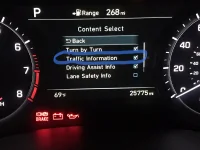
On my 2019 G80, in the HUD Content Select screen, you enable the Traffic Information to display the speed limit sign in the HUD.
 

Attachments

  • 0BA98C43-C180-4520-895C-4E30AF42EB42.webp
    0BA98C43-C180-4520-895C-4E30AF42EB42.webp
    112.6 KB · Views: 9
I don't know if I did something wrong or if something is broken. After the first day when we had temps over 70 Degrees F, my Heads Up Display stopped displaying. A day or two later, Genesis sent me a message on the dashboard display asking me if I wanted to do a software update. I said OK, it said it would take around 15 minutes so I went into my house until the next day. Well low and behold, it still does not work. But the voice of the navigation system changed from Brit to American. I looked in the manual to find out if there is a setting for it, to no avail.

Has anyone else had this problem?

2021 G80 Prestige 3.5T, AWD 4600 miles.
 
My car is a GV60 but I have an electrified G80 as a loaner. The Hud does not show the speed limit but the map panel (far right on the screen) does show it. Weird. Has anyone figured this out? I do have all the boxes checked for the HUD.
 
I don't know if I did something wrong or if something is broken. After the first day when we had temps over 70 Degrees F, my Heads Up Display stopped displaying. A day or two later, Genesis sent me a message on the dashboard display asking me if I wanted to do a software update. I said OK, it said it would take around 15 minutes so I went into my house until the next day. Well low and behold, it still does not work. But the voice of the navigation system changed from Brit to American. I looked in the manual to find out if there is a setting for it, to no avail.

Has anyone else had this problem?

2021 G80 Prestige 3.5T, AWD 4600 miles.
My bad.

I found the HUD in settings and now it works like a charm.

Thanks!
______________________________

Help support this site so it can continue supporting you!
 
Back
Top