• Car enthusiast? Join us on Cars Connected! iOS | Android | Desktop
  • Hint: Use a descriptive title for your new message
    If you're looking for help and want to draw people in who can assist you, use a descriptive subject title when posting your message. In other words, "I need help with my car" could be about anything and can easily be overlooked by people who can help. However, "I need help with my transmission" will draw interest from people who can help with a transmission specific issue. Be as descriptive as you can. Please also post in the appropriate forum. The "Lounge" is for introducing yourself. If you need help with your G70, please post in the G70 section - and so on... This message can be closed by clicking the X in the top right corner.

I can’t ever get the maintenance indicator correct nor can Genesis please help

Ashecnc

Registered Member
Joined
Apr 9, 2022
Messages
38
Reaction score
6
Points
8
Genesis Model Year
2022
Genesis Model Type
Genesis G70
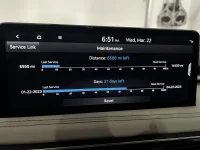
I have a 2022 g70, on the maintenance screen I have two lines, one shows mileage since last service and a blue bar showing when next service is, which is correct. The one I can’t ever correct is the second line, it shows days left 31. I start the car and it tells me I have service due, which I don’t. When I sign onto my Genesis account it says I have it set to 500 miles, which I don’t. If i hit reset it clears both lines starting over which I don’t want to do. How in the *ell do I manage this second line, it has driven me crazy for nearly 8 months. I am attaching a pic, its the second line, I don’t see any benefit in this line except for driving me crazy. I hope someone on here can enlighten me on how to correct this. Thank you.
 

Attachments
  • 46F5CA4A-82B4-4EE6-867F-6FB09ACB3A7A.webp
    46F5CA4A-82B4-4EE6-867F-6FB09ACB3A7A.webp
    99.4 KB · Views: 12
Last edited:
I had the same issue with my GV80. I talked to my service manager, and they are able to set it correctly.
 
Looking to update and upgrade your Genesis luxury sport automobile? Look no further than right here in our own forum store - where orders are shipped immediately!
I disabled all that crap. Kept getting urgent service messages when the stupid car had 400 miles and 2 months old (3+ from build date), with 5K OCIs. And even deactivated, got a warning again, so had to call CS to ask to stop those messages, which were supposedly disabled on my profile. I always keep track of my maintenance (and do it myself) anyway. But if I wanted to rely on that stupid system, I'd be pissed too. Ha ha.
 
OP, is the second line changing every day, counting down to 4/22/23, or is it stuck on 31 days? Does the 4/22/23 date show up anywhere in your Genesis account or the car’s computer that will allow you to edit it?
 
Last edited:
OP, is the second line changing every day, counting down to 4/22/23, or is it stuck on 31 days? Does the 4/22/23 date show up anywhere in your Genesis account or the car’s computer that will allow you to edit it?
The countdown is working, seems to be set at 90 days, even though I never did that, nor can I see anywhere to change that. Also, when I sign into Genesis Owner account, about the alert for service, which I do not need, it has a warning saying based on my driving habits I have my interval at 500 miles, which no where in the car do I have this set at. I drive the car normal, I don't’ know what’s going on here.
 
There are two maintenance intervals. One for connected services, which you are looking at. The other is the standard time and mileage setting. Setup->vehicle->cluster->service interval.

For the connected services interval you can do the following
Log into MyGenesis website (or genesis app)
Scroll down to vehicle health, view vehicle health
Manage driving habits
select "none of the above"
notifications should go to 6 months

Ultimately I ignore the connected services reminders and go based on the time and mileage, which shows up in the gauge cluster in front of your steering wheel.
 
There are two maintenance intervals. One for connected services, which you are looking at. The other is the standard time and mileage setting. Setup->vehicle->cluster->service interval.

For the connected services interval you can do the following
Log into MyGenesis website (or genesis app)
Scroll down to vehicle health, view vehicle health
Manage driving habits
select "none of the above"
notifications should go to 6 months

Ultimately I ignore the connected services reminders and go based on the time and mileage, which shows up in the gauge cluster in front of your steering wheel.
Thanks. On the online account, I have selected none of the above, it tells me I need service every 500 miles. I have a ticket into genesis customer care. They can’t figure out any of it and why I keep getting alerts to schedule service every 500 miles. I finally got a response that I need an oil change every 6000 miles, because both screens never match and no one could figure out what to input in there.
 
Back
Top





