

-

-
Hint: Use a descriptive title for your new message
If you're looking for help and want to draw people in who can assist you, use a descriptive subject title when posting your message. In other words, "I need help with my car" could be about anything and can easily be overlooked by people who can help. However, "I need help with my transmission" will draw interest from people who can help with a transmission specific issue. Be as descriptive as you can. Please also post in the appropriate forum. The "Lounge" is for introducing yourself. If you need help with your G70, please post in the G70 section - and so on... This message can be closed by clicking the X in the top right corner.
- Genesis Forums
- Genesis Motors Forums
- Genesis GV70 Forum / GV70 EV Forum - GV70FORUM.COM
- GV70 Engine, Drivetrain and Exhaust Discussion
You are using an out of date browser. It may not display this or other websites correctly.
You should upgrade or use an alternative browser.
You should upgrade or use an alternative browser.
JB4
- Thread author Jgolden1016
- Start date
JrJanowski
New member
- Joined
- Aug 18, 2023
- Messages
- 2
- Reaction score
- 0
- Points
- 1
- Genesis Model Year
- 2022
- Genesis Model Type
- Genesis GV70
Just picked up a used JB4 for my 3.5T.
Might be in my head but I feel like it shifts better/smoother.
Running Map 2 with 93 octane.. what gains does this equate to? Haven't really had a chance to get on it yet, was impressed with the car before and more impressed now. Not sure I will notice much of a difference?
I did notice the camera flickering in reverse as some have mentioned.
Might be in my head but I feel like it shifts better/smoother.
Running Map 2 with 93 octane.. what gains does this equate to? Haven't really had a chance to get on it yet, was impressed with the car before and more impressed now. Not sure I will notice much of a difference?
I did notice the camera flickering in reverse as some have mentioned.
Mflow2
Registered Member
- Joined
- May 18, 2023
- Messages
- 30
- Reaction score
- 4
- Points
- 8
- Genesis Model Year
- 2023
- Genesis Model Type
- Genesis GV70
Have you tried map2 yet? I just ordered my JB4 for a 23 2.5t. I run 93 octane here in NY. Also, in reading the thread here did you hook up the brown wire as well or leave it unplugged as others here? I think the others are running 3.3 motors.I can share my experience on my '23 2.5T with the JB4 and 0-60 runs using the OBDLink MX+ recorder. With only 91 octane available I'm using map #1 and do not have the OBD connection as I couldn't figure how to get it through the firewall. This resulted in a repeatable 0-60 improvement of 1 second,
from 7 to 6 seconds 0-60 times. You can definitely feel the car pull with more authority.
I've since added the JB4 pedal tuner and although I know it doesn't make more power it sure brings the car to life by eliminating the dead pedal. Seat of the pants feel and fun factor greatly improved. I've also noticed it allows me to keep in comfort mode which IMO has shift points better matched to the power curve, the Sport mode forces too much over-rev where the 2.5 drops off in it's powerband at higher rpm's. This combination keeps it in the fat part of the powerband much more consistently.
damosis
New member
- Joined
- Apr 5, 2023
- Messages
- 18
- Reaction score
- 8
- Points
- 3
- Genesis Model Year
- 2025
- Genesis Model Type
- Genesis GV70
I did try map 2 which resulted in slightly slower 0-60 runs, probably fending off detonation with the 91octane fuel. I haven't connected any wires, so no experience there. I may try to after the service interval and dealer visit.Have you tried map2 yet? I just ordered my JB4 for a 23 2.5t. I run 93 octane here in NY. Also, in reading the thread here did you hook up the brown wire as well or leave it unplugged as others here? I think the others are running 3.3 motors.
Mflow2
Registered Member
- Joined
- May 18, 2023
- Messages
- 30
- Reaction score
- 4
- Points
- 8
- Genesis Model Year
- 2023
- Genesis Model Type
- Genesis GV70
Thanks. I’ll start with Map 1 and see what the logs look like with the 93 octane around me. I’m not swapping out plugs and don’t want to go crazy.I did try map 2 which resulted in slightly slower 0-60 runs, probably fending off detonation with the 91octane fuel. I haven't connected any wires, so no experience there. I may try to after the service interval and dealer visit.

Mflow2
Registered Member
- Joined
- May 18, 2023
- Messages
- 30
- Reaction score
- 4
- Points
- 8
- Genesis Model Year
- 2023
- Genesis Model Type
- Genesis GV70
Ok so the JB4 and pedal commander came in. Pedal commander really wakes up the throttle response which is nice. For the JB4 the pictures in the install guide are scattered. Can anyone with a 2.5t lend some advice as to the location of the sensors??Thanks. I’ll start with Map 1 and see what the logs look like with the 93 octane around me. I’m not swapping out plugs and don’t want to go crazy.
Mflow2
Registered Member
- Joined
- May 18, 2023
- Messages
- 30
- Reaction score
- 4
- Points
- 8
- Genesis Model Year
- 2023
- Genesis Model Type
- Genesis GV70
Much better pictures here folks. They should put these in the install guide.Ok so the JB4 and pedal commander came in. Pedal commander really wakes up the throttle response which is nice. For the JB4 the pictures in the install guide are scattered. Can anyone with a 2.5t lend some advice as to the location of the sensors??
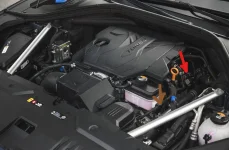
Attachments
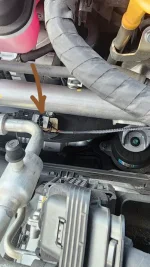
SirSLeaZY
New member
- Joined
- Jul 27, 2023
- Messages
- 8
- Reaction score
- 2
- Points
- 3
- Genesis Model Year
- 2022
- Genesis Model Type
- Genesis GV70
Just got my jb4 for my 3.5t i updated it to the latest firmware and it says “ suggest to connect the fuel pressure with open loop set to 70“
But in the installation guide it says connect fuel pressure if you running E85 anyway i didn’t plug the fuel pressure nor the loop there is no instructions how to do so , for ppl running the latest update what is the turbo psi and do you notice any difference in the performance?
For me i’m running map 2 on sport+ but didn’t notice power difference the boost still the same and the 0-60 times acutely slower 6 sec , the only “mod” is bov
But in the installation guide it says connect fuel pressure if you running E85 anyway i didn’t plug the fuel pressure nor the loop there is no instructions how to do so , for ppl running the latest update what is the turbo psi and do you notice any difference in the performance?
For me i’m running map 2 on sport+ but didn’t notice power difference the boost still the same and the 0-60 times acutely slower 6 sec , the only “mod” is bov
Last edited:

- Joined
- Apr 12, 2014
- Messages
- 2,677
- Reaction score
- 969
- Points
- 113
- Location
- Romeoville, IL
- Genesis Model Year
- 2023
- Genesis Model Type
- Genesis GV70
Just got my jb4 for my 3.5t i updated it to the latest firmware and it says “ suggest to connect the fuel pressure with open loop set to 70“
But in the installation guide it says connect fuel pressure if you running E85 anyway i didn’t plug the fuel pressure nor the loop there is no instructions how to do so , for ppl running the latest update what is the turbo psi and do you notice any difference in the performance?
For me i’m running map 2 on sport+ but didn’t notice power difference the boost still the same and the 0-60 times acutely slower 6 sec , the only “mod” is bov
You need to connect that fuel pressure wire/plug. It's really easy. Easier then I thought it would be.
I run Map2 and Map3 (sometimes) on 93 octane all the time without any problems, on latest firmware and I didn't set the value to 70, but I will tomorrow and see if there are any changes.
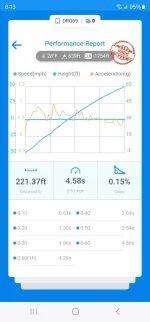
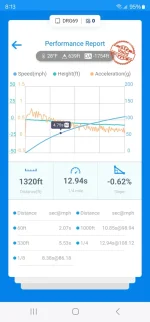
A few days ago, I was bored and added a few ounces of Boostoctane pro, aimed for ~98+ octanes.....switched to Map3 and did some pulls.
My best 0 to 60 was 4.58 sec.
Attachments
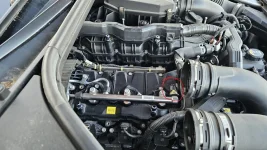
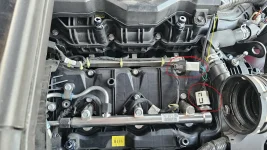
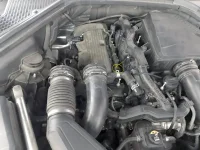
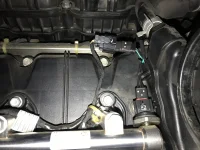
Mflow2
Registered Member
- Joined
- May 18, 2023
- Messages
- 30
- Reaction score
- 4
- Points
- 8
- Genesis Model Year
- 2023
- Genesis Model Type
- Genesis GV70
Silly question here but how did you get access to that opening next to the brake booster above the brake pedal?? How do I take the plastic/foam cover off that’s covering that area? Is there a bolt holding it in place and if so where is it?Watch my video and I show you were the OBDII cable goes through the firewall.
SirSLeaZY
New member
- Joined
- Jul 27, 2023
- Messages
- 8
- Reaction score
- 2
- Points
- 3
- Genesis Model Year
- 2022
- Genesis Model Type
- Genesis GV70
Thanx man for the instructions i did hook the fuel line , map 2 now and still i think they can do better job with tuning and power gains
You need to connect that fuel pressure wire/plug. It's really easy. Easier then I thought it would be.
I run Map2 and Map3 (sometimes) on 93 octane all the time without any problems, on latest firmware and I didn't set the value to 70, but I will tomorrow and see if there are any changes.
A few days ago, I was bored and added a few ounces of Boostoctane pro, aimed for ~98+ octanes.....switched to Map3 and did some pulls.
My best 0 to 60 was 4.58 sec.
- Joined
- Apr 12, 2014
- Messages
- 2,677
- Reaction score
- 969
- Points
- 113
- Location
- Romeoville, IL
- Genesis Model Year
- 2023
- Genesis Model Type
- Genesis GV70
There's definitely room for more power, but they won't push it. I believe they even lowered the boost to avoid surging while WOT.Thanx man for the instructions i did hook the fuel line , map 2 now and still i think they can do better job with tuning and power gains
Read this thread and you'll see why is that.
SirSLeaZY
New member
- Joined
- Jul 27, 2023
- Messages
- 8
- Reaction score
- 2
- Points
- 3
- Genesis Model Year
- 2022
- Genesis Model Type
- Genesis GV70
what boost you get in map2 ?There's definitely room for more power, but they won't push it. I believe they even lowered the boost to avoid surging while WOT.
Read this thread and you'll see why is that.
Looking to update and upgrade your Genesis luxury sport automobile? Look no further than right here in our own forum store - where orders are shipped immediately!
- Joined
- Apr 12, 2014
- Messages
- 2,677
- Reaction score
- 969
- Points
- 113
- Location
- Romeoville, IL
- Genesis Model Year
- 2023
- Genesis Model Type
- Genesis GV70
what boost you get in map2 ?
Max ~17-18psi.
SirSLeaZY
New member
- Joined
- Jul 27, 2023
- Messages
- 8
- Reaction score
- 2
- Points
- 3
- Genesis Model Year
- 2022
- Genesis Model Type
- Genesis GV70
Max ~17-18p
Something wrong with mine i literally get the same boost in stock map1 map2 the psi doesn’t get more than 12-13 , tried comfort sport and sport+ same psi thats why i was shocked about the power gainMax ~17-18psi.
Last edited:
GV70SP24
Registered Member
- Joined
- Jan 31, 2024
- Messages
- 152
- Reaction score
- 45
- Points
- 28
- Genesis Model Year
- 2024
- Genesis Model Type
- Genesis GV70
Patiently waiting to see more feedback on how this is going and if anyone is changing the plugs to avoid boost blowing the spark out.
And of course octane addition to help?
What’s the magic recipe yall figured out so far?
Must be a chart like map2 nothing is needed but anything more you’ll need octane and plugs to take full advantage of it?
And of course octane addition to help?
What’s the magic recipe yall figured out so far?
Must be a chart like map2 nothing is needed but anything more you’ll need octane and plugs to take full advantage of it?
GV70SP24
Registered Member
- Joined
- Jan 31, 2024
- Messages
- 152
- Reaction score
- 45
- Points
- 28
- Genesis Model Year
- 2024
- Genesis Model Type
- Genesis GV70
Didn’t see much talk about E85 blend or straight E85 yet?Patiently waiting to see more feedback on how this is going and if anyone is changing the plugs to avoid boost blowing the spark out.
And of course octane addition to help?
What’s the magic recipe yall figured out so far?
Must be a chart like map2 nothing is needed but anything more you’ll need octane and plugs to take full advantage of it?
And if anyone installed an E85 meter so you can see the live % mixture so you use the proper map
- Joined
- Apr 12, 2014
- Messages
- 2,677
- Reaction score
- 969
- Points
- 113
- Location
- Romeoville, IL
- Genesis Model Year
- 2023
- Genesis Model Type
- Genesis GV70
All 3 connectors are connected where they suppose to be?Something wrong with mine i literally get the same boost in stock map1 map2 the psi doesn’t get more than 12-13 , tried comfort sport and sport+ same psi thats why i was shocked about the power gain
Correct firmware?
- Joined
- Apr 12, 2014
- Messages
- 2,677
- Reaction score
- 969
- Points
- 113
- Location
- Romeoville, IL
- Genesis Model Year
- 2023
- Genesis Model Type
- Genesis GV70
I thought about it changing the plugs to something better, like HKS M45iL and gap them to .022Didn’t see much talk about E85 blend or straight E85 yet?
And if anyone installed an E85 meter so you can see the live % mixture so you use the proper map
So far, I put ~8k miles on OEM plugs and all is good.
As for E85 blend....Terry said I could try ~20% e85 with 93 octane and start with Map2, then switch to Map3. I didn't try it yet. I still have a can of Boostoctane and can add some to make it 98+
Great products:
- VIN Check
- Add more horsepower!
- Clean your leather!
- Safe Emergency Charging
- Windshield Repair Kit
- Chemical Guys HydroSpeed Ceramic Quick Detailer
- Chemical Guys HydroCharge High-Gloss Hydrophobic SI02 Ceramic Spray Coating
- Get a dash cam!
- Auto Buyers Market
- Foreign invaders vs USA gangs
- VIN Check
- Add more horsepower!
- Clean your leather!
- Safe Emergency Charging
- Windshield Repair Kit
- Chemical Guys HydroSpeed Ceramic Quick Detailer
- Chemical Guys HydroCharge High-Gloss Hydrophobic SI02 Ceramic Spray Coating
- Get a dash cam!
- Auto Buyers Market
- Foreign invaders vs USA gangs
 | ||||
 |  |  |  |  |
 |  | |||





Featured content
-

-
Thread 'Help us to keep helping you. Your support is essential to our survival.'
- Sal Collaziano
Replies: 32