• Car enthusiast? Join us on Cars Connected! iOS | Android | Desktop
  • Hint: Use a descriptive title for your new message
    If you're looking for help and want to draw people in who can assist you, use a descriptive subject title when posting your message. In other words, "I need help with my car" could be about anything and can easily be overlooked by people who can help. However, "I need help with my transmission" will draw interest from people who can help with a transmission specific issue. Be as descriptive as you can. Please also post in the appropriate forum. The "Lounge" is for introducing yourself. If you need help with your G70, please post in the G70 section - and so on... This message can be closed by clicking the X in the top right corner.

connected services- worth it?

I'm planning on finding out where the modem antenna connector is and unplugging it just to make sure there is absolutely no data connection. Hyundai/Kia/Genesis only quit selling data when they - along with other car mfrs - got publicly shamed into admitting it. I'm not taking any chances.
A friend of mine found the antenna in his Kia Forte (base model with no nav) and unplugged it (it's in the shark fin antenna on the roof) and something very strange happened... Even when using Apple CarPlay or Android Auto, his maps quit working. He asked around and found out that when the phone is plugged into the car it uses the car's GPS antenna and not the phone's for navigation. Not sure if Genesis is the same, just thought it was interesting.
 
A friend of mine found the antenna in his Kia Forte (base model with no nav) and unplugged it (it's in the shark fin antenna on the roof) and something very strange happened... Even when using Apple CarPlay or Android Auto, his maps quit working. He asked around and found out that when the phone is plugged into the car it uses the car's GPS antenna and not the phone's for navigation. Not sure if Genesis is the same, just thought it was interesting.
I would have expected that. When bluetooth for phones in cars first became available, one of the key marketing items was that it would use the car's antenna and get a stronger signal than would a phone inside the metal box.
 
A friend of mine found the antenna in his Kia Forte (base model with no nav) and unplugged it (it's in the shark fin antenna on the roof) and something very strange happened... Even when using Apple CarPlay or Android Auto, his maps quit working. He asked around and found out that when the phone is plugged into the car it uses the car's GPS antenna and not the phone's for navigation. Not sure if Genesis is the same, just thought it was interesting.
GPS Antenna != Data Antenna. Those are two separate things.

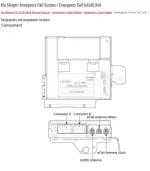
The GPS antenna is receive only. It is in the shark fin, along with the Sirius XM antenna. Those are satellite antennas. The data (LTE cellular) antenna is behind the dash.
 
GPS Antenna != Data Antenna. Those are two separate things.

The GPS antenna is receive only. It is in the shark fin, along with the Sirius XM antenna. Those are satellite antennas. The data (LTE cellular) antenna is behind the dash.
This is correct.

Cell modem(eCall) and GNSS(GPS) operate differently and do not share TX/RX line. There is no need to disconnect the GNSS(GPS) antenna lead.

kstinger 1.webp
 
I've never turned it on, don't miss it, and will never own a car that phones home in such a fashion.
So what app do you use for maps, directions, and general web searches instead of Google and and android auto?
 
I'm not being a smarty pants, but what's this data collecting paranoia about? What are the issues?
 
I'm not being a smarty pants, but what's this data collecting paranoia about? What are the issues?
I have to feel that anyone carrying a smart phone around (myself included) is not really all that worried about it.
 
There are differences between data collection on a cellphone and what car mfrs were/are doing. On a phone, the user by and large has the ability to turn off specific permissions or delete apps entirely. Any of the wireless comms on the phone can also be turned off any time the user chooses to. Also, if I so choose, I can associate my phone as much - or as little - to my person as I deem fit.

The wireless modem on the car OTOH is controlled by the car mfr - not the car owner. Not only is it on any time I'm driving, the modem can still be on after I turn off the ignition. On some Hyundai/Kia/Genesis models, there used to be menu item selection where the user can turn off the modem. They have since deleted that option. Wanna guess why?

This means I could be driving like a nun in everyday driving - which is actually how I drive most of the time. But on AutoX weekends and Track Days, I could be going balls to the wall and trashing my driving score. Just this past week, we were in the Smoky Mountains putting my Stinger through the proper paces. I highly doubt my car could differentiate between Tail of the Dragon and my morning commute.

I could turn off my phone. The car's wireless modem... I could not.

Call me paranoid if you want. I plain don't like paying $$$$ for a car and subsequently having absolutely no control over how the car mfr - which no longer owns any rights to my vehicle - uses it to collect driving data and having free reign over sales of the same.
 
Last edited:
In case you actually think this is all just fear mongering... FCRA
 
GPS Antenna != Data Antenna. Those are two separate things.

The GPS antenna is receive only. It is in the shark fin, along with the Sirius XM antenna. Those are satellite antennas. The data (LTE cellular) antenna is behind the dash.
This is correct.

Cell modem(eCall) and GNSS(GPS) operate differently and do not share TX/RX line. There is no need to disconnect the GNSS(GPS) antenna lead.

View attachment 59354
Great information, thank you!
______________________________

Help support this site so it can continue supporting you!
 
So what app do you use for maps, directions, and general web searches instead of Google and and android auto?
My personal preference is Waze.

That said, to expand on what Volfy said: The app on Carplay/Android Auto may see GPS inputs showing high rate of speed and acceleration, and be able to tie it to me. But the app can't confirm if I'm driving or not (what if I'm the passenger whose phone is connected to the car?), or read what my inputs as a driver are.

The car's cellular modem can report everything the app can, along with all of the telemetry (driver inputs, engine instrumentation, etc) that is directly tied to the car's VIN - and sends it all off ready for resale.
 
I use google maps for most of my GPS/NAV work. No doubt Google collects my data as well, but Google may or may not have the correct personal info on me, depending on which profile I used to establish the Google account. Also, Google allows you to download map data to your phone, so active data connection is not necessary while you drive in areas that are covered by the downloaded map data. We used this extensively when we travelled this last week... for more reasons than just data privacy. Many parts along the routes we drove did not have good cell signal coverage, so downloading map data beforehand help ensure uninterrupted NAV functions. And when we ran the Tail of the Dragon, Cherohala Skyway, Hellbender 28. etc., my cellphones were on airplane mode. Rather aptly named, if you asked me.

Only regret was I didn't get to figure out how to unplug the cell antenna in my Stinger before the trip.
 
Worth it any place the temperature exceeds 85 or goes below 35.
Loved mine, when it worked! Most times I got the error message/try again/etc. Coping in this heat without it.
 
Loved mine, when it worked! Most times I got the error message/try again/etc. Coping in this heat without it.
There are may aftermarket remotes that will start the car for you. Too damned hot to not have it.
 
Loved mine. The weather today was 110+F and I was parked outside my kids place as they were packing up to go home. I used the phone app to turn on the AC and it worked perfectly. In my former BMW it took a long time to connect and confirm that the AC was now on; the GV60P did it in a second flat.
 
Just renewed my subscription. They gave me a discount and, because there were so many issues with renewing it, they gave me an extra 3 months. So, I got 15 months for all 3 services for $118 (about $8 a month). To me, you can't beat that.
 
Just renewed my subscription. They gave me a discount and, because there were so many issues with renewing it, they gave me an extra 3 months. So, I got 15 months for all 3 services for $118 (about $8 a month). To me, you can't beat that.
And why were they so generous? Threat of not renewing?
 
And why were they so generous? Threat of not renewing?
Actually no. My service had roughly a month or so left when, without me asking, I received an email with a discount code. So there was no "threat" of me not renewing.
 
Actually no. My service had roughly a month or so left when, without me asking, I received an email with a discount code. So there was no "threat" of me not renewing.
Good to know. Thank you
 
Just renewed my subscription. They gave me a discount and, because there were so many issues with renewing it, they gave me an extra 3 months. So, I got 15 months for all 3 services for $118 (about $8 a month). To me, you can't beat that.
Good price. I'd pay that, not the original $300.
 
Looking to update and upgrade your Genesis luxury sport automobile? Look no further than right here in our own forum store - where orders are shipped immediately!
Back
Top