• Car enthusiast? Join us on Cars Connected! iOS | Android | Desktop
  • Hint: Use a descriptive title for your new message
    If you're looking for help and want to draw people in who can assist you, use a descriptive subject title when posting your message. In other words, "I need help with my car" could be about anything and can easily be overlooked by people who can help. However, "I need help with my transmission" will draw interest from people who can help with a transmission specific issue. Be as descriptive as you can. Please also post in the appropriate forum. The "Lounge" is for introducing yourself. If you need help with your G70, please post in the G70 section - and so on... This message can be closed by clicking the X in the top right corner.

2020 G70 2.0T RWD software update problems/troubleshoot

wandawonton28

New member
Joined
Mar 22, 2025
Messages
2
Reaction score
0
Points
1
Genesis Model Year
2020
Genesis Model Type
Genesis G70
Hi, I just bought a 2020 G70, used from a dealer. I love this car. It's my wife and I's 2nd genesis, we have a 23 GV70 AWD, as well. Great cars, we both love them. Here's my issue...

I have tried doing a software update via USB jump drive at least 3x now, unsuccessfully. I've followed the instructions from genesis, I've downloaded navigation updater, made sure the jump drive is 32gb, formatted it to FAT32, i've tried 2 different jump drives, re-downloaded the software directly to the drive, then transferred it to the jump drive from my laptop hard drive separately, i've downloaded it directly to the jump drive. Nothing works. I cannot load connected services at all; when I try, it says to retry with a better internet connection, not working. I also know that i'm running old software on there, I've checked the update file version. What am I missing?

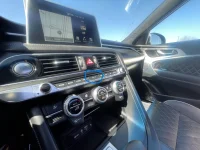
**When I plug in the jump drive to USB port for upload, it cycles thru playing 3 different audio tune files on repeat, but no update files are available to upload, despite the fact that it shows them on the jump drive...help, please if you can!

Thanks!
 
I had similar problems updating the maps in my previous car ((Jaguar XE), until I purchased a newer thumb drive than the older ones I had been using. The newer one worked immediately. It turns out that thumb drives can deteriorate as they age. Who knew?
 
I have tried doing a software update via USB jump drive at least 3x now, unsuccessfully. I've followed the instructions from genesis, I've downloaded navigation updater, made sure the jump drive is 32gb, formatted it to FAT32, i've tried 2 different jump drives, re-downloaded the software directly to the drive, then transferred it to the jump drive from my laptop hard drive separately, i've downloaded it directly to the jump drive.
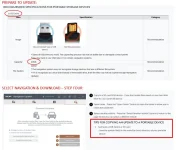
Updating it yourself can be a pain, but hang in there. I added a couple of screenshots below from the update site.

It used to be 32GB for USB Drives, but they now recommend a 64GB USB Drive ( Navigation Updater | Official Genesis Navigation Update Website ). I've had trouble too with cheap USB drives in the past, so get a decent name brand. I bought a package of 2 SanDisk Ultra USB 3.0 Flash Drives for under $20 at Walmart last year, and had no problems (the 3.0 versions can transfer data faster than the 2.0).

When it comes time to copy the update from your computer to the USB Drive, save the files in the main/top (root) directory of the USB Drive. Don't put them in a folder or the car won't be able to find them.

Good luck.
 

Attachments

  • Screenshot 2025-04-17.webp
    Screenshot 2025-04-17.webp
    56.5 KB · Views: 4
Looking to update and upgrade your Genesis luxury sport automobile? Look no further than right here in our own forum store - where orders are shipped immediately!
Dude! You’re the man! I’m on way home from work to try your advice! I have a 64gb jump drive that I’ll try! Thanks again, so much!
 
If your G70 has navigation then you need to use the factory SD card that is located behind the button in center console. Pull cover with fingernail and then push (click) to eject the SD card. You then use a card reader or whatever to connected it to PC that is running the updater software. Pop the SD card back into the car and perform the update as described on Update Guide..... usually its just "Settings" > "General" > "Software Info/Update"
 

Attachments

  • inspection_image_133.webp
    inspection_image_133.webp
    223.5 KB · Views: 1
BTW, they just released the April 2025 map update on the website, so make sure and download the latest one.
 
Back
Top