• Car enthusiast? Join us on Cars Connected! iOS | Android | Desktop
  • Hint: Use a descriptive title for your new message
    If you're looking for help and want to draw people in who can assist you, use a descriptive subject title when posting your message. In other words, "I need help with my car" could be about anything and can easily be overlooked by people who can help. However, "I need help with my transmission" will draw interest from people who can help with a transmission specific issue. Be as descriptive as you can. Please also post in the appropriate forum. The "Lounge" is for introducing yourself. If you need help with your G70, please post in the G70 section - and so on... This message can be closed by clicking the X in the top right corner.

Apple Car Play - Screen Size

LordGuthrie

Registered Member
Joined
Nov 17, 2021
Messages
36
Reaction score
23
Points
8
Location
Edmonton, Alberta
Genesis Model Year
2022
Genesis Model Type
Genesis G70
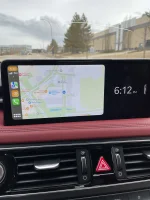
Did something change in the latest update that changed the size of Apple Car Play to only be 2/3 the screen size with the right 1/3 being that pop out (weather, time, compass, etc..). I'm not sure, so I've been hunting around for the setting and I'm not sure where that is. When there is no Apple Car Play, I can click the button and it pops back in and I get full screen of the Radio, Map, etc... but not Car Play. Car Play was full screen for at least the last 4-5 months now it's changed.

Anyone else? See pic below. Clicking the button to pop it in does nothing. Very odd.
Don't mind the crack... just the casualty of driving the QE2 Highway :(
IMG_3732.webp
 
I believe it's under the user profile settings, if I remember correctly.
 
The button on the right side with the arrow does nothing? That should slide away the Genesis panel and make Apple CarPlay full screen
 
Looking to update and upgrade your Genesis luxury sport automobile? Look no further than right here in our own forum store - where orders are shipped immediately!
look in the thread "no fullscreen with Android auto". I showed how to make Apple full screen
 
Did you find your answer, if not the last OTA update - updated the side by side features. You need to go into the settings and customize what you want your side by side to be.
 
For the G80 with the latest Apple update, what are the exact procedures to make the car play map full screen?
 
I don't think it's a phone thing, no? There's a setting on the car where it asks if you want split screen with ACP, and you just check the square if you do. I don't use it, so cannot comment on that, but just wanted to mention that I saw that setting somewhere. Hope this helps. Good luck.
 
I don't think it's a phone thing, no? There's a setting on the car where it asks if you want split screen with ACP, and you just check the square if you do. I don't use it, so cannot comment on that, but just wanted to mention that I saw that setting somewhere. Hope this helps. Good luck.
Thanks I'll try and find it.
 
Back
Top





