• Car enthusiast? Join us on Cars Connected! iOS | Android | Desktop
  • Hint: Use a descriptive title for your new message
    If you're looking for help and want to draw people in who can assist you, use a descriptive subject title when posting your message. In other words, "I need help with my car" could be about anything and can easily be overlooked by people who can help. However, "I need help with my transmission" will draw interest from people who can help with a transmission specific issue. Be as descriptive as you can. Please also post in the appropriate forum. The "Lounge" is for introducing yourself. If you need help with your G70, please post in the G70 section - and so on... This message can be closed by clicking the X in the top right corner.

Blind spot monitor

Trojanlawyer

Registered Member
Joined
Jun 7, 2020
Messages
38
Reaction score
13
Points
8
Genesis Model Type
Genesis G70
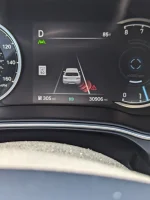
Question on the G70. So on my GV80, when there is a car in my blind spot, there is an indicator as seen in this picture. I don't see it in my G70. Is there an issue with mine or is it not an option on G70s?
PXL_20240615_185713991.webp
 
You didn't mention the year and I don't have a G70, but I believe the Blind Spot Detection indicator you're showing is standard on all models and trim levels. Check the settings under Vehicle > Driving Assist > Blind Spot Detection (or ???) to see which options are already selected, then make the necessary adjustment, if any. I think there's an "OFF" option. There is also a Monitor in the digital cluster of some trim levels/models when using the turn signal to change lanes, but I don't think that's what you're questioning.
 
Looking to update and upgrade your Genesis luxury sport automobile? Look no further than right here in our own forum store - where orders are shipped immediately!
You didn't mention the year and I don't have a G70, but I believe the Blind Spot Detection indicator you're showing is standard on all models and trim levels. Check the settings under Vehicle > Driving Assist > Blind Spot Detection (or ???) to see which options are already selected, then make the necessary adjustment, if any. I think there's an "OFF" option. There is also a Monitor in the digital cluster of some trim levels/models when using the turn signal to change lanes, but I don't think that's what you're questioning.
It's a 23 and I am asking about the indicator in the cluster as shown in the photo. The yellow indicator in the mirror works.
 
It's a 23 and I am asking about the indicator in the cluster as shown in the photo. The yellow indicator in the mirror works.
I rarely look at my display but what you see there I see in my headup display (HUD). Did you do as enrique suggested? If you do check all your settings, and you still don't see it, then it is time to visit your dealership.

One more thought: I have this slight memory that if you put something on the HUD, it doesn't show on the display you are showing. Do you have a HUD and do you get that coloring in your HUD? If you do, I have one piece of advice: stop looking at the display and use the HUD which helps keep your eyes on the road.
 
I rarely look at my display but what you see there I see in my headup display (HUD). Did you do as enrique suggested? If you do check all your settings, and you still don't see it, then it is time to visit your dealership.

One more thought: I have this slight memory that if you put something on the HUD, it doesn't show on the display you are showing. Do you have a HUD and do you get that coloring in your HUD? If you do, I have one piece of advice: stop looking at the display and use the HUD which helps keep your eyes on the road.

Thanks. I'll check the settings. I do not have HUD.
 
Back
Top