noremacnova
Registered Member
- Joined
- Mar 14, 2024
- Messages
- 655
- Reaction score
- 429
- Points
- 63
- Location
- Northern VA
- Genesis Model Year
- 2024
- Genesis Model Type
- Genesis GV60
Thanks to user George S on another forum, there seems to be a way to see the 12V battery state of charge status (percentage) via the Genesis Connected Services webpage! Someone else please help me verify this!
Instructions:
1. Login to the Genesis Owners Homepage | MyGenesis webpage (I'm in the USA)
2. Go to the upper right and select the triple dash "-" menu pulldown
3. Select Connected Services
4. Select the Vehicle Status tab on the far right
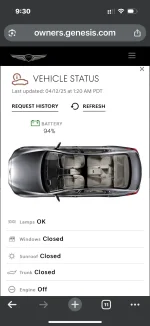
5. Observe the battery icon in the upper right. This indication is NOT the DC traction battery SOC!
See screen grab:

Instructions:
1. Login to the Genesis Owners Homepage | MyGenesis webpage (I'm in the USA)
2. Go to the upper right and select the triple dash "-" menu pulldown
3. Select Connected Services
4. Select the Vehicle Status tab on the far right
5. Observe the battery icon in the upper right. This indication is NOT the DC traction battery SOC!
See screen grab: