• Car enthusiast? Join us on Cars Connected! iOS | Android | Desktop
  • Hint: Use a descriptive title for your new message
    If you're looking for help and want to draw people in who can assist you, use a descriptive subject title when posting your message. In other words, "I need help with my car" could be about anything and can easily be overlooked by people who can help. However, "I need help with my transmission" will draw interest from people who can help with a transmission specific issue. Be as descriptive as you can. Please also post in the appropriate forum. The "Lounge" is for introducing yourself. If you need help with your G70, please post in the G70 section - and so on... This message can be closed by clicking the X in the top right corner.

How Do I Change the Default Audio From "Audio Off" to Bluetooth

SahilG

Registered Member
Joined
Apr 11, 2021
Messages
66
Reaction score
2
Points
8
Genesis Model Year
2019
Genesis Model Type
Genesis G70
How do I make bluetooth the default audio so that when I get in my car I don't have to change it every time from off to bluetooth?

Also how do I change it from "Audio Off" to any other audio option upon startup?
 
All I had to do was pair my phone with the car, and if I was listening to spotify before I shut off the car, it defaults to bluetooth audio when I start up and all I have to do is open spotify on my phone and hit play.

In my experience, the radio remembers the last setting I used before turning the car off, so if I was listening to spotify, it will start up in bluetooth audio mode; if I was listening to sirius, it will start there, and if I turn the radio off, it will start with the radio turned off.

Hope this helps.
 
All I had to do was pair my phone with the car, and if I was listening to spotify before I shut off the car, it defaults to bluetooth audio when I start up and all I have to do is open spotify on my phone and hit play.

In my experience, the radio remembers the last setting I used before turning the car off, so if I was listening to spotify, it will start up in bluetooth audio mode; if I was listening to sirius, it will start there, and if I turn the radio off, it will start with the radio turned off.

Hope this helps.
Mine doesn't do that. Maybe there's a setting i accidentally turned on. As soon as the car turns back on, it says "audio off".
 
Last edited:
Looking to update and upgrade your Genesis luxury sport automobile? Look no further than right here in our own forum store - where orders are shipped immediately!
Mine doesn't do that. Maybe there's a setting i accidentally turned on. As soon as the car turns back on, it says "audio off".
That's odd - I can't seem to find any setting that would cause this behavior - have you tried resetting it?

reset.webp
 
Mine doesn't do that. Maybe there's a setting i accidentally turned on. As soon as the car turns back on, it says "audio off".
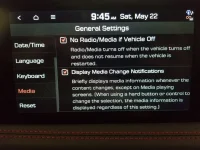
Go to your general settings under media, there is an option there.
 

Attachments

  • 20210522_094516.webp
    20210522_094516.webp
    197.2 KB · Views: 28
Ive got mine unchecked, and since the update it always defaults to off when I turn the car back on. Tried checking and unchecking, no changes. Not the biggest deal, but a minor annoyance
 
Ive got mine unchecked, and since the update it always defaults to off when I turn the car back on. Tried checking and unchecking, no changes. Not the biggest deal, but a minor annoyance
Did you do the 2nd update? I think the initial update had some issues. I just tested mine checked and unchecked and it works as it's supposed to.
 
Did you do the 2nd update? I think the initial update had some issues. I just tested mine checked and unchecked and it works as it's supposed to.
I ordered the SD card, not sure which one that is.
Tested more. It works fine if I have the radio playing when I turn the car off. But when using CarPlay I unplug my phone and now it doesn’t turn back on to the last used input (fm radio) it just goes to media off
______________________________

Help support this site so it can continue supporting you!
 
Back
Top