• Car enthusiast? Join us on Cars Connected! iOS | Android | Desktop
  • Hint: Use a descriptive title for your new message
    If you're looking for help and want to draw people in who can assist you, use a descriptive subject title when posting your message. In other words, "I need help with my car" could be about anything and can easily be overlooked by people who can help. However, "I need help with my transmission" will draw interest from people who can help with a transmission specific issue. Be as descriptive as you can. Please also post in the appropriate forum. The "Lounge" is for introducing yourself. If you need help with your G70, please post in the G70 section - and so on... This message can be closed by clicking the X in the top right corner.

how to open the SD card slot

lentiformnucleus

Registered Member
Joined
Nov 11, 2019
Messages
17
Reaction score
6
Points
3
Genesis Model Type
Genesis G70
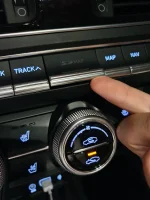
so i just got the navigation SD card for my g70, but i couldnt figure out how to open the slot to put it in, it is very difficult, especially that i dont want to break anything lol, does anyone know how to do it ? would be better with a video
 
so i just got the navigation SD card for my g70, but i couldnt figure out how to open the slot to put it in, it is very difficult, especially that i dont want to break anything lol, does anyone know how to do it ? would be better with a video
Take a look at this thread.

 
Still havent gotten it open , dont know which way it should open, i pulled it someway but i think i got the whole button structure out lol , so i just pushed it back
 
Mine pulls out from the bottom and has tiny tabs at the top corners that act somewhat like a hinge. I also have two rubbery small strap-like things on each side that prevent the cover from falling loose. I pulled from the bottom and wiggled the top so the corner tabs came free (All this is from memory). From there it is normal card removal practice.
 
Still havent gotten it open , dont know which way it should open, i pulled it someway but i think i got the whole button structure out lol , so i just pushed it back
You did it right. Pull out the sh***t and the whole button structure will go out, don't worry it will remain attached.
 
Still havent gotten it open , dont know which way it should open, i pulled it someway but i think i got the whole button structure out lol , so i just pushed it back
Just pry it and pull it out. You won't break it.
 
Looking to update and upgrade your Genesis luxury sport automobile? Look no further than right here in our own forum store - where orders are shipped immediately!
Hi Guys, i opened it up, but now i cant re attach it, i'm pushing it in the top first but as i push it down there's no click, it just doesn't sit flush anymore, beware!
 
Hi Guys, i opened it up, but now i cant re attach it, i'm pushing it in the top first but as i push it down there's no click, it just doesn't sit flush anymore, beware!
beware what? no one here has ever broken the SD card slot and no one has ever said they couldnt get it back in after opening it. sounds like youre doing it wrong
 
So when the SD card is pushed in place it locks in correct? I pulled the cover off mine, pressed the SD card to eject just to check it out, re-installed the card until it seated in place and pushed the cover plate on. It really should be that simple.
 
So when the SD card is pushed in place it locks in correct? I pulled the cover off mine, pressed the SD card to eject just to check it out, re-installed the card until it seated in place and pushed the cover plate on. It really should be that simple.
Yes...and it is.
 
Hi Guys, i opened it up, but now i cant re attach it, i'm pushing it in the top first but as i push it down there's no click, it just doesn't sit flush anymore, beware!
Beware of what? This is the first time somebody in this forum reports this issue. I've opened and closed the SD card cover in my car no less than 10 times without any problems.
 
Last edited:
Back
Top