Canon Shooter
Registered Member
- Joined
- Nov 10, 2023
- Messages
- 63
- Reaction score
- 31
- Points
- 18
- Location
- Virginia
- Genesis Model Year
- 2022
- Genesis Model Type
- Genesis G70
Is this possible as I have no street address.
The car lovers social network
Automotive components
Create videos that captivate
Automotive Hot or Not
Vehicle hacker protection
Genesis parts & accessories
Advertise with us!
The car lovers social network
Automotive components
Create videos that captivate
Automotive Hot or Not
Vehicle hacker protection
Genesis parts & accessories
Advertise with us!

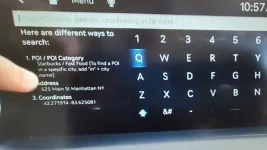
The image here is from a 2025 GV70 video, but I would think it's the same for your G70.Is this possible as I have no street address.
Bummer, not a feature on my car but thanks anyway.The image here is from a 2025 GV70 video, but I would think it's the same for your G70.
Press the NAV button, and then selecting SEARCH gets you to this page. Coordinates is the 3rd option on the left. Like other destinations, you should be able to do that with Voice commands as well.

Google maps can.maybe there's an app for your phone that can convert coordinates to an address?
Select Genesis where? As one of your contacts? LolGoogle maps can.
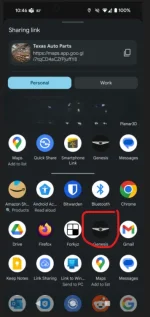
On Android, what I do is go to The Fountain of Knowledge (Google Maps) find whatever I need. Select it on the screen. Then, click Share (little genomic looking icon). In the share screen select Genesis...boom, sent to the car.
No. Scroll down...see the millions of apps that can accept that type of share...?Select Genesis where? As one of your contacts? Lol
Never thought to try that. ThanksNo. Scroll down...see the millions of apps that can accept that type of share...?
View attachment 59920
I tried and it doesn't even show my Genesis app in apps to share to... So it doesn't work. Maybe US vs Canada thing? I'm in CanadaNever thought to try that. Thanks
Hmmmm...weird. Android version also matters, I am running Android 14.I tried and it doesn't even show my Genesis app in apps to share to... So it doesn't work. Maybe US vs Canada thing? I'm in Canada
Great tip, thanks.Google maps can.
On Android, what I do is go to The Fountain of Knowledge (Google Maps) find whatever I need. Select it on the screen. Then, click Share (little genomic looking icon). In the share screen select Genesis...boom, sent to the car.
 | ||||
 |  |  |  |  |
 |  | |||






 . You can also get coordinates for your current location, and I've seen them, but don't remember where.