• Car enthusiast? Join us on Cars Connected! iOS | Android | Desktop
  • Hint: Use a descriptive title for your new message
    If you're looking for help and want to draw people in who can assist you, use a descriptive subject title when posting your message. In other words, "I need help with my car" could be about anything and can easily be overlooked by people who can help. However, "I need help with my transmission" will draw interest from people who can help with a transmission specific issue. Be as descriptive as you can. Please also post in the appropriate forum. The "Lounge" is for introducing yourself. If you need help with your G70, please post in the G70 section - and so on... This message can be closed by clicking the X in the top right corner.

Messages on Dash

Norton

New member
Joined
May 4, 2023
Messages
4
Reaction score
1
Points
3
Genesis Model Year
2021
Genesis Model Type
Genesis G70
I was recently on a road trip and the following messages started coming up on my dash "Uneven road ahead. Drive Carefully" and "Slippery Road Ahead Drive Carefully"

I have been advised to update the software which I will but in the meantime is there a way to reset/reboot the system in an attempt to stop these messages?

My car is a 2022 G70.

Thanks in advance
 
  • Like
Reactions: Arc
I was recently on a road trip and the following messages started coming up on my dash "Uneven road ahead. Drive Carefully" and "Slippery Road Ahead Drive Carefully"

I have been advised to update the software which I will but in the meantime is there a way to reset/reboot the system in an attempt to stop these messages?

My car is a 2022 G70.

Thanks in advance
Same exact issue with my car (2022 G70) as of 3 days ago.
 
My dealer told me that the only fix was to wait for the new software version. Do you have any workaround while we wait ?
 
I am having the same issue. Anyone got it fixed yet?
 
This started about 5 days ago for me as well. It is incredibly annoying.
 
I got a message like that only 1 time about a couple of months ago on a ramp to the highway I get often, and the car braked on me all of a sudden. I was not going that fast, it was a little disconcerting.
 
Last edited:
This seems to be a real problem. I see it on FB forums as well. Did a new update rollout?
 
Last edited:
I updated the software last night, and so far, that seems to have fixed it.
**EDIT** Here's the website and instructions for updating your software. It took me a total of about an hour.
Navigation Updater | Official Genesis Navigation Update Website
I used a 64GB USB stick. Followed the directions and had no issues.
I'll try to post in a week or so to confirm the software update fixes the issue.
 
Last edited:
The new software came out May 5 for Hyundais, so I figured it'd be out for the G70 (same system) as welll, and that seems to be the case. As far as that super annoying issue, it must be a 'BlueLink' issue, no? Because the previous software update dates back to August of last year, if memory serves me right. Makes no sense to go haywire now, and in a lot of cars. Seems like a BlueLink glitch to me, but glad the new software version seems to take care of that. I haven't used the car, so it might be affected as well, since I have to use the '22 software version (no '23 as of last time).
 
I just checked the website here in Canada and it says the software will not be available until the end of the month?? Then installer.exe was available but not the actual software. My car is a 2022 Genesis G70 3.3 AWD
 
Message about uneven road ahead started today. @Genesis , not cool! Please fix this annoying message that constantly beeps.
 
I just did the update on my '22 Santa Fe Calligraphy, but read on a forum that Hyundai reportedly pulled the freaking update YET AGAIN. I had the USB ready since Monday. Wish I had seen that before, to not do it. It's the 3rd freaking time they do this, supposedly due to bugs. Can't those incompetent people learn to test their crap before releasing it? Geez. Guess will have to redo the freaking update for the 3rd time. And yes, just tried downloading the update for my '23 G70, and it said not available at this time. Probably for the same reason, since it's the same 5W infotainment as the SF. Hopefully nothing nefarious, since I have a long trip in a few weeks. Oh, and the darn thing took well over 1.5 hours to update this time; that's ridiculous.
 
I just did the update on my '22 Santa Fe Calligraphy, but read on a forum that Hyundai reportedly pulled the freaking update YET AGAIN. I had the USB ready since Monday. Wish I had seen that before, to not do it. It's the 3rd freaking time they do this, supposedly due to bugs. Can't those incompetent people learn to test their crap before releasing it? Geez. Guess will have to redo the freaking update for the 3rd time. And yes, just tried downloading the update for my '23 G70, and it said not available at this time. Probably for the same reason, since it's the same 5W infotainment as the SF. Hopefully nothing nefarious, since I have a long trip in a few weeks. Oh, and the darn thing took well over 1.5 hours to update this time; that's ridiculous.
Thanks for the update. Can you do the update with the car on "accessory" or does the engine need to be started ?
 
Looking to update and upgrade your Genesis luxury sport automobile? Look no further than right here in our own forum store - where orders are shipped immediately!
I was doing it with ACCESSORY mode only, but turns out you can turn off the ignition, and it will continue doing it. You could actually choose the option to do it when off since the beginning, but I don't know if it'd start immediately or not. So rather start it manually, then turn off ignition. I turned acc back on a couple of times, and it was advancing. Still left my 5A smart charger (Optimate6) connected though. Will do the same with the G70 when available. I saw the end of it, and assumed several times that was it, but it wasn't finished, so DO NOT REMOVE the USB until your normal screen is there for a few seconds, or you'd risk messing the update up, and possibly needing a dealer to fix it. I'd turn accessory on at the 1:20 hr mark, to see it finish yourself. Hope this helps.
 
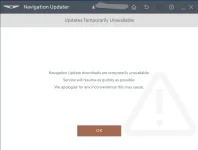
I got this same annoying issue on May 8, 2023. I called Genesis and they said they're getting a lot of calls about this and they're all starting to happen on our about May 8. They said they do not know what the issue is yet. I tried to download the update for software and it says that software updates are temporarily unavailable. I have an appointment at the dealership next Friday. I hope that I'm not going to have to deal with this issue for the next week and a half.
 

Attachments

  • Screenshot 2023-05-10 181426.webp
    Screenshot 2023-05-10 181426.webp
    15.2 KB · Views: 17
G70 2023
Issue started 2 days ago after a pop informed me that the software for maps hasn't been updated and needs to update.

Apparently this was a software update that happened in May 1. The general update seems to have cause anyone who has never updated their software to glitch out. I got the same response to go and download the software and manually update the vehicle but the services for update are unavailable. If you are driving and using the GPS be careful, it seems to the mapping isn't exactly "accurate" or for that matter it's been glitching out. If anyone has found a solution to this issue please let me know.

Thanks
 
I started getting this issue on my 2022. Beeps every 10 seconds about slippery or uneven roads, even when it's in park. Super frustrated with the electronics on this car. The gauge cluster randomly is in Korean too.
 
Back
Top