


Bill Hall
Registered Member
- Joined
- Nov 10, 2021
- Messages
- 202
- Reaction score
- 79
- Points
- 28
- Location
- Dallas
- Genesis Model Year
- 2022
- Genesis Model Type
- Genesis G80
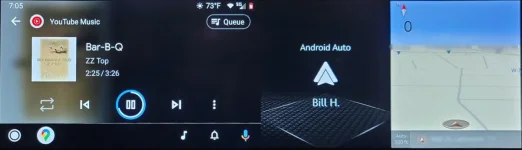
I have a '22 G80 Prestige, and I'm using the Motorola MA1 to use Android Auto from my Samsung Note 20 Ultra. This appears not to be the wide screen mode that Android Auto supports. However, I do have that nice map on the right that is one of the options that I can scroll through. It looks like it comes from the car's navigation. That zero in the upper left below the compass is the speed. Nice little screen. Except - if I set a route in Google maps, that sub-screen disappears, and is replaced by the weather. At that point, I can scroll through several options, like a compass and the weather, but I can't get that option. Once I again have no route set, I can again scroll to that option.
Is anyone else having this problem? And have you found a way around it? Or, even better, have you found a way to display the wide screen mode? I've seen pictures with a map on the left and the music being played in the center. Be sure to mention which model car you have. This seems to be different for different models.
Is anyone else having this problem? And have you found a way around it? Or, even better, have you found a way to display the wide screen mode? I've seen pictures with a map on the left and the music being played in the center. Be sure to mention which model car you have. This seems to be different for different models.












