

-

-
Hint: Use a descriptive title for your new message
If you're looking for help and want to draw people in who can assist you, use a descriptive subject title when posting your message. In other words, "I need help with my car" could be about anything and can easily be overlooked by people who can help. However, "I need help with my transmission" will draw interest from people who can help with a transmission specific issue. Be as descriptive as you can. Please also post in the appropriate forum. The "Lounge" is for introducing yourself. If you need help with your G70, please post in the G70 section - and so on... This message can be closed by clicking the X in the top right corner.
- Genesis Forums
- Hyundai Genesis Sedan Forums - 3.8 V6, 4.6 V8, 5.0
- General 2015-2016 Hyundai Genesis Sedan Discussion
You are using an out of date browser. It may not display this or other websites correctly.
You should upgrade or use an alternative browser.
You should upgrade or use an alternative browser.
New map 15.5 update released on Nov 8th.
- Thread author tomek75
- Start date


surprisinguy
Registered Member
- Joined
- Jul 24, 2018
- Messages
- 1,131
- Reaction score
- 338
- Points
- 83
- Location
- NC
- Genesis Model Type
- 2G Genesis Sedan (2015-2016)
As far as I know (been discussed several times here) hooking up to a wifi source is pointless. It was supposed to be used to update "apps" for the head unit but there's no appsWhy I do that I have no idea.
kingofeastnc
New member
- Joined
- Apr 21, 2020
- Messages
- 2
- Reaction score
- 1
- Points
- 1
- Genesis Model Type
- 2G Genesis Sedan (2015-2016)
I am having a peculiar issue with my attempt to update my 2015 3.8 Ultimate: the navigation updated to the latest version, but the audio system [software] has not.
I believe I explicitly followed the instructions from the Hyundai Navigation Update website in preparation for installing the updates on my car.
The software had never been updated previously. I removed the OEM SD Card. Upon inserting the new SD card with the update, a message popped up acknowledging an SD card has been inserted and the system will restart within 5 seconds. And that's what it did.
From there, when I go to Setup my menu does not look exactly like the one pictured on the Hyundai website. Nonetheless, when I access the software update screen it says insert SD card or USB and press the "Update" button, but despite the SD card being inserted the update button is grayed out [not selectable].
Removing the card and reinserting it initiates the system restarting as already mentioned.
When I selected Navigation it was immediately apparent that the maps and user interface had been updated. I guess, the navigation update was basically instant, although there was nothing that alerted me the update was successful.
Again, looking at the system info page I confirmed the map updated but the software had not.
Afterwards, I copied to contents of the SD card to a 64 GB USB drive and inserted it while attempting the same process I explained herein, but I still was unable to get the audio software to update. The only thing that happened when inserting the USB is the media cycling through 10 short audio files (various chimes and dings) that must be system sounds included in the update.
This evening I had the map up on my commute—enjoying the new to me 3D view and the scale automatically adjusting based on my speed— and noticed that turning the volume controls would only adjust the navigation volume instead of the audio volume (FM radio and Bluetooth media) despite me not actively having a route/destination programmed.
I've searched all over and I'm at the end of my wits. Does anyone have an idea as to how to get the audio software to update?
Thanks.
I believe I explicitly followed the instructions from the Hyundai Navigation Update website in preparation for installing the updates on my car.
The software had never been updated previously. I removed the OEM SD Card. Upon inserting the new SD card with the update, a message popped up acknowledging an SD card has been inserted and the system will restart within 5 seconds. And that's what it did.
From there, when I go to Setup my menu does not look exactly like the one pictured on the Hyundai website. Nonetheless, when I access the software update screen it says insert SD card or USB and press the "Update" button, but despite the SD card being inserted the update button is grayed out [not selectable].
Removing the card and reinserting it initiates the system restarting as already mentioned.
When I selected Navigation it was immediately apparent that the maps and user interface had been updated. I guess, the navigation update was basically instant, although there was nothing that alerted me the update was successful.
Again, looking at the system info page I confirmed the map updated but the software had not.
Afterwards, I copied to contents of the SD card to a 64 GB USB drive and inserted it while attempting the same process I explained herein, but I still was unable to get the audio software to update. The only thing that happened when inserting the USB is the media cycling through 10 short audio files (various chimes and dings) that must be system sounds included in the update.
This evening I had the map up on my commute—enjoying the new to me 3D view and the scale automatically adjusting based on my speed— and noticed that turning the volume controls would only adjust the navigation volume instead of the audio volume (FM radio and Bluetooth media) despite me not actively having a route/destination programmed.
I've searched all over and I'm at the end of my wits. Does anyone have an idea as to how to get the audio software to update?
Thanks.
Andyj
Registered Member
- Joined
- Dec 26, 2018
- Messages
- 948
- Reaction score
- 436
- Points
- 63
- Genesis Model Type
- 2G Genesis Sedan (2015-2016)
The first time updating a 2015 ultimate you must use the USB stick to enable the Update button and perform the software update. Subsequent updates no longer require the USB stick, just the SD card. I'm not sure if the USB stick content is to be exactly the same as the sim card content.

TinsleyC
SUSTAINING MEMBER
- Joined
- Nov 12, 2019
- Messages
- 2,987
- Reaction score
- 1,242
- Points
- 113
- Location
- Dallas, TX
- Genesis Model Type
- Genesis G80
On the latest radio update, anyone notice the number of preset locations reduced from 6 to 5? There's Home, Work and three other spots. I could swear there were four other, before.

surprisinguy
Registered Member
- Joined
- Jul 24, 2018
- Messages
- 1,131
- Reaction score
- 338
- Points
- 83
- Location
- NC
- Genesis Model Type
- 2G Genesis Sedan (2015-2016)
I honestly wish this was an option - be glad the audio update didnt apply
2015g5.0
Registered Member
I had this problem too. I called mapnsoft they walked me through a lengthy fix. I don’t recall the procedure but seem to remember a setting change somewhere.I am having a peculiar issue with my attempt to update my 2015 3.8 Ultimate: the navigation updated to the latest version, but the audio system [software] has not.
I believe I explicitly followed the instructions from the Hyundai Navigation Update website in preparation for installing the updates on my car.
The software had never been updated previously. I removed the OEM SD Card. Upon inserting the new SD card with the update, a message popped up acknowledging an SD card has been inserted and the system will restart within 5 seconds. And that's what it did.
From there, when I go to Setup my menu does not look exactly like the one pictured on the Hyundai website. Nonetheless, when I access the software update screen it says insert SD card or USB and press the "Update" button, but despite the SD card being inserted the update button is grayed out [not selectable].
Removing the card and reinserting it initiates the system restarting as already mentioned.
When I selected Navigation it was immediately apparent that the maps and user interface had been updated. I guess, the navigation update was basically instant, although there was nothing that alerted me the update was successful.
Again, looking at the system info page I confirmed the map updated but the software had not.
Afterwards, I copied to contents of the SD card to a 64 GB USB drive and inserted it while attempting the same process I explained herein, but I still was unable to get the audio software to update. The only thing that happened when inserting the USB is the media cycling through 10 short audio files (various chimes and dings) that must be system sounds included in the update.
This evening I had the map up on my commute—enjoying the new to me 3D view and the scale automatically adjusting based on my speed— and noticed that turning the volume controls would only adjust the navigation volume instead of the audio volume (FM radio and Bluetooth media) despite me not actively having a route/destination programmed.
I've searched all over and I'm at the end of my wits. Does anyone have an idea as to how to get the audio software to update?
Thanks.

technocrat
Registered Member
- Joined
- Oct 25, 2021
- Messages
- 111
- Reaction score
- 32
- Points
- 28
- Genesis Model Year
- 2016
- Genesis Model Type
- Genesis G80 Ultimate
Just bought a 2016 Ultimate 5.0. The SW version I see is DH16MY.CAN.SOP.11.008 and Map Ver is NAM.08.41.52.591.001
How to check if this is old version or new? Also when you guys 15.5 is the system version or Map version. Sorry for dumb questions but just trying to understand
I have downloaded the installer and also downloading the latest version but wanted to check how old is mine LoL
How to check if this is old version or new? Also when you guys 15.5 is the system version or Map version. Sorry for dumb questions but just trying to understand
I have downloaded the installer and also downloading the latest version but wanted to check how old is mine LoL
Last edited:
TinsleyC
SUSTAINING MEMBER
- Joined
- Nov 12, 2019
- Messages
- 2,987
- Reaction score
- 1,242
- Points
- 113
- Location
- Dallas, TX
- Genesis Model Type
- Genesis G80
It's certainly an older version.Just bought a 2016 Ultimate 5.0. The SW version I see is DH16MY.CAN.SOP.11.008 and Map Ver is NAM.08.41.52.591.001
How to check if this is old version or new? Also when you guys 15.5 is the system version or Map version. Sorry for dumb questions but just trying to understand
I have downloaded the installer and also downloading the latest version but wanted to check how old is mine LoL
Looks like this table goes up to v13 or so, and yours is down the list.
Looks like you have v9.
Hyundai Mapcare | SD Matrix
Last edited:
TinsleyC
SUSTAINING MEMBER
- Joined
- Nov 12, 2019
- Messages
- 2,987
- Reaction score
- 1,242
- Points
- 113
- Location
- Dallas, TX
- Genesis Model Type
- Genesis G80
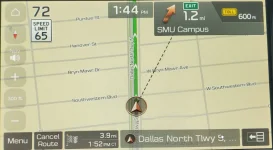
This is a new feature on my 15.5 update - now, it draws a dotted bee-line to the destination - at least that way, you know if you're headed in the right direction - or at least how off-track you are.
arcman
Registered Member
- Joined
- Nov 24, 2018
- Messages
- 379
- Reaction score
- 225
- Points
- 43
- Genesis Model Type
- 2G Genesis Sedan (2015-2016)
So I updated the card a while back and lately, usually after parking the car for the night, the display will start up in the map mode, after it was shut off in the audio mode. Anyone else notice this? Never did it until the newest update.
One other thing I noticed is a couple days ago when it was in the single digits cold (rare), after parking the car outside for a few hours, I started the car, set the heat to floor and it would only stay at that setting for a few seconds and then flash 'Auto". It kept blowing heat on the windshield. I'm wondering if this is some safety reason to make sure the window doesn't fog up?.
One other thing I noticed is a couple days ago when it was in the single digits cold (rare), after parking the car outside for a few hours, I started the car, set the heat to floor and it would only stay at that setting for a few seconds and then flash 'Auto". It kept blowing heat on the windshield. I'm wondering if this is some safety reason to make sure the window doesn't fog up?.
surprisinguy
Registered Member
- Joined
- Jul 24, 2018
- Messages
- 1,131
- Reaction score
- 338
- Points
- 83
- Location
- NC
- Genesis Model Type
- 2G Genesis Sedan (2015-2016)
You can disable that function but it is supposed to keep your windshield clear - usually works pretty well

- Joined
- Jul 7, 2017
- Messages
- 15,608
- Reaction score
- 9,720
- Points
- 113
- Location
- Parrish, FL
- Genesis Model Year
- 2018
- Genesis Model Type
- Genesis G80
There is an auto defrost function that is selectable. In my last two cars, I never had to manually select the defroster as it works well. It is still blowing warmed air into the cabin.So I updated the card a while back and lately, usually after parking the car for the night, the display will start up in the map mode, after it was shut off in the audio mode. Anyone else notice this? Never did it until the newest update.
One other thing I noticed is a couple days ago when it was in the single digits cold (rare), after parking the car outside for a few hours, I started the car, set the heat to floor and it would only stay at that setting for a few seconds and then flash 'Auto". It kept blowing heat on the windshield. I'm wondering if this is some safety reason to make sure the window doesn't fog up?.

joegr
SUSTAINING MEMBER
- Joined
- Feb 28, 2019
- Messages
- 4,644
- Reaction score
- 2,149
- Points
- 113
- Genesis Model Year
- 2018
- Genesis Model Type
- Genesis G80 Ultimate
Sometimes, and not related to the updates. For me it depends on the audio source. It never does it if set to FM radio. I don't think it ever does it for the jukebox either. However, it frequently does for USB. I think that the issue is that it does not get the USB drive going soon enough on startup sometimes, so it switches to the map screen. Once the USB does startup, it does start playing it, but it says on the map screen.So I updated the card a while back and lately, usually after parking the car for the night, the display will start up in the map mode, after it was shut off in the audio mode. Anyone else notice this? Never did it until the newest update.
...
Looking to update and upgrade your Genesis luxury sport automobile? Look no further than right here in our own forum store - where orders are shipped immediately!
arcman
Registered Member
- Joined
- Nov 24, 2018
- Messages
- 379
- Reaction score
- 225
- Points
- 43
- Genesis Model Type
- 2G Genesis Sedan (2015-2016)
That's all I listen to is the USB. But... it's not switched to Nav from USB until that update.Sometimes, and not related to the updates. For me it depends on the audio source. It never does it if set to FM radio. I don't think it ever does it for the jukebox either. However, it frequently does for USB. I think that the issue is that it does not get the USB drive going soon enough on startup sometimes, so it switches to the map screen. Once the USB does startup, it does start playing it, but it says on the map screen.
arcman
Registered Member
- Joined
- Nov 24, 2018
- Messages
- 379
- Reaction score
- 225
- Points
- 43
- Genesis Model Type
- 2G Genesis Sedan (2015-2016)
Another one of those functions I've never noticed.There is an auto defrost function that is selectable. In my last two cars, I never had to manually select the defroster as it works well. It is still blowing warmed air into the cabin.
technocrat
Registered Member
- Joined
- Oct 25, 2021
- Messages
- 111
- Reaction score
- 32
- Points
- 28
- Genesis Model Year
- 2016
- Genesis Model Type
- Genesis G80 Ultimate
Thanks, I was able to upgrade to Map Version NAM.14.47.47.451.101.3It's certainly an older version.
Looks like this table goes up to v13 or so, and yours is down the list.
Looks like you have v9.
Hyundai Mapcare | SD Matrix
www.mapnsoft.com
Its amazing to see(coming from 2 Acuras) that they not only update the map data but also change UI(Map UI looks different) and add features to the system(Sounds of Nature LOL)
With Acura you will be hard pressed to notice what changed LoL

Schindawg
Getting familiar with the group...
- Joined
- Nov 13, 2014
- Messages
- 58
- Reaction score
- 3
- Points
- 8
- Genesis Model Type
- 2G Genesis Sedan (2015-2016)
KingOfEastNCI am having a peculiar issue with my attempt to update my 2015 3.8 Ultimate: the navigation updated to the latest version, but the audio system [software] has not.
I believe I explicitly followed the instructions from the Hyundai Navigation Update website in preparation for installing the updates on my car.
The software had never been updated previously. I removed the OEM SD Card. Upon inserting the new SD card with the update, a message popped up acknowledging an SD card has been inserted and the system will restart within 5 seconds. And that's what it did.
From there, when I go to Setup my menu does not look exactly like the one pictured on the Hyundai website. Nonetheless, when I access the software update screen it says insert SD card or USB and press the "Update" button, but despite the SD card being inserted the update button is grayed out [not selectable].
Removing the card and reinserting it initiates the system restarting as already mentioned.
When I selected Navigation it was immediately apparent that the maps and user interface had been updated. I guess, the navigation update was basically instant, although there was nothing that alerted me the update was successful.
Again, looking at the system info page I confirmed the map updated but the software had not.
Afterwards, I copied to contents of the SD card to a 64 GB USB drive and inserted it while attempting the same process I explained herein, but I still was unable to get the audio software to update. The only thing that happened when inserting the USB is the media cycling through 10 short audio files (various chimes and dings) that must be system sounds included in the update.
This evening I had the map up on my commute—enjoying the new to me 3D view and the scale automatically adjusting based on my speed— and noticed that turning the volume controls would only adjust the navigation volume instead of the audio volume (FM radio and Bluetooth media) despite me not actively having a route/destination programmed.
I've searched all over and I'm at the end of my wits. Does anyone have an idea as to how to get the audio software to update?
Thanks.
I have the same car as you; 2015 3.8 Ultimate and had the same initial issue. I was still on the stock software and maps. Here's how I did it:
1.) Downloaded and installed the Navigation Updater software from Hyundai
2.) Launched the Navigation Updater and downloaded the updates to my PC
3.) Inserted a 32GB SD card into a card reader like this: https://www.amazon.com/Sabrent-Micro-Card-Reader-CR-T2MS/dp/B07GZYGVT8 (in my case I used a micro-SD card that came with a regular-sized SD adapter, like this: https://www.amazon.com/PNY-Elite-microSDHC-Memory-P-SDU32GU185GW-GE/dp/B07R8GVGN9/
4.) Transferred the updates to the SD card using Navigation Updater
5.) With the SD card still plugged in to the USB reader, plug it into the USB port of the Genesis located at the bottom of the console (NOT the SD reader slot)
6.) With the car started, go into your settings, and you should now be able to select "update". Note: This process is very slow took about 40-45 minutes to complete. It even took a few minutes to register 1% progress, so be patient. The car needs to be running the entire time, and I can verify that you can drive while the update is in progress. That said, you cannot turn the car off until it is complete.
7.) After the software update completes, take your SD card out of the reader, and put it into the Genesis SD card slot.
8.) Go into the menu system again, settings, and NOW you should be able to complete the balance of the updates as the update button will no longer be grayed out. Mine quickly progressed to 80%, being that the system update was already complete, then took another 5 minutes or so to update whatever else is needed.
This process should work for any 2015 Ultimate with the 9.2-inch screen which is still running on stock software. Hope that helps!

20GV7022
2022 GV70 2.5T Prestige
- Joined
- Dec 2, 2016
- Messages
- 103
- Reaction score
- 38
- Points
- 28
- Genesis Model Type
- 2G Genesis Sedan (2015-2016)
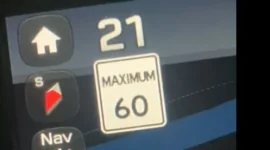
This popped up on my maps suddenly. I did nothing - just appeared months after the update. Top left corner has speed, speed limits and compass. Still don't have any buildings let alone 3D buildings. Maybe in a few months time they will magically appear. 2015 3.8 Tech I see that others have it.
Attachments
TinsleyC
SUSTAINING MEMBER
- Joined
- Nov 12, 2019
- Messages
- 2,987
- Reaction score
- 1,242
- Points
- 113
- Location
- Dallas, TX
- Genesis Model Type
- Genesis G80
On my base G80 with 8" screen, there's a setting to turn on vehicle speed and I think to show speed limits.
That really is odd that it would pop up months after the update. Were you in there making other changes? If so, maybe saving one setting toggled the other setting on.
That really is odd that it would pop up months after the update. Were you in there making other changes? If so, maybe saving one setting toggled the other setting on.
Great products:
- VIN Check
- Add more horsepower!
- Clean your leather!
- Safe Emergency Charging
- Windshield Repair Kit
- Chemical Guys HydroSpeed Ceramic Quick Detailer
- Chemical Guys HydroCharge High-Gloss Hydrophobic SI02 Ceramic Spray Coating
- Get a dash cam!
- Auto Buyers Market
- Foreign invaders vs USA gangs
- VIN Check
- Add more horsepower!
- Clean your leather!
- Safe Emergency Charging
- Windshield Repair Kit
- Chemical Guys HydroSpeed Ceramic Quick Detailer
- Chemical Guys HydroCharge High-Gloss Hydrophobic SI02 Ceramic Spray Coating
- Get a dash cam!
- Auto Buyers Market
- Foreign invaders vs USA gangs
 | ||||
 |  |  |  |  |
 |  | |||





Featured content
-

-
Thread 'Help us to keep helping you. Your support is essential to our survival.'
- Sal Collaziano
Replies: 32