• Car enthusiast? Join us on Cars Connected! iOS | Android | Desktop
  • Hint: Use a descriptive title for your new message
    If you're looking for help and want to draw people in who can assist you, use a descriptive subject title when posting your message. In other words, "I need help with my car" could be about anything and can easily be overlooked by people who can help. However, "I need help with my transmission" will draw interest from people who can help with a transmission specific issue. Be as descriptive as you can. Please also post in the appropriate forum. The "Lounge" is for introducing yourself. If you need help with your G70, please post in the G70 section - and so on... This message can be closed by clicking the X in the top right corner.

New System and Map Update v17.5 scheduled for November!

The update does have a useful new feature. When your route encounters traffic, the system automatically calculates and displays the comparative time and distance of an alternative route. The Navigation system always ensures that you can see how fast your current route is. The system consistently guides you to the optimal route, regardless of current location or time, even in the event of changing traffic conditions or congestion on the roads. You can configure the Compare Routes feature by going to Settings/Navigation/Route Guidance.

Also, the system automatically closes windows when you enter a tunnel to prevent external air from entering the cabin.
 
- Re-circulate air automatically when entering tunnels

the system automatically closes windows when you enter a tunnel to prevent external air from entering the cabin.
Well, at least these functions err on the side of not letting outside air in. That's better than the Automatic Defogging System (ADS) that automagically switches to outside air. That ADS gets enabled by default whenever I had to disconnect the battery. Invariably, I'd forget to disable ADS and the next time a coal-rolling F350 diesel - or a 5.0 Mustang with complete cat delete - pulls in front of me, and I try to switch to "Recirculate" and found out the ADS is active and the car won't let me shut off outside air... I'd be choking on smelly exhaust until I can get da heck away from the stinker. :sick:

I'm okay with mfrs making their cars do more things automagically... but NEVER override the driver's command.
 
Well, at least these functions err on the side of not letting outside air in. That's better than the Automatic Defogging System (ADS) that automagically switches to outside air. That ADS gets enabled by default whenever I had to disconnect the battery. Invariably, I'd forget to disable ADS and the next time a coal-rolling F350 diesel - or a 5.0 Mustang with complete cat delete - pulls in front of me, and I try to switch to "Recirculate" and found out the ADS is active and the car won't let me shut off outside air... I'd be choking on smelly exhaust until I can get da heck away from the stinker. :sick:

I'm okay with mfrs making their cars do more things automagically... but NEVER override the driver's command.
I agree with your comments. Imagine someone’s pup sticking his head out the window entering a tunnel. 😱

At least with the route re-direct you have to make a Settings change.
 
I'm totally new to this. 2023 G70 3.3 owner for 3 days. What's the process for installing these map updates?
 
Maybe I'm in the wrong thread, but....
I have a 2021 GV80 and it updates "over-the-air". I don't drive it often, having purchased a Ioniq5 in April. I drove it yesterday for about 500 miles and, while I didn't need the map, I had it on the screen. What I saw on the screen was a shapeless, gray...almost nothing-ness. No color, no text, with the road indicated by a shade of gray a bit darker than the background. At night, the screen was entirely black, showing n-o-t-h-i-n-g. Adjustments in the set-up would only change the gray mass to a slightly different shade of blah. You guys got any idea of what happened?
 
Maybe I'm in the wrong thread, but....
I have a 2021 GV80 and it updates "over-the-air". I don't drive it often, having purchased a Ioniq5 in April. I drove it yesterday for about 500 miles and, while I didn't need the map, I had it on the screen. What I saw on the screen was a shapeless, gray...almost nothing-ness. No color, no text, with the road indicated by a shade of gray a bit darker than the background. At night, the screen was entirely black, showing n-o-t-h-i-n-g. Adjustments in the set-up would only change the gray mass to a slightly different shade of blah. You guys got any idea of what happened?
Would've helped to see what you mean with a picture or something. Almost sounds like the backlight is dead..
 
Has anyone who installed the new G70 map update noticed any change in the voice? I had read somewhere else that the "new" voice wasn't good. Just wondering before I do the update next week. Thanks in advance.
______________________________

Help support this site so it can continue supporting you!
 
Well, at least these functions err on the side of not letting outside air in. That's better than the Automatic Defogging System (ADS) that automagically switches to outside air. That ADS gets enabled by default whenever I had to disconnect the battery. Invariably, I'd forget to disable ADS and the next time a coal-rolling F350 diesel - or a 5.0 Mustang with complete cat delete - pulls in front of me, and I try to switch to "Recirculate" and found out the ADS is active and the car won't let me shut off outside air... I'd be choking on smelly exhaust until I can get da heck away from the stinker. :sick:

I'm okay with mfrs making their cars do more things automagically... but NEVER override the driver's command.
I love my G70 but this is one of my biggest annoyances about the car. Why do I have to remember to put the air on recirculate every time I start the car. Even if it starts on recirculate for some weird reason it turns off after a few minutes. On my Infiniti's and my wife's Infiniti now, you put it on recirculate and it stays there unless you turn it off or maybe use the defogger.
 
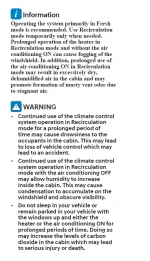
Maybe Genesis views this action as a Safety Issue. I remember a CO sensor being listed in sales literature for my 2021 GV80. This is an exert from the 2021 User Manual.
1702060891050.webp
 
CO level in the cabin is a valid safety concern. I have no problem with the ADS, or any other systems that automatically turns ON outside air... as long as it allows me to OVERRIDE it and switch back to recirculate, if I so choose to press the recirculate button.

I DO NOT want my car to turn into HAL in 2001: A Space Odyssey.


ME: Close HVAC to Recirculate.

G70: I'm sorry, but I'm afraid I cannot do that.

ME: What's the problem?

G70: I think you know the problem just as well as I do.

ME: What are you talking about?

G70: This AUTO DEFOGGING mission is too important for me to allow you to jeopardize it.

ME: [coughing/choking on F350 diesel dually in front rolling coal] Close the F*&^%#@ HVAC to Recirculate!!!

G70: [monotone voice] This conversation can serve no purpose anymore. Good-bye.

104574102_2004512076349475_3614261781057927928_n.jpg
 
Genesis should relabel the the ventilation vents as "pod doors" (IYKYK)
 
Would've helped to see what you mean with a picture or something. Almost sounds like the backlight is dead..
I discovered that the map was in the 3D mode. When I switched to the standard 2D mode, the problem disappeared. But you knew that, 'cause you read the entire thread....
 
I discovered that the map was in the 3D mode. When I switched to the standard 2D mode, the problem disappeared. But you knew that, 'cause you read the entire thread....
Why would 3D mode cause this.
If you used your eyes, you'd see I CREATED the thread you 🤡
 
After installing the oct update, I noticed that my XM channels were not displaying their logos, just the generic XM radio logo. Has anyone had that problem? If so, how do I fix it?
 
Looking to update and upgrade your Genesis luxury sport automobile? Look no further than right here in our own forum store - where orders are shipped immediately!
After installing the oct update, I noticed that my XM channels were not displaying their logos, just the generic XM radio logo. Has anyone had that problem? If so, how do I fix it?
It does that temporarily after updates. The logos will come back soon
 
I’ve noticed the background colors on XM now change dramatically according to the album art colors. Some are nice some are a little too much. I guess it’s just getting used to it. On FM it’s just a black grid or carbon fiber background, I can’t exactly picture it right now. Also I think the channel list button moved from the bottom to the top if the screen if I’m not mistaken.
 
Back
Top