• Car enthusiast? Join us on Cars Connected! iOS | Android | Desktop
  • Hint: Use a descriptive title for your new message
    If you're looking for help and want to draw people in who can assist you, use a descriptive subject title when posting your message. In other words, "I need help with my car" could be about anything and can easily be overlooked by people who can help. However, "I need help with my transmission" will draw interest from people who can help with a transmission specific issue. Be as descriptive as you can. Please also post in the appropriate forum. The "Lounge" is for introducing yourself. If you need help with your G70, please post in the G70 section - and so on... This message can be closed by clicking the X in the top right corner.

New System and Map Update v17.5 scheduled for November!

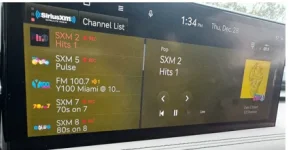
After installing the oct update, I noticed that my XM channels were not displaying their logos, just the generic XM radio logo. Has anyone had that problem? If so, how do I fix it?
Same. Usually takes a few days for the album cover art to fully load on all channels. Annoying but happens every update.
 
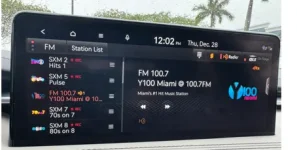
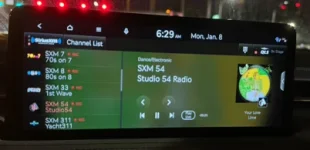
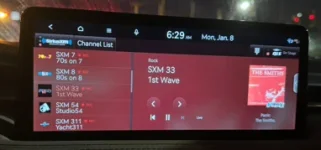
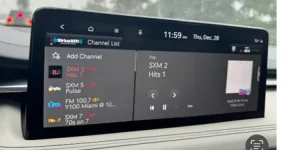
I’ve noticed the background colors on XM now change dramatically according to the album art colors. Some are nice some are a little too much. I guess it’s just getting used to it. On FM it’s just a black grid or carbon fiber background, I can’t exactly picture it right now. Also I think the channel list button moved from the bottom to the top if the screen if I’m not mistaken.
Share pic?
 
Share pic?
I’ve just arrived in Switzerland for a Christmas market river cruise. I’ll share pics when I get back home, if I don’t forget by then LOL.
 
Why do I have to remember to put the air on recirculate every time I start the car.
Did you mess with the climate settings on the infotainment? I could swear my '23 remembers that, but I'm not certain. I have all HVAC options turned off. Give it a try, and report back.

So there's another update? Will do it one of these days. Thanks for the heads up.
 
One of the big things I was wondering with this update is whether or not it will make our drive mode car graphic look generic. I know on one of the updates it supposedly did that so I refused to update it then because I like the current drive mode as it actually looks like a G70. Any thoughts on this?
 

Attachments

  • FM.webp
    FM.webp
    18.5 KB · Views: 17
  • Lime green.webp
    Lime green.webp
    12.3 KB · Views: 17
  • Red.webp
    Red.webp
    10.2 KB · Views: 17
  • white.webp
    white.webp
    13 KB · Views: 16
  • yellow.webp
    yellow.webp
    16.3 KB · Views: 16
Sorry for the delay here are some pics.
I guess thats only for newer models with the new screen. My 2019 doesn't do that :(
 
New 2024 G70 owner. When a new update is available, is there a message that pops up on the infotainment screen?
 
My 2022 G70 2.0T had an update pushed on Jan 10 2024. The startup greeting, which I think says "System check", and the cold weather warning, which I think says, "Careful it's cold outside" ... these messages are in Korean and appear on the speedometer cluster. This is definitely a new problem. Anyone else notice this?

I thought I turned off auto-update but I guess I'm mistaken or they pushed an update anyway. Version IKFL,USA,S5W_M.V010.003.230526. The language is set to English in the General Setting --> Language.
 
My 2022 G70 2.0T had an update pushed on Jan 10 2024. The startup greeting, which I think says "System check", and the cold weather warning, which I think says, "Careful it's cold outside" ... these messages are in Korean and appear on the speedometer cluster. This is definitely a new problem. Anyone else notice this?

I thought I turned off auto-update but I guess I'm mistaken or they pushed an update anyway. Version IKFL,USA,S5W_M.V010.003.230526. The language is set to English in the General Setting --> Language.
How do you turn on auto update? Can’t find it (old age here)!😩
 
Looking to update and upgrade your Genesis luxury sport automobile? Look no further than right here in our own forum store - where orders are shipped immediately!
2019 G70...

Downloaded and updated the system (confirmed I have the latest version of everything through the head unit). I have 0 new features, even though the update site shows them on my car.

Anyone else have this issue? Should I download and re flash the SD card?
 
How do you turn on auto update? Can’t find it (old age here)!😩
I'd look through the menus for you but it's too fricking cold outside at the moment. Also, I might not have turned auto-update off, as I thought, so I might just be confused as to whether or not this is actually possible. When it warms up I will actually look.
 
My 2022 G70 2.0T had an update pushed on Jan 10 2024. The startup greeting, which I think says "System check", and the cold weather warning, which I think says, "Careful it's cold outside" ... these messages are in Korean and appear on the speedometer cluster. This is definitely a new problem. Anyone else notice this?

I thought I turned off auto-update but I guess I'm mistaken or they pushed an update anyway. Version IKFL,USA,S5W_M.V010.003.230526. The language is set to English in the General Setting --> Language.
Replying to myself, I haven't seen this reoccur. But no, this was not a senior-moment, a stroke, or a result of coloring my hair blond. If I had to guess hos this was "fixed", it might be because I checked the setting to confirm the updated software retained the proper language setting. It had. But perhaps backing out of that menu set or reset some part of the software which was using Korean rather than English. Anyway, no harm done.
 
I'd look through the menus for you but it's too fricking cold outside at the moment. Also, I might not have turned auto-update off, as I thought, so I might just be confused as to whether or not this is actually possible. When it warms up I will actually look.
Thank You!
 
I agree i got no complains here. Once they updated to get rid of that annoying Android Auto logo that took 30% of the screen, I've been a happy camper.
This is because you didn't enable split screen in the AA app on your phone, it was one of the best features they added last update. You could have Maps on 70% and Spotify on 30%. If you tap the 30% side it would switch them. If you tapped the 70% side it would full screen that app(and get rid of that logo in your case.) Seems like they just programmed it not to be 70/30 if you didn't have this feature enabled.

I would recommend enabling this it will make you even more happy.
How to Use Split Screen on Android Auto
 
This is because you didn't enable split screen in the AA app on your phone, it was one of the best features they added last update. You could have Maps on 70% and Spotify on 30%. If you tap the 30% side it would switch them. If you tapped the 70% side it would full screen that app(and get rid of that logo in your case.) Seems like they just programmed it not to be 70/30 if you didn't have this feature enabled.

I would recommend enabling this it will make you even more happy.
How to Use Split Screen on Android Auto
I miss not having AA app on my phone. I can only access the app when in my car & via AA on the infotainment system
 
Back
Top