

-

-
Hint: Use a descriptive title for your new message
If you're looking for help and want to draw people in who can assist you, use a descriptive subject title when posting your message. In other words, "I need help with my car" could be about anything and can easily be overlooked by people who can help. However, "I need help with my transmission" will draw interest from people who can help with a transmission specific issue. Be as descriptive as you can. Please also post in the appropriate forum. The "Lounge" is for introducing yourself. If you need help with your G70, please post in the G70 section - and so on... This message can be closed by clicking the X in the top right corner.
- Genesis Forums
- Genesis Motors Forums
- Genesis G70 Forum - G70FORUM.COM
- Genesis G70 Technology Discussion
You are using an out of date browser. It may not display this or other websites correctly.
You should upgrade or use an alternative browser.
You should upgrade or use an alternative browser.
October Map Update?
- Thread author RBrylawski
- Start date
Update. Downloaded the software, went to install it in my car, and system said it's the same already installed. It asked if I wanted to re-install it anyway, and clicked 'no'. No sense in doing that. Weird it's the same thing. Maybe the October update didn't involve my '23, which is the same as '22. Oh well. But thanks for the help anyway guys. Will wait for the next one. I was hoping to get the digital card added, but doubt it'll happen.

RBrylawski
Registered Member
- Joined
- Feb 17, 2023
- Messages
- 289
- Reaction score
- 163
- Points
- 43
- Genesis Model Year
- 2023
- Genesis Model Type
- Genesis GV70
I have two 23 GV70 and the map update which was released in October, is different from the map update, released in the spring of 23.Update. Downloaded the software, went to install it in my car, and system said it's the same already installed. It asked if I wanted to re-install it anyway, and clicked 'no'. No sense in doing that. Weird it's the same thing. Maybe the October update didn't involve my '23, which is the same as '22. Oh well. But thanks for the help anyway guys. Will wait for the next one. I was hoping to get the digital card added, but doubt it'll happen.

blnewto
Registered Member
- Joined
- Nov 10, 2023
- Messages
- 502
- Reaction score
- 275
- Points
- 63
- Location
- Roswell, NM
- Genesis Model Year
- 2021
- Genesis Model Type
- Genesis G70
Just downloaded it, first tried a 64gb flash drive and said it was too big, needed a 32gb, whatever 
took a while to get past that first stage, it loaded but now I have no navigation, said "check SD card". Will try to reformat the flash drive and try again, I truly hate these updates, went through the same BS on a Hyundai Tucson. Maybe down the road these will get better, one can hope
If that doesn't work should I remove the SD card in the dash, reformat that one and try again??
TIA
took a while to get past that first stage, it loaded but now I have no navigation, said "check SD card". Will try to reformat the flash drive and try again, I truly hate these updates, went through the same BS on a Hyundai Tucson. Maybe down the road these will get better, one can hope
If that doesn't work should I remove the SD card in the dash, reformat that one and try again??
TIA

blnewto
Registered Member
- Joined
- Nov 10, 2023
- Messages
- 502
- Reaction score
- 275
- Points
- 63
- Location
- Roswell, NM
- Genesis Model Year
- 2021
- Genesis Model Type
- Genesis G70
Worked much better using an SD card vs. the flash drive, if you haven't done this yet don't bother using a flash drive.

CobraBob
Registered Member
- Joined
- May 6, 2019
- Messages
- 257
- Reaction score
- 127
- Points
- 43
- Location
- Central CT
- Genesis Model Year
- 2023
- Genesis Model Type
- Genesis G70
Any use the flash drive successfully? I have the October update on a flash drive sent to me by Genesis. I plan to do the update next week but reading about these issues is making me have second thoughts.
RBrylawski
Registered Member
- Joined
- Feb 17, 2023
- Messages
- 289
- Reaction score
- 163
- Points
- 43
- Genesis Model Year
- 2023
- Genesis Model Type
- Genesis GV70
Used a flash drive in both of 2023 GV70 Sport Prestige with no issues at all.
CobraBob
Registered Member
- Joined
- May 6, 2019
- Messages
- 257
- Reaction score
- 127
- Points
- 43
- Location
- Central CT
- Genesis Model Year
- 2023
- Genesis Model Type
- Genesis G70
I have a G70 which has a different infotainment system than your GV70. Thanks for your reply, but I'm hoping someone with a newer G70 can respond.
RBrylawski
Registered Member
- Joined
- Feb 17, 2023
- Messages
- 289
- Reaction score
- 163
- Points
- 43
- Genesis Model Year
- 2023
- Genesis Model Type
- Genesis GV70
I don't think there is ANY difference in your infotainment system than the infotainment system in my 2023 GV70 Sport Prestige. Sure, you have a 3.5 and I have a 2.5, but the infotainment systems are the same.
Can you point me to the differences you believe exist between a 2023 GV70 3.5t and and 2023 GV70 Sport Prestige 2.5t as far as infotainment systems are concerned? Please don't let the 6 vs 4 cylinder engines give you some sort of superiority. They have the same controls and features.
Can you point me to the differences you believe exist between a 2023 GV70 3.5t and and 2023 GV70 Sport Prestige 2.5t as far as infotainment systems are concerned? Please don't let the 6 vs 4 cylinder engines give you some sort of superiority. They have the same controls and features.
CobraBob
Registered Member
- Joined
- May 6, 2019
- Messages
- 257
- Reaction score
- 127
- Points
- 43
- Location
- Central CT
- Genesis Model Year
- 2023
- Genesis Model Type
- Genesis G70
Read my post again! I have a 2023 G70 3.3T. NOT a GV70. The infotainment systems ARE different.
RBrylawski
Registered Member
- Joined
- Feb 17, 2023
- Messages
- 289
- Reaction score
- 163
- Points
- 43
- Genesis Model Year
- 2023
- Genesis Model Type
- Genesis GV70
I am sorry. I saw the G and 70 and 3.5 and my brain inserted a mental V. My apologies for misreading your post.
CobraBob
Registered Member
- Joined
- May 6, 2019
- Messages
- 257
- Reaction score
- 127
- Points
- 43
- Location
- Central CT
- Genesis Model Year
- 2023
- Genesis Model Type
- Genesis G70
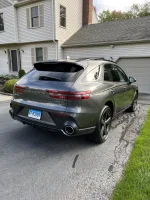
No worries. Been there and done that. By the way, prior to me buying my 2023 G70, I owned a 2022 GV70 3.5T. Himalayan Gray. It was one heck of a nice SUV. The only issue I had was a sloppy shifting transmission that the dealer couldn't fix. Probably not a common issue with the GV70.
RBrylawski
Registered Member
- Joined
- Feb 17, 2023
- Messages
- 289
- Reaction score
- 163
- Points
- 43
- Genesis Model Year
- 2023
- Genesis Model Type
- Genesis GV70
Mine is Himalayan Gray with Red Leather. Fortunately, mine shifts without issue. Our other GV70 SP is Cardiff Green, with Black Leather. Both have been terrific!No worries. Been there and done that. By the way, prior to me buying my 2023 G70, I owned a 2022 GV70 3.5T. Himalayan Gray. It was one heck of a nice SUV. The only issue I had was a sloppy shifting transmission that the dealer couldn't fix. Probably not a common issue with the GV70.
View attachment 57636
I hope you're happy with your G70!

Hueydriver
Registered Member
- Joined
- Jul 30, 2018
- Messages
- 655
- Reaction score
- 203
- Points
- 43
- Location
- Florida
- Genesis Model Type
- Genesis G70
I have the 2023 G70 and downloaded the program to a usb and installed without issues.
CobraBob
Registered Member
- Joined
- May 6, 2019
- Messages
- 257
- Reaction score
- 127
- Points
- 43
- Location
- Central CT
- Genesis Model Year
- 2023
- Genesis Model Type
- Genesis G70
I am happy with my 2023 G70. I used to have a 2019 G70 3.3T which I loved. I do miss the great luxury touches/features on my previous GV70. The performance sedans are very different from SUVs, of course. Different strokes for different folks, depending on their needs.Mine is Himalayan Gray with Red Leather. Fortunately, mine shifts without issue. Our other GV70 SP is Cardiff Green, with Black Leather. Both have been terrific!
I hope you're happy with your G70!
Looking to update and upgrade your Genesis luxury sport automobile? Look no further than right here in our own forum store - where orders are shipped immediately!
CobraBob
Registered Member
- Joined
- May 6, 2019
- Messages
- 257
- Reaction score
- 127
- Points
- 43
- Location
- Central CT
- Genesis Model Year
- 2023
- Genesis Model Type
- Genesis G70
I'm happy to hear that.I have the 2023 G70 and downloaded the program to a usb and installed without issues.
 But.....see post below.
Last edited:
CobraBob
Registered Member
- Joined
- May 6, 2019
- Messages
- 257
- Reaction score
- 127
- Points
- 43
- Location
- Central CT
- Genesis Model Year
- 2023
- Genesis Model Type
- Genesis G70
Any downsides to the new update that you've noticed? I'm reading of some owners not liking some of the UI changes. I was going to do the install this afternoon, but I think I'm going to hold off until I have a firmer grasp on any UI downsides. Once you upgrade you really can't go back to what you had. I use Waze most of the time, so map updates aren't all that important to me. I'm more focused on UI changes.I have the 2023 G70 and downloaded the program to a usb and installed without issues.
Hueydriver
Registered Member
- Joined
- Jul 30, 2018
- Messages
- 655
- Reaction score
- 203
- Points
- 43
- Location
- Florida
- Genesis Model Type
- Genesis G70
None at all! Everything works as it should.Any downsides to the new update that you've noticed? I'm reading of some owners not liking some of the UI changes. I was going to do the install this afternoon, but I think I'm going to hold off until I have a firmer grasp on any UI downsides. Once you upgrade you really can't go back to what you had. I use Waze most of the time, so map updates aren't all that important to me. I'm more focused on UI changes.
CobraBob
Registered Member
- Joined
- May 6, 2019
- Messages
- 257
- Reaction score
- 127
- Points
- 43
- Location
- Central CT
- Genesis Model Year
- 2023
- Genesis Model Type
- Genesis G70
Someone mentioned that the fade-in graphics when changing Drive Modes radically changed. Did you notice that? Apparently they changed from an actual G70 graphic to a generic car graphic. Not necessarily a huge deal to me, but it was for some. I also heard that the navigation voice changed. But not confirmed.
What navigation system type do I choose when installing? The PDF instructions show a number of "standard" and "premium" navigation systems. I'm thinking that I want to choose StandardGen5WNavigation. Correct? Or does the update automatically select the navigation type when you insert the USB drive?
Lastly, do you insert the USB drive as the first step? The instructions only say "take the USB drive to your vehicle and proceed with the update process. They don't tell you exactly when to insert the USB drive.
What navigation system type do I choose when installing? The PDF instructions show a number of "standard" and "premium" navigation systems. I'm thinking that I want to choose StandardGen5WNavigation. Correct? Or does the update automatically select the navigation type when you insert the USB drive?
Lastly, do you insert the USB drive as the first step? The instructions only say "take the USB drive to your vehicle and proceed with the update process. They don't tell you exactly when to insert the USB drive.
Last edited:
Great products:
- VIN Check
- Add more horsepower!
- Clean your leather!
- Safe Emergency Charging
- Windshield Repair Kit
- Chemical Guys HydroSpeed Ceramic Quick Detailer
- Chemical Guys HydroCharge High-Gloss Hydrophobic SI02 Ceramic Spray Coating
- Get a dash cam!
- Auto Buyers Market
- Read: PSYCHOPATHY
- VIN Check
- Add more horsepower!
- Clean your leather!
- Safe Emergency Charging
- Windshield Repair Kit
- Chemical Guys HydroSpeed Ceramic Quick Detailer
- Chemical Guys HydroCharge High-Gloss Hydrophobic SI02 Ceramic Spray Coating
- Get a dash cam!
- Auto Buyers Market
- Read: PSYCHOPATHY
 | ||||
 |  |  |  |  |
 |  | |||





Featured content
-

-
Thread 'Help us to keep helping you. Your support is essential to our survival.'
- Sal Collaziano
Replies: 32