• Car enthusiast? Join us on Cars Connected! iOS | Android | Desktop
  • Hint: Use a descriptive title for your new message
    If you're looking for help and want to draw people in who can assist you, use a descriptive subject title when posting your message. In other words, "I need help with my car" could be about anything and can easily be overlooked by people who can help. However, "I need help with my transmission" will draw interest from people who can help with a transmission specific issue. Be as descriptive as you can. Please also post in the appropriate forum. The "Lounge" is for introducing yourself. If you need help with your G70, please post in the G70 section - and so on... This message can be closed by clicking the X in the top right corner.

Open Letter to Genesis Motors - How I'd Improve the GV60

We filed a lemon law action because of the User Authorization system failing consistently and being unable to be repaired despite many software replacements and two full hardware replacements
That's unfortunate. :confused:
 
Neither the fingerprint or facial biometric features on my new car work accurately, so I deactivated both.
I have the distinct impression that the fingerprint reader needs to re-read (reset) my finger every few weeks or so to work consistently. It seems like the print reading technology reads such minute changes in the print that it stops recognizing it once we have shed some cells and/or the finger is more moist or dryer, etc. It is quirky. I agree it should be more generalized for the print so it works more consistently, so perhaps Genesis got ahead of themselves on this one? I dunno.🤷‍♀️
 
I have the distinct impression that the fingerprint reader needs to re-read (reset) my finger every few weeks or so to work consistently. It seems like the print reading technology reads such minute changes in the print that it stops recognizing it once we have shed some cells and/or the finger is more moist or dryer, etc. It is quirky. I agree it should be more generalized for the print so it works more consistently, so perhaps Genesis got ahead of themselves on this one? I dunno.🤷‍♀️
I agree that it is quirky. That is why I use it as the third and last means of defense (my phone as my primary key; the cardkey as my secondary key; and the eyeball scanner/fingerprint scanner as my third and emergency backup).
 
Phone work on all models?
 
Phone work on all models?
Unfortunately for you and I, the phone key only works in the US for the GV60. They haven't gotten it going for Canada yet, in case that helps answer the question.
 
Unfortunately for you and I, the phone key only works in the US for the GV60. They haven't gotten it going for Canada yet, in case that helps answer the question.
And...it only works with the Performance trim.
 
I agree that it is quirky. That is why I use it as the third and last means of defense (my phone as my primary key; the cardkey as my secondary key; and the eyeball scanner/fingerprint scanner as my third and emergency backup).

My key card is apparently programmed but I haven't managed to open or start the car with it. Maybe I'm doing (or not doing) something silly (or obvious)? Any tips for the key card?
 
I have the distinct impression that the fingerprint reader needs to re-read (reset) my finger every few weeks or so to work consistently. It seems like the print reading technology reads such minute changes in the print that it stops recognizing it once we have shed some cells and/or the finger is more moist or dryer, etc. It is quirky. I agree it should be more generalized for the print so it works more consistently, so perhaps Genesis got ahead of themselves on this one? I dunno.🤷‍♀️
I also find the fingerprint reader unreliable. It works for a week or so and then fails to match my print unless I re-enroll it. The Face ID works great though.

I always count on my iPhone digital key and Apple Watch digital key and carry the card key as a backup. If I’m driving far from home I’ll bring a physical key and the backup key as a precaution so I’m not stranded if all the other tech fails.

It’s nice to have so many options, but it would be much better if they made the fingerprint sensor more reliable.
 
My key card is apparently programmed but I haven't managed to open or start the car with it. Maybe I'm doing (or not doing) something silly (or obvious)? Any tips for the key card?
How are you using it?

I place the key card on the door handle and it’ll unlock. Placing it in the Qi charger allows the vehicle to start, just don’t leave it there once it starts.
 
Maybe I'm just a luddite, but I'm perfectly happy just using the key fob and have never even tried to use the fingerprint reader or the facial scanner. I certainly can't imagine filing a lemon law complaint over the fingerprint reader and Face ID gizmos not working, but to each his own.
______________________________

Help support this site so it can continue supporting you!
 
Maybe I'm just a luddite, but I'm perfectly happy just using the key fob and have never even tried to use the fingerprint reader or the facial scanner. I certainly can't imagine filing a lemon law complaint over the fingerprint reader and Face ID gizmos not working, but to each his own.
I'm with you there. The fob is how I roll. It unlocks the car as I approach it, and has any other controls I may need... like getting the trunk open as I approach from the front of the car, etc. Get in and start the car without hesitation.

Facial scanner is nearly 100% accurate, but I've been locked out of the fingerprint scanner too many times to rely on it. That being said, I use it EVERY time I start the car (after starting it!). I just like doing it. Yeah it's goofy, but I've also gotten pretty good at it, and have found a slight hack to it... I very slightly roll my finger while on the sensor. For some reason that seems to recognize the print more frequently. Also, every couple months I redo the print as mine seem to change a bit (wear and tear?).
 
I have the distinct impression that the fingerprint reader needs to re-read (reset) my finger every few weeks or so to work consistently. It seems like the print reading technology reads such minute changes in the print that it stops recognizing it once we have shed some cells and/or the finger is more moist or dryer, etc. It is quirky. I agree it should be more generalized for the print so it works more consistently, so perhaps Genesis got ahead of themselves on this one? I dunno.🤷‍♀️
OK, this is what I do. Before using the fingerprint reader, rub you finger on your nose to pick up some extra oil. Then set (don't press!) your finger lightly on the reader. Maybe it's a placebo effect, but it works consistently for me...
 
My key card is apparently programmed but I haven't managed to open or start the car with it. Maybe I'm doing (or not doing) something silly (or obvious)? Any tips for the key card?
Just do what the picture shows. I had trouble when I was testing it on the second use. I put it up against the outside door handle and the doors opened up. I then put it where the phone charges but nothing seemed to happed; I then put it up against the start button and then I went back. The car started up. I think there must be some kind of delay (deliberate or inadvertent) built in.
 
And...it only works with the Performance trim.
SURE ONLY PERFORMANCE TRIM?

The Hyundai GV60 Advanced model does include the digital key feature as part of its standard technology package. This feature allows you to use your compatible smartphone to unlock, start, and operate the vehicle without needing a physical key. The digital key can be shared with others via the app, and it can also be programmed to customize settings like seat position and mirror adjustments based on the user profile.

To use the digital key, you'll need to ensure that your smartphone is compatible and that the Hyundai Digital Key app is installed. Additionally, the feature might require activation at a Hyundai dealership, depending on the market or specific vehicle setup.
 
The Hyundai GV60 Advanced model does include the digital key feature ...

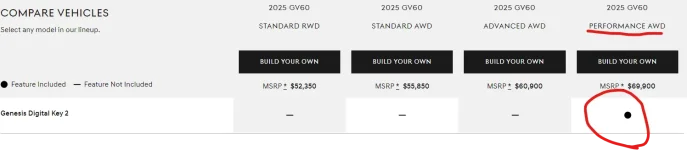
I'm happy to hear that, but wondering if you have personal experience or have read that somewhere? Everything that I've read says only the Performance trim (in the U.S.) can use the smartphone-based Digital Key. See screengrab:
1725315839813.webp
 
Performance has DK2.

Face & Finger work near perfectly for me. Even used the fingerprint reader at a 90 degree angle a few times this weekend when replacing my dashcam hardwire kit. Face even works with or without glasses.
 
I'm happy to hear that, but wondering if you have personal experience or have read that somewhere? Everything that I've read says only the Performance trim (in the U.S.) can use the smartphone-based Digital Key. See screengrab:
View attachment 59907
Great question
A I says yes
My attempts say NO
Sent email to Genesis & my dealer...could hear tomorrow?
 
Just do what the picture shows. I had trouble when I was testing it on the second use. I put it up against the outside door handle and the doors opened up. I then put it where the phone charges but nothing seemed to happed; I then put it up against the start button and then I went back. The car started up. I think there must be some kind of delay (deliberate or inadvertent) built in.

Ok, gave it another try. It works to start the vehicle - in the charge pad. But no joy holding it against the door handle. Do you hold it by the dashes you touch to unlock? Near the front of the handle? The back? I'm wondering if I have an issue with the NFC sensor in the door...
 
Looking to update and upgrade your Genesis luxury sport automobile? Look no further than right here in our own forum store - where orders are shipped immediately!
Ok, gave it another try. It works to start the vehicle - in the charge pad. But no joy holding it against the door handle. Do you hold it by the dashes you touch to unlock? Near the front of the handle? The back? I'm wondering if I have an issue with the NFC sensor in the door...
most of the time it sits in my back pocket or in a wallet case. Door unlocks as I get close. But if I approach from the back, so the back hatch goes off, even though it may not open, I then have to touch the spot on the door handle to get the door handle to pop out.
 
most of the time it sits in my back pocket or in a wallet case. Door unlocks as I get close. But if I approach from the back, so the back hatch goes off, even though it may not open, I then have to touch the spot on the door handle to get the door handle to pop out.

So the NFC card functions like the fob or phone (as a key) and just needs to be near the vehicle? You do not need to touch the NFC card to the door handle? My car does not seem to respond to the NFC card at all except for when I place it on the wireless charger.
 
Back
Top