• Car enthusiast? Join us on Cars Connected! iOS | Android | Desktop
  • Hint: Use a descriptive title for your new message
    If you're looking for help and want to draw people in who can assist you, use a descriptive subject title when posting your message. In other words, "I need help with my car" could be about anything and can easily be overlooked by people who can help. However, "I need help with my transmission" will draw interest from people who can help with a transmission specific issue. Be as descriptive as you can. Please also post in the appropriate forum. The "Lounge" is for introducing yourself. If you need help with your G70, please post in the G70 section - and so on... This message can be closed by clicking the X in the top right corner.

Please consider taking a break

sdginz

New member
Joined
Dec 9, 2019
Messages
11
Reaction score
3
Points
3
Genesis Model Type
No Genesis Yet!
I have a 2024 G70. Took a long road trip this weekend. The "Please consider taking a break" coffee cup warning message came up frequently.

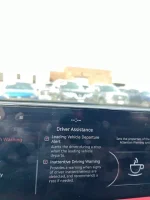
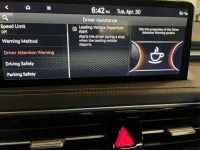
Am I to understand that this cannot be turned off? I called Genesis and they were no help. There does not seem to be an option to turn this feature off. The driver attention warning menu has the coffee cup shown but only the leading vehicle departure alert has a checkbox.image0.webp
 
Last edited:
I have a 2024 G70. Took a long road trip this weekend. The "Please consider taking a break" coffee cup warning message came up frequently.

Am I to understand that this cannot be turned off? I called Genesis and they were no help. There does not seem to be an option to turn this feature off. The driver attention warning menu has the coffee cup shown but only the leading vehicle departure alert has a checkbox.
I don't know any way to turn it off. I don't know what all it senses, but sometimes, it is correct, time to take a break. You can avoid it going off by steady hand on the wheel, staying in the lane, etc.

First time I saw it was after some hours on the road and yes, I really needed a break.
 
That was my experience as well. Despite a few random false alarms over the years that didn't persist, the only time it did persist I did in fact need a rest. I'm not sure what they're sensing.
 
That was my experience as well. Despite a few random false alarms over the years that didn't persist, the only time it did persist I did in fact need a rest. I'm not sure what they're sensing.
It happened to me after yawning several times on a long drive. So, maybe the same camera that prompts the "keep your eyes on the road" message? It was correct, I needed a break. Cool feature, IMO.
 
I did see a setting that doesn't mute the music when the alert goes off so its not as jarring but I still find this irritating. I think I should determine when I need a break not the car. When it was really windy, which is all the time in the Midwest, the car did swerve all over and the alert was going off often.

Does it really have a camera that looks at your eyes? Is it impacted by polarized sunglasses?
 
Last edited:
Conspiracy theory. Either Starbucks or Dunkin send out signals to approaching cars to take a break.

Dunkin coffee good. But I'd rather drink buffalo piss than Starbucks.
 
Conspiracy theory. Either Starbucks or Dunkin send out signals to approaching cars to take a break.
You don't understand. The hallmark of conspiracy theories is that the holder actually believes in the theory. You are way too intelligent for that.
 
  • Like
Reactions: EdP
My salesperson sent me this picture from his 2023 G70. On here there is a way to turn off this feature. I do not have this in 2024. Could this be solved with a software update? Genesis corporate has been absolutely worthless.
______________________________

Help support this site so it can continue supporting you!
 

Attachments

  • G70 2023.webp
    G70 2023.webp
    28.9 KB · Views: 50
I'd say there is a non-zero chance Hyundai/Kia/Genesis is selling collected data to more than just insurance companies.

Genesis has just recently decided to provide Connected Services with no expiration date for all owners and lessees of 2023 and newer model-year vehicles. Highly doubt that was purely out of the kindness of their hearts. Selling data on errbody must be far more profitable than collecting subscription fees on only a percentage of owners. :cautious:
 
There is an IR camera and 2 infrared emitters in your gauge cluster. They are in many cars now and are used to track your eyes and tell when you are being inattentive or have your eyes closed.
 
Are you certain there is an IR camera in the gauge cluster? Would it be impacted by polarized glasses?
 
I have a first gen g70 and I was able to turn this feature off completely in the gauge cluster controls. Does yours have this option?
 
There is a setting on the '24 GV70 menu to shut that feature off + you can just cut a bit of black felt or cloth & cover the IR sensors/camera.
They are built in to the top of the dash binnacle.
 
Looking to update and upgrade your Genesis luxury sport automobile? Look no further than right here in our own forum store - where orders are shipped immediately!
Are you certain there is an IR camera in the gauge cluster? Would it be impacted by polarized glasses?
That's only on the cars with the 3D instrument cluster. I don't have that in my 2018, but it still estimates attentiveness. I think it uses time driving and steering movements. It seems more accurate than I would have expected it to be.
 
My salesperson sent me this picture from his 2023 G70. On here there is a way to turn off this feature. I do not have this in 2024. Could this be solved with a software update? Genesis corporate has been absolutely worthless.
My 2023 GV60P has both controls that are shown here. So...presumably...one can turn off the warnings on the GV60P.
 
Software update just came out. There is no added functionality on how to turn off this warning in the 2024 G70. To this day this is by far the most annoying feature on this car.
 
There were times in dense traffic where I swerved to one side to get a better look at the traffic ahead. That pesky warning always shows up immediately after. I have no doubt it sensed me veering off the center of the lane and thought I was falling asleep at the wheel. It's as simple - and dumb - as that. No hidden interior cams looking at my eyeballs.
 
There were times in dense traffic where I swerved to one side to get a better look at the traffic ahead. That pesky warning always shows up immediately after. I have no doubt it sensed me veering off the center of the lane and thought I was falling asleep at the wheel. It's as simple - and dumb - as that. No hidden interior cams looking at my eyeballs.

I do that when I am behind a slow truck and can't see what is ahead of it. And I think you are right; it is after that the warning appears. Oh well. I suppose it is like the collision warning...I get it too often when I am clearly timing my arrival at a point where a car in front of me is turning. In both cases I suppose I prefer getting the false positives to turning off the warnings and risking the alternative.
 
Back
Top