• Car enthusiast? Join us on Cars Connected! iOS | Android | Desktop
  • Hint: Use a descriptive title for your new message
    If you're looking for help and want to draw people in who can assist you, use a descriptive subject title when posting your message. In other words, "I need help with my car" could be about anything and can easily be overlooked by people who can help. However, "I need help with my transmission" will draw interest from people who can help with a transmission specific issue. Be as descriptive as you can. Please also post in the appropriate forum. The "Lounge" is for introducing yourself. If you need help with your G70, please post in the G70 section - and so on... This message can be closed by clicking the X in the top right corner.

QLS Settings Via CarPlay

bak_yn

Registered Member
Joined
Dec 19, 2022
Messages
27
Reaction score
5
Points
3
Genesis Model Year
2022
Genesis Model Type
Genesis G70
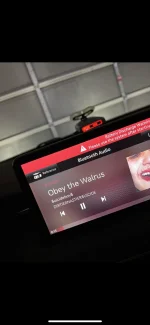
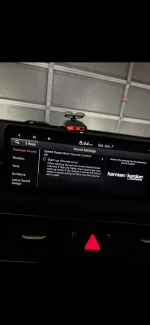
I haven’t found a thread if this has been mentioned before. I am on the latest software version as of Nov. 2022. Does anyone know of a way to change the QLS settings when connected to CarPlay? I have looked through the sound settings and it seems there is no way to change it without unplugging the usb cable and changing it via Bluetooth. It’s such an annoyance.
 

Attachments

  • B62F3E26-DBBC-457B-B928-8BC9A1D1407C.webp
    B62F3E26-DBBC-457B-B928-8BC9A1D1407C.webp
    51 KB · Views: 26
  • 28F7405F-EA73-4859-B4BA-AEE5E9F47625.webp
    28F7405F-EA73-4859-B4BA-AEE5E9F47625.webp
    47.1 KB · Views: 28
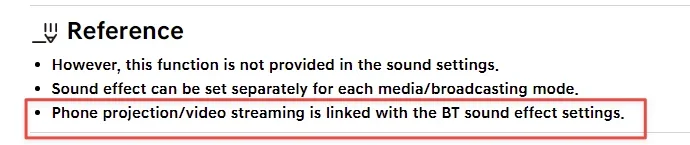
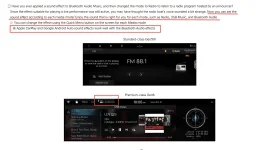
Per my understanding (see screenshots taken from Genesis online manuals), phone projection (CarPlay) is linked with the Bluetooth sound effect settings, so whatever you have set for BT Audio will apply to CarPlay
 

Attachments

  • QLS2.webp
    QLS2.webp
    16.4 KB · Views: 17
  • QLS.webp
    QLS.webp
    69.3 KB · Views: 18
Looking to update and upgrade your Genesis luxury sport automobile? Look no further than right here in our own forum store - where orders are shipped immediately!
Per my understanding (see screenshots taken from Genesis online manuals), phone projection (CarPlay) is linked with the Bluetooth sound effect settings, so whatever you have set for BT Audio will apply to CarPlay
Yeah I found that after. Just an annoyance I guess.
 
Yeah I found that after. Just an annoyance I guess.
Question: In your G70, is QLS listed under the "Premium Sound" section in the Sound settings, or has this moved following the latest update to "only" show at the top of each media source screen?
 
Qls is in the Radio/Bluetooth/XM screens when listening to music. I don’t see an option to change it within the actual settings button. Can’t remember if it was there before I updated in November/December.
 
It’s now only with radio/Bluetooth/satellite at the top of the screen and not in the menu nor can it be used with Apple CarPlay (and unlikely on android play either).
 
It’s now only with radio/Bluetooth/satellite at the top of the screen and not in the menu nor can it be used with Apple CarPlay (and unlikely on android play either).
Ok, that's what I thought. There are older YouTube videos showing QLS in the "Sound -> Premium Sound" menu, but now I understand that was before the update when QLS was a universal/global sound effect setting. Now that you can set the sound effect per each audio source (excluding CarPlay/AA), it's now only listed at the top of the screen.

My only gripe is that by moving to top of screen it no longer provides on-screen information re: what each sound effect does... Users must either "listen" for the change in effect or find more info online.
 
Ok, that's what I thought. There are older YouTube videos showing QLS in the "Sound -> Premium Sound" menu, but now I understand that was before the update when QLS was a universal/global sound effect setting. Now that you can set the sound effect per each audio source (excluding CarPlay/AA), it's now only listed at the top of the screen.

My only gripe is that by moving to top of screen it no longer provides on-screen information re: what each sound effect does... Users must either "listen" for the change in effect or find more info online.
I just got my car Saturday and was aggravated it wasn’t on the screen like on all videos online too. Then I found something about it in a forum being moved and then saw it worked everywhere but apple play where the best quality music resides. I hope it’s fixed in the next update for apple but I doubt we get back the menu item.
 
I just got my car Saturday and was aggravated it wasn’t on the screen like on all videos online too. Then I found something about it in a forum being moved and then saw it worked everywhere but apple play where the best quality music resides. I hope it’s fixed in the next update for apple but I doubt we get back the menu item.
Congrats on the new ride! I just mine (Uyni White, 2.5T Advanced) on 1/10/23 and really enjoying it thus far!

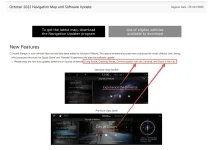
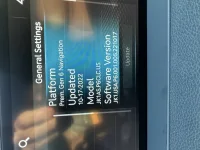
When you get a chance, can you pls confirm which update version you have under General Settings. My car says it was last updated on 10-17-2022, but the Genesis update website shows the latest update as 10-25-2022 for Prem. Gen 6 Navigation platform. Prob not an issue, but since I haven't received any OTA prompts, I was curious if I should download the 10/25/22 update and manually install via USB drive.

Also, when looking at new Sounds of Nature songs that were added in Oct 2022 up[date, it seems the titles are off (see screenshot).. for example, mine shows as City at Dawn (vs Dawn in the City) and Experience the Universe (vs Communication with the Universe). Not a major issue but just curious what others are seeing.

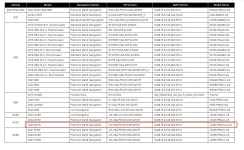
Lastly, the Model listed in my car settings is JK1AS.P6CLC.US (2022 model) vs what it should be: JK1AS.P6CLN.A.US (2023 model) as shown in screenshot log. However, the Software and MAP versions are correct in my car as shown on log.
 

Attachments

  • Update 25-Oct-2022.webp
    Update 25-Oct-2022.webp
    85.5 KB · Views: 10
  • Oct 25 2022 - Update log.webp
    Oct 25 2022 - Update log.webp
    157.1 KB · Views: 9
Congrats on the new ride! I just mine (Uyni White, 2.5T Advanced) on 1/10/23 and really enjoying it thus far!

When you get a chance, can you pls confirm which update version you have under General Settings. My car says it was last updated on 10-17-2022, but the Genesis update website shows the latest update as 10-25-2022 for Prem. Gen 6 Navigation platform. Prob not an issue, but since I haven't received any OTA prompts, I was curious if I should download the 10/25/22 update and manually install via USB drive.

Also, when looking at new Sounds of Nature songs that were added in Oct 2022 up[date, it seems the titles are off (see screenshot).. for example, mine shows as City at Dawn (vs Dawn in the City) and Experience the Universe (vs Communication with the Universe). Not a major issue but just curious what others are seeing.

Lastly, the Model listed in my car settings is JK1AS.P6CLC.US (2022 model) vs what it should be: JK1AS.P6CLN.A.US (2023 model) as shown in screenshot log. However, the Software and MAP versions are correct in my car as shown on log.
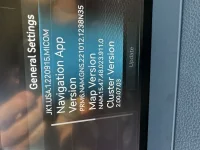
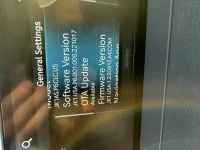
These are my stats:
______________________________

Help support this site so it can continue supporting you!
 

Attachments

  • 9A7368A8-F078-420D-9730-BC25B1D9A9D0.webp
    9A7368A8-F078-420D-9730-BC25B1D9A9D0.webp
    196.8 KB · Views: 11
  • 45CD9CF6-FBF0-416E-B5A1-09C9E6935D79.webp
    45CD9CF6-FBF0-416E-B5A1-09C9E6935D79.webp
    177.3 KB · Views: 10
  • 5F95E9FB-561F-4A58-842D-D0835CA8AF56.webp
    5F95E9FB-561F-4A58-842D-D0835CA8AF56.webp
    200.4 KB · Views: 10
Congrats on the new ride! I just mine (Uyni White, 2.5T Advanced) on 1/10/23 and really enjoying it thus far!

When you get a chance, can you pls confirm which update version you have under General Settings. My car says it was last updated on 10-17-2022, but the Genesis update website shows the latest update as 10-25-2022 for Prem. Gen 6 Navigation platform. Prob not an issue, but since I haven't received any OTA prompts, I was curious if I should download the 10/25/22 update and manually install via USB drive.

Also, when looking at new Sounds of Nature songs that were added in Oct 2022 up[date, it seems the titles are off (see screenshot).. for example, mine shows as City at Dawn (vs Dawn in the City) and Experience the Universe (vs Communication with the Universe). Not a major issue but just curious what others are seeing.

Lastly, the Model listed in my car settings is JK1AS.P6CLC.US (2022 model) vs what it should be: JK1AS.P6CLN.A.US (2023 model) as shown in screenshot log. However, the Software and MAP versions are correct in my car as shown on log.
I'm a new G70 owner, having same issue. Where did you get that log showing they have your model year listed incorrectly?
Thank you in advance!
 
I'm a new G70 owner, having same issue. Where did you get that log showing they have your model year listed incorrectly?
Thank you in advance!
Hello and congrats on the new ride!

Here's the log link (this is based on the April 2022 Navigation Map and Software Update): GENESIS NAVIGATION MAP UPDATE > Notifications

Some other helpful links:
1. Official Genesis update site (allows you to download the Navigation Updater for manual Nav update):

2. Info on OTA updates:

3. System & Map update (Option to purchase the map & software update on USB vs doing OTA, or manual download/install):

All in all, update inform is scattered across different sites and can be a bit confusing. Your best bet is to wait for an in-vehicle OTA update notification (and/or a notification by email or via the Genesis Connected Services app), or do a manual install using the Navigation Updater (#1 above) if you're tech savvy.

Help to this helps!
 
Hello and congrats on the new ride!

Here's the log link (this is based on the April 2022 Navigation Map and Software Update): GENESIS NAVIGATION MAP UPDATE > Notifications

Some other helpful links:
1. Official Genesis update site (allows you to download the Navigation Updater for manual Nav update):

2. Info on OTA updates:

3. System & Map update (Option to purchase the map & software update on USB vs doing OTA, or manual download/install):

All in all, update inform is scattered across different sites and can be a bit confusing. Your best bet is to wait for an in-vehicle OTA update notification (and/or a notification by email or via the Genesis Connected Services app), or do a manual install using the Navigation Updater (#1 above) if you're tech savvy.

Help to this helps!
That helps a lot! Thank you!
 
Back
Top