• Car enthusiast? Join us on Cars Connected! iOS | Android | Desktop
  • Hint: Use a descriptive title for your new message
    If you're looking for help and want to draw people in who can assist you, use a descriptive subject title when posting your message. In other words, "I need help with my car" could be about anything and can easily be overlooked by people who can help. However, "I need help with my transmission" will draw interest from people who can help with a transmission specific issue. Be as descriptive as you can. Please also post in the appropriate forum. The "Lounge" is for introducing yourself. If you need help with your G70, please post in the G70 section - and so on... This message can be closed by clicking the X in the top right corner.

Split screen question

sethm1

Registered Member
Joined
Jan 6, 2024
Messages
66
Reaction score
8
Points
8
Genesis Model Year
2024
Genesis Model Type
Genesis G70
2024 sport prestige using Android Auto.
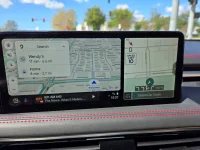
Why does the screen show my Android map on left and Genesis’ map on right?
is there and where a setting in car or Android that tells the car to show only android app on left and my XM on the right?
 

Attachments
  • IMG_2024-04-08-144134.webp
    IMG_2024-04-08-144134.webp
    226.7 KB · Views: 13
Last edited:
Using your fingers, scroll up and down the image on the right to display the option you want, or press the arrow on the far right side to remove it completely.
 
I have the Genesis map direction showing on the right because it shows up on the Heads Up Display (HUD) while AA maps on the left. The alternatives are FM, Compass and clock not really desirable for me.
 
Looking to update and upgrade your Genesis luxury sport automobile? Look no further than right here in our own forum store - where orders are shipped immediately!
I can live with the swipe up/down or the right when car starts up. But with my AAwireless that disconnects then reconnects sometimes often during the drive it gets annoying. Wish the car saved the last display setting when last turned off the car like my Mazda 6 would also be nice, but this car has no memory….
 
I have an AAwireless that did that whenever I was near a turnpike location on the highway. I went in and changed the frequency from auto to a higher band and it stopped disconnecting.
 
Wade wolf- where is that setting in AA?
 
Hit the gear in the app then go to advanced settings then Wi-fi settings. Change the Wi-Fi channel from auto to something like 157. That is what fixed it for me. You may need to play with the exact channel depending on where your interference is.
 
Back
Top





