• Car enthusiast? Join us on Cars Connected! iOS | Android | Desktop
  • Hint: Use a descriptive title for your new message
    If you're looking for help and want to draw people in who can assist you, use a descriptive subject title when posting your message. In other words, "I need help with my car" could be about anything and can easily be overlooked by people who can help. However, "I need help with my transmission" will draw interest from people who can help with a transmission specific issue. Be as descriptive as you can. Please also post in the appropriate forum. The "Lounge" is for introducing yourself. If you need help with your G70, please post in the G70 section - and so on... This message can be closed by clicking the X in the top right corner.

Touching the Navigation screen

Markbridge

Registered Member
Joined
Sep 15, 2019
Messages
129
Reaction score
97
Points
28
Location
SE Ohio
Genesis Model Type
Genesis G70
Whenever I touch the navigation screen to either pinch it out or to move it to another location to look around I get a circle and line on the screen and an indicator asking if I wanted to start guidance. Is there any way to stop this from happening, this is very annoying. What good is a touch screen if you can't touch it?! Please help!

Thanks, Lloyd
 
If all you want to do is zoom you can set the radio tune knob to zoom in and out. I find it much easier.
 
If all you want to do is zoom you can set the radio tune knob to zoom in and out. I find it much easier.

I do this as well, but if you want to move from side to side, you still get that line. What I've been doing is ignoring the line as I look around the map and then hit the map button to snap back to place
 
I do this as well, but if you want to move from side to side, you still get that line. What I've been doing is ignoring the line as I look around the map and then hit the map button to snap back to place
Welcome to my world. I've been doing this for years (I used to have a 2016 Genesis before my G70 but with the same Map GUI)
 
I'm glad I'm not the only one to have issues with this feature. However, I think I should post an update.

I recently had to travel to the Midwest and ended up putting approximately 2,000 miles on the car. This really gave me an opportunity to learn the ins and outs of the car, particularly the navigation. As much as I find the "circle" feature annoying most of the time, I will admit that I did find the feature useful while on a trip. It was helpful for finding the distance to a city or POI during my trip. I also found out how to set the navigation to snap back to my position automatically after some time when using this feature (it's in the Navigation Setup). This really makes my life a lot easier. Personally, I think the feature should be able to be disabled if the driver doesn't want to use it and then enable it when the driver wants to use it.

One final thing, ironically somewhere along the line I set up the tune knob to zoom in and out of the map and only realized this out tonight. :) But, what good is a nav system if the zoom cannot be used by pinching the screen? Isn't that the whole point of a touch screen nav system?
 
I'm glad I'm not the only one to have issues with this feature. However, I think I should post an update.

I recently had to travel to the Midwest and ended up putting approximately 2,000 miles on the car. This really gave me an opportunity to learn the ins and outs of the car, particularly the navigation. As much as I find the "circle" feature annoying most of the time, I will admit that I did find the feature useful while on a trip. It was helpful for finding the distance to a city or POI during my trip. I also found out how to set the navigation to snap back to my position automatically after some time when using this feature (it's in the Navigation Setup). This really makes my life a lot easier. Personally, I think the feature should be able to be disabled if the driver doesn't want to use it and then enable it when the driver wants to use it.

One final thing, ironically somewhere along the line I set up the tune knob to zoom in and out of the map and only realized this out tonight. :) But, what good is a nav system if the zoom cannot be used by pinching the screen? Isn't that the whole point of a touch screen nav system?

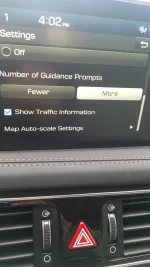
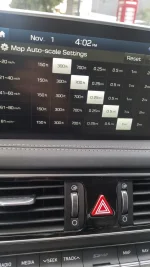
I actually prefer the knob for simple zoom adjustments, but another thing I found after the recent map update is that you can set a custom "zoom schedule" based on speed (I think). That is to say further out at higher speeds and closer in at lower speeds.
 
I actually prefer the knob for simple zoom adjustments, but another thing I found after the recent map update is that you can set a custom "zoom schedule" based on speed (I think). That is to say further out at higher speeds and closer in at lower speeds.
A different setting than the Auto Zoom? Could you please tell me in which menu it is located?
 
A different setting than the Auto Zoom? Could you please tell me in which menu it is located?

I'll have to find it again, but I'm fairly certain I was either mid navigation or at least within the map screen. Then went to one of the options in the menu there
 

Attachments

  • 20191101_160232.webp
    20191101_160232.webp
    93.8 KB · Views: 18
  • 20191101_160247.webp
    20191101_160247.webp
    127.7 KB · Views: 18
Last edited:
Looking to update and upgrade your Genesis luxury sport automobile? Look no further than right here in our own forum store - where orders are shipped immediately!
Back
Top