• Car enthusiast? Join us on Cars Connected! iOS | Android | Desktop
  • Hint: Use a descriptive title for your new message
    If you're looking for help and want to draw people in who can assist you, use a descriptive subject title when posting your message. In other words, "I need help with my car" could be about anything and can easily be overlooked by people who can help. However, "I need help with my transmission" will draw interest from people who can help with a transmission specific issue. Be as descriptive as you can. Please also post in the appropriate forum. The "Lounge" is for introducing yourself. If you need help with your G70, please post in the G70 section - and so on... This message can be closed by clicking the X in the top right corner.

USB does not work

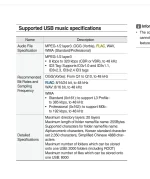
Ok, I did the leg work. M4a is not supported. Need to re encode.
 

Attachments

  • Screenshot_20200224-094604_OneDrive.webp
    Screenshot_20200224-094604_OneDrive.webp
    92.2 KB · Views: 29
  • Screenshot_20200224-094551_OneDrive.webp
    Screenshot_20200224-094551_OneDrive.webp
    56.4 KB · Views: 27
Looking to update and upgrade your Genesis luxury sport automobile? Look no further than right here in our own forum store - where orders are shipped immediately!
If you choose M4A due to iTunes it should be able to reencode as mp3, IIRC.
 
Ok, I did the leg work. M4a is not supported. Need to re encode.

Actually I just got back home and that's what I'm going to try right now. I re-read the manual again this morning and saw that. At my dealership they insisted only format is M4A.
 
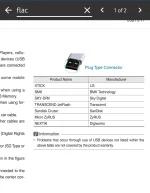
If you want lossless go FLAC. All of mine are in that format and it works great.
 
OK here's the solution I have come up with and it works flawlessly:

1. turn the bluetooth off on your phone.
2. put the flash drive into the port on the dash console (Not glove compartment) and push the start button once, but do not hold it down..... do not start the car.
3. wait for the flash drive to either appear or press the MEDIA button on your dash.
4. once it is loaded and working, then start your car and turn on the phone's bluetooth

I hope this helps!
There's some type of conflict with bluetooth and the usb port
 
OK here's the solution I have come up with and it works flawlessly:

1. turn the bluetooth off on your phone.
2. put the flash drive into the port on the dash console (Not glove compartment) and push the start button once, but do not hold it down..... do not start the car.
3. wait for the flash drive to either appear or press the MEDIA button on your dash.
4. once it is loaded and working, then start your car and turn on the phone's bluetooth

I hope this helps!
There's some type of conflict with bluetooth and the usb port
So can I take my ITunes library and copy to a USB drive and possibly load it via the USB then to listen to tunes? My phone IOS and my iTunes revision still running on Win 7 don’t like each other or I would just play from my iPhone. The few songs I purchased direct from iTunes from my iPhone work just fine when played in the car.
 
Per my dealer, alleged problem with USB port. Replaced once, still very hit and miss with no consistency playing tunes off of my I-phone, very annoying. They are gonna replace port a second time. Will stop mid-tune, switch over to radio, when you push MEDIA button, reads "no device connected" despite either an I-phone (or thumb drive) plugged in.
 
Per my dealer, alleged problem with USB port. Replaced once, still very hit and miss with no consistency playing tunes off of my I-phone, very annoying. They are gonna replace port a second time. Will stop mid-tune, switch over to radio, when you push MEDIA button, reads "no device connected" despite either an I-phone (or thumb drive) plugged in.
I can't see your history or profile, but surely you've replaced your cable with a new, quality cable?
______________________________

Help support this site so it can continue supporting you!
 
Fwiw I have a Hi Rez player from Hiby their R3 Pro that plays any and all files ex: DSD, Flac basically anything the player can decode in this case all. And plays through the Bluetooth connection easily and I keep several mini drives to feed it. I also can play Spotify through my phone vie Bluetooth.
 
Back
Top