


Stevendom1987
Registered Member
- Joined
- Jul 29, 2018
- Messages
- 204
- Reaction score
- 59
- Points
- 28
- Genesis Model Type
- No Genesis Yet!
Does anyone else like to use Waze/Google Maps on Android Auto and have issues with all of the buttons on the display working properly?
When I'm in either map feature, but even more so on Waze, the buttons towards the bottom right corner won't work aka aren't responsive to my touch. I also notice you have to press "above" the actual selection you want when making changes on the app.
I am 99.9% sure I don't have a defective unit because everything else works perfectly in that area in the screen, regardless if it's a different app within Android Auto or the native menu screen.
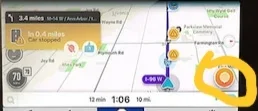
Below is the waze button/icon selection that doesn't work. If anyone can try pressing the button/icon in their waze I would love to know if it's just me.
When I'm in either map feature, but even more so on Waze, the buttons towards the bottom right corner won't work aka aren't responsive to my touch. I also notice you have to press "above" the actual selection you want when making changes on the app.
I am 99.9% sure I don't have a defective unit because everything else works perfectly in that area in the screen, regardless if it's a different app within Android Auto or the native menu screen.
Below is the waze button/icon selection that doesn't work. If anyone can try pressing the button/icon in their waze I would love to know if it's just me.
Last edited:














