• Car enthusiast? Join us on Cars Connected! iOS | Android | Desktop
  • Hint: Use a descriptive title for your new message
    If you're looking for help and want to draw people in who can assist you, use a descriptive subject title when posting your message. In other words, "I need help with my car" could be about anything and can easily be overlooked by people who can help. However, "I need help with my transmission" will draw interest from people who can help with a transmission specific issue. Be as descriptive as you can. Please also post in the appropriate forum. The "Lounge" is for introducing yourself. If you need help with your G70, please post in the G70 section - and so on... This message can be closed by clicking the X in the top right corner.

Android Auto Navigation Glitches

Stevendom1987

Registered Member
Joined
Jul 29, 2018
Messages
204
Reaction score
59
Points
28
Genesis Model Type
No Genesis Yet!
Does anyone else like to use Waze/Google Maps on Android Auto and have issues with all of the buttons on the display working properly?

When I'm in either map feature, but even more so on Waze, the buttons towards the bottom right corner won't work aka aren't responsive to my touch. I also notice you have to press "above" the actual selection you want when making changes on the app.

I am 99.9% sure I don't have a defective unit because everything else works perfectly in that area in the screen, regardless if it's a different app within Android Auto or the native menu screen.

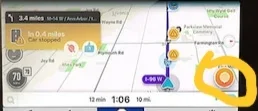
Below is the waze button/icon selection that doesn't work. If anyone can try pressing the button/icon in their waze I would love to know if it's just me.
20181202_223812.webp
 
Last edited:
Does anyone else like to use Waze/Google Maps on Android Auto and have issues with all of the buttons on the display working properly?

When I'm in either map feature, but even more so on Waze, the buttons towards the bottom right corner won't work aka aren't responsive to my touch. I also notice you have to press "above" the actual selection you want when making changes on the app.

I am 99.9% sure I don't have a defective unit because everything else works perfectly in that area in the screen, regardless if it's a different app within Android Auto or the native menu screen.

Below is the waze button/icon selection that doesn't work. If anyone can try pressing the button/icon in their waze I would love to know if it's just me.

View attachment 16942
Bump... Nobody has this issue? That button for waze works for EVERYONE using Android Auto?
 
As far as I can tell all the buttons on my screen work with AA, waze included.
 
If it's not a touch screen dead spot as you claim, I would try to (1) clear cache for Waze but ideally (2) uninstall/reinstall Waze completely for a fresh build.
 
If it's not a touch screen dead spot as you claim, I would try to (1) clear cache for Waze but ideally (2) uninstall/reinstall Waze completely for a fresh build.

Thanks man. I did some more research and it's actually my specific cell phone model. Apparently the latest Samsung cell released, the Note 9, has a resolution issue. Once I set the phone to 1080p and not 4K the issue fixes itself.

It's unfortunate, but it's a Samsung issue (what's new right?) and not a Genesis issue.
 
Since I dont like large phones I bought a Samsung A3 online - been perfectly happy with it and it runs AA fine plus JBV1 for my V1, media monkey for my music at the same time.
 
Looking to update and upgrade your Genesis luxury sport automobile? Look no further than right here in our own forum store - where orders are shipped immediately!
I honestly had a ton of issues with my Galaxy S8+ on AA with my GTI, just transitioned off to a Huawei P20 Pro and man it boots AA way faster and thus far has been super stable. With the Galaxy I would have to reboot the head unit or phone all the time as Spotify would just stop outputting audio, it was annoying as heck. Sadly in the AA side of things the separate Android branches make for inconsistent experiences from phone to phone which really sucks.
 
Back
Top





