• Car enthusiast? Join us on Cars Connected! iOS | Android | Desktop
  • Hint: Use a descriptive title for your new message
    If you're looking for help and want to draw people in who can assist you, use a descriptive subject title when posting your message. In other words, "I need help with my car" could be about anything and can easily be overlooked by people who can help. However, "I need help with my transmission" will draw interest from people who can help with a transmission specific issue. Be as descriptive as you can. Please also post in the appropriate forum. The "Lounge" is for introducing yourself. If you need help with your G70, please post in the G70 section - and so on... This message can be closed by clicking the X in the top right corner.

I hate this remote start

I just tried this out and while it "worked", it's ridiculous!

Went to the garage to make sure car was unlocked. In Settings, the setting to lock the car if it's unlocked when remote starting was checked.

Used app to start car. Mine typically takes 40 seconds to respond but after 40 seconds nothing happened. The app reported that I still had a pending start, so I canceled it.

I tried the command again, and this time I waited. Again after 40 seconds nothing happened, but continued to wait. 40 seconds later I heard the doors lock! ... But no start. Phone still showed a pending start, but I canceled it again.

Then I started thinking maybe it's doing it in three stages, so I tried it all again (had to unlock the car to restart test) without cancellation. Sure enough!

- After 40 seconds nothing happened.
- After another 40 seconds the doors locked.
- After another 40 seconds the car started!

So it takes a full 2 minutes to start your car if the doors are unlocked. I never leave them unlocked unless the car is in the garage.

Primitive!
That is ridiculous! With an aftermarket starter it would be running in 10 to 15 seconds. Both have advantages and disadvantages but there are times that 2 minutes is significant.
 
Just a note. It all depends on your car location. It communicates off of cellular.

If your car is stuffed in a location with awful cell communication...except the worst. Not Genesis’ fault.

Do a full test in open space...and when the company is not being hijacked by hackers (LOL)...then report back.
 
My car always takes 40 seconds (give it take a few). Not sure that would have any affect since the call is either successful or not. Mine appear to be.
 
Looking to update and upgrade your Genesis luxury sport automobile? Look no further than right here in our own forum store - where orders are shipped immediately!
Ok, getting a weird error message now while trying to remote start my G70. Before I start monkeying with settings and makes things worse, thought I’d see if others have seen this? I get a ‘pin token expired’ message. Didn’t know we had anything that expired other than the whole connected services subscription?
 
ios or Android?
Did you try killing the app and restarting?
Reboot?
 
ios or Android?
Did you try killing the app and restarting?
Reboot?
IOS, latest software is on my iPhone. I fingerprint log in to App each time I use it. Logs in just fine, for start function 2nd authentication I also fingerprint authenticate which is when the expired pin token note happens. I need to turn off fingerprint and manually enter passwords and see what happens? Just haven’t played around with the App much for it was always working fine prior.
 
Hey Everyone, I wanted to revive this thread to ask a favor.

I'm in Canada stuck with the outdated app and frustrated with the time it takes to open the app, wait for login, start the car, enter the pin, then keep the app open until it changes from sending to processing. I looked through the web version and these actions are done via a REST API. Meaning I can write a script to run on a widget on my phone to do all that in the background with 1 click. (And hopefully later build some cool automation for it like starting before I head out for work, or a button on my watch to skip the whole pulling out my phone aspect)

The command to turn on the car includes all the preset options wanted, and I was curious if I'm able to trick the car to do some actions that are possible with the US app and not the Canadian (Such as turning on the heated seat).
I'm aware that reduces some of the securities built into the app by hardcoding my login and pin, but I'm willing to live with that compromise.

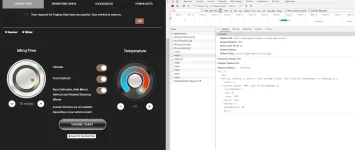
What I'm asking is if someone can go to the website, open the console view, and post what the command sent is in the networking tab when starting the car with all possible options to help me include these options in my script. You can find that by:
  1. Go to the genesisconnect website
  2. Click f12 on the keyboard
  3. Go to the "Network" tab
  4. Back on the webpage, choose all the settings
  5. Click the "Engine Start" button
  6. Back on the network tab, an entry with the name "rmtstrt" will show up, click on it
  7. Click on the headers tab
  8. Collapse all the response and request headers
  9. Expand all request payload
It should look like below. Be aware this will send the command and start your car (if you don't want that, you can disconnect from the internet before clicking "Engine Start" to show the command but prevent it from going through). Make sure to remove your pin and remote address from the screenshots before posting.

Thanks in advance!

Capture.webp
 
Canada based too but I'm all over this if you can get this working....one question is does F12 work with all browsers to see the REST commands?
 
Canada based too but I'm all over this if you can get this working....one question is does F12 work with all browsers to see the REST commands?
F12 brings up the debug frame/window in both IE and Chrome.

I can do this for you...I just need to wrap up my work day. I assume these are just web service/API calls, etc that you are tapping into?
 
F12 brings up the debug frame/window in both IE and Chrome.

I can do this for you...I just need to wrap up my work day. I assume these are just web service/API calls, etc that you are tapping into?
I work in IT too but not done much with REST APIs but they are fairly simple I understand
______________________________

Help support this site so it can continue supporting you!
 
Canada based too but I'm all over this if you can get this working....one question is does F12 work with all browsers to see the REST commands?
Yes, F12 brings up the Dev menu in all major browsers (Chrome, Firefox, Edge, IE). In that, one of the tabs is networking, which allows you to view all incoming and outgoing communications for that webpage.

If I get it working, I can clean up the basics of my code and share it on Github. If someone wants to use it they can feel free, they would just need to input their login info and pin in the code and then compile it. which isn't the most secure thing, but I'm okay with it for personal use.

F12 brings up the debug frame/window in both IE and Chrome.

I can do this for you...I just need to wrap up my work day. I assume these are just web service/API calls, etc that you are tapping into?

Thank you! Yes, there are 2 calls to make, 1 to authenticate the login info and get the auth key, and the second uses the auth key plus PIN to request the remote start with the included parameters. That's what you see in the screenshot above. Also please make sure to collapse the Request and Response header fields and hide your IP and PIN in the screenshot.


I've been thinking about doing this since I got my car but never found the time. Ran across this thread today and it brought the idea back. Thought if I'm going to do it, might as well try to include features I can't access through the app. It's a long shot because most likely the car has the Canadian version of firmware on it and might simply not support those.

As for the lock before start, that's simply another API call that can be sent before the remote start call.
 
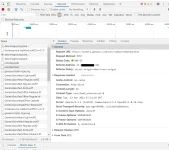
On my setup (USA G80) I'm not getting the "rmtstrt" entry. Below is remoteAction.

1615649710902.webp
 
Hey Everyone, I wanted to revive this thread to ask a favor.

I'm in Canada stuck with the outdated app and frustrated with the time it takes to open the app, wait for login, start the car, enter the pin, then keep the app open until it changes from sending to processing. I looked through the web version and these actions are done via a REST API. Meaning I can write a script to run on a widget on my phone to do all that in the background with 1 click. (And hopefully later build some cool automation for it like starting before I head out for work, or a button on my watch to skip the whole pulling out my phone aspect)
I think you should start a separate thread for this. This seems very promising, and I'm willing to support it whatever way I can.

I also really like the idea of making this possible on smartwatches, or maybe even virtual assistants (google assistant) here in Canada.

Question, are you focusing on iOS or Android?
 
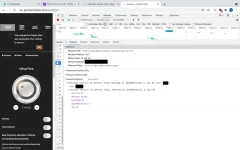
Here's mine
 

Attachments

  • Screen Shot 2021-03-23 at 1.23.06 PM.webp
    Screen Shot 2021-03-23 at 1.23.06 PM.webp
    75.6 KB · Views: 12
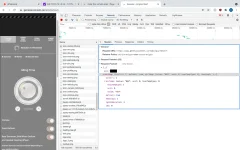
Sorry, realized you wanted it with all options selected. Another photo attached.
 

Attachments

  • Screen Shot 2021-03-23 at 1.32.05 PM.webp
    Screen Shot 2021-03-23 at 1.32.05 PM.webp
    82.7 KB · Views: 15
Back
Top