• Car enthusiast? Join us on Cars Connected! iOS | Android | Desktop
  • Hint: Use a descriptive title for your new message
    If you're looking for help and want to draw people in who can assist you, use a descriptive subject title when posting your message. In other words, "I need help with my car" could be about anything and can easily be overlooked by people who can help. However, "I need help with my transmission" will draw interest from people who can help with a transmission specific issue. Be as descriptive as you can. Please also post in the appropriate forum. The "Lounge" is for introducing yourself. If you need help with your G70, please post in the G70 section - and so on... This message can be closed by clicking the X in the top right corner.

New Mapnsoft v15.5 releasing November 15, 2021

My over the air download stopped at 88%. It still says it downloading but it hasn’t moved in days. Any dealt with this before?
no, but then I never even got any notification that ota is available.
 
Another welcomed change/fix: When you press Media button (for playing music on your Bluetooth device) then press Radio to come back, it directly comes back to the channel you were listening to whether that was on XM or FM.

Before I would need to press Radio 3 times to go back to XM because it would always come back to FM. So pressing 2 mores times for AM, then XM. Not anymore which is awesome.
My car finally finished the OTA update, this isn't the case for me, I would be on XM, When I click on media then back too radio it still brings me back to FM.
 
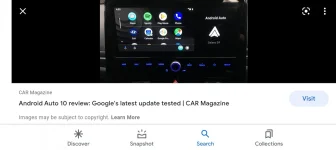
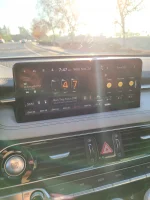
I'm not sure if this was due to the update or I missed it when initially going through settings, but I found an option for split screen android auto that takes away the stupid Android auto ad box. It looks so much better now!
 
I'm not sure if this was due to the update or I missed it when initially going through settings, but I found an option for split screen android auto that takes away the stupid Android auto ad box. It looks so much better now!
Can you show a pic?
 
I'm not sure if this was due to the update or I missed it when initially going through settings, but I found an option for split screen android auto that takes away the stupid Android auto ad box. It looks so much better now!
'what android auto ad box?
 
'what android auto ad box?
This is just a pic I found online. I will get a pic (if I can remember) tomorrow of the new split screen. This is what it used to look like with the android box on the right
 

Attachments

  • Screenshot_20211123-204055_Google.webp
    Screenshot_20211123-204055_Google.webp
    42.3 KB · Views: 49
Ah yes, that little square. Since the April update, you can actually swiped up and down on that square and get more info (time, compass, weather, map....), pretty cool!
 
My car finally finished the OTA update, this isn't the case for me, I would be on XM, When I click on media then back too radio it still brings me back to FM.
Hmm weird. I like the fact that it brings me back to where I was. Not sure why it's not doing it for you now :S
 
My apologies in advance if this has been asked and answered already but I didn't see this shown in any post in this thread. Is this update for all G70's or just model year 2022? When I select the year for my 2020 G70 it tells me there are no updates available.
______________________________

Help support this site so it can continue supporting you!
 
My apologies in advance if this has been asked and answered already but I didn't see this shown in any post in this thread. Is this update for all G70's or just model year 2022? When I select the year for my 2020 G70 it tells me there are no updates available.
all but you need to select the gen 1 G70
 
The update has been pulled.
Not sure when they will bring it back and why there isn't any messages mentioning it anywhere. If you try to update, it says the update doesn't exist.
 
Yes, I have been selecting 2019-2021 G70 but it looks like they did pull it. Message says "Updates temporarily unavailable". Thanks.

Huh. Wonder why they pulled it. I have it installed and haven't seen any issues.
 
Huh. Wonder why they pulled it. I have it installed and haven't seen any issues.
Same. Wondering that as well. Also wonder if the same build will be available again or we'll need to update to a newer one
 
Since the update xm radio doesn’t allow me to rewind to the beginning of songs. Now the radio just allows me to go back 5 seconds. So basically it seems the memory function has been limited.
 
not sure what version you were referring to, but there is a map/software update available: Notice | Official Genesis Navigation Update Website. I'm downloaded it to my computer (it's almost 32GB!) and am going to give it a shot, once I locate a 32gb USB, which I thought I had, but maybe I don't...
 
Looking to update and upgrade your Genesis luxury sport automobile? Look no further than right here in our own forum store - where orders are shipped immediately!
Same. Wondering that as well. Also wonder if the same build will be available again or we'll need to update to a newer one
not sure what version you were referring to, but there is a map/software update available: Notice | Official Genesis Navigation Update Website. I'm downloaded it to my computer (it's almost 32GB!) and am going to give it a shot, once I locate a 32gb USB, which I thought I had, but maybe I don't...
 
Since the update xm radio doesn’t allow me to rewind to the beginning of songs. Now the radio just allows me to go back 5 seconds. So basically it seems the memory function has been limited.
Can anyone else confirm this? When I first bought the car, I could drive 1/2 hour and go back to the first XM song I listened to.
 
Back
Top