

-

-
Hint: Use a descriptive title for your new message
If you're looking for help and want to draw people in who can assist you, use a descriptive subject title when posting your message. In other words, "I need help with my car" could be about anything and can easily be overlooked by people who can help. However, "I need help with my transmission" will draw interest from people who can help with a transmission specific issue. Be as descriptive as you can. Please also post in the appropriate forum. The "Lounge" is for introducing yourself. If you need help with your G70, please post in the G70 section - and so on... This message can be closed by clicking the X in the top right corner.
- Genesis Forums
- Genesis Motors Forums
- Genesis G70 Forum - G70FORUM.COM
- Genesis G70 Technology Discussion
You are using an out of date browser. It may not display this or other websites correctly.
You should upgrade or use an alternative browser.
You should upgrade or use an alternative browser.
New System and MAP update v17.0 coming in May!
- Thread author 00thvs
- Start date

Looking to update and upgrade your Genesis luxury sport automobile? Look no further than right here in our own forum store - where orders are shipped immediately!

TwentyThreeG70
Registered Member
- Joined
- Jun 13, 2022
- Messages
- 29
- Reaction score
- 12
- Points
- 3
- Genesis Model Year
- 2023
- Genesis Model Type
- Genesis G70
Hey I just used the updater and USB drive to update my '23 G70 3.3T. Was there something you had to do to get full screen AA to work? Mine still looks the same as prior to the update... Thank you in advance for the help!Worked PERFECTLY!! Now have the full screen AA maps and updated audio features!
Thanks for the input and help.
Happy G70 owner here...

Horizon Limos
Registered Member
- Joined
- Sep 21, 2022
- Messages
- 25
- Reaction score
- 15
- Points
- 3
- Genesis Model Year
- 2022
- Genesis Model Type
- Genesis G70
I did the update and the AA map became full screen. Didn't have to do anything extra.Hey I just used the updater and USB drive to update my '23 G70 3.3T. Was there something you had to do to get full screen AA to work? Mine still looks the same as prior to the update... Thank you in advance for the help!
TwentyThreeG70
Registered Member
- Joined
- Jun 13, 2022
- Messages
- 29
- Reaction score
- 12
- Points
- 3
- Genesis Model Year
- 2023
- Genesis Model Type
- Genesis G70
Thanks for the quick reply. I found that I had to go into Settings > device connections > phone projection and deselect the split screen option for it to work. It's great now! Thanks again!I did the update and the AA map became full screen. Didn't have to do anything extra.

XamnosiddA
Registered Member
- Joined
- Jan 16, 2023
- Messages
- 157
- Reaction score
- 65
- Points
- 28
- Location
- Orlando, FL
- Genesis Model Year
- 2019
- Genesis Model Type
- Genesis G70


greenythebeast
New member
- Joined
- Dec 27, 2022
- Messages
- 23
- Reaction score
- 4
- Points
- 3
- Genesis Model Year
- 2021
- Genesis Model Type
- Genesis G70
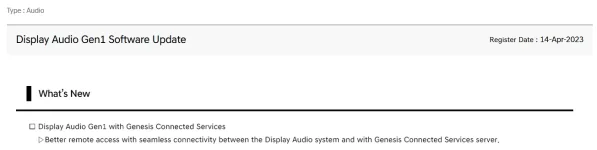
I could be wrong but I believe that's for models without navigation.Sorry if it's been mentioned before but I just noticed there's a Display Audio Gen 1 update for 2019-2020 G70s. Looks like it was released on 4/14/23. I'm going to install it tomorrow.
View attachment 52595

joegr
SUSTAINING MEMBER
- Joined
- Feb 28, 2019
- Messages
- 4,652
- Reaction score
- 2,152
- Points
- 113
- Genesis Model Year
- 2018
- Genesis Model Type
- Genesis G80 Ultimate
Are there any models without navigation?I could be wrong but I believe that's for models without navigation.
greenythebeast
New member
- Joined
- Dec 27, 2022
- Messages
- 23
- Reaction score
- 4
- Points
- 3
- Genesis Model Year
- 2021
- Genesis Model Type
- Genesis G70
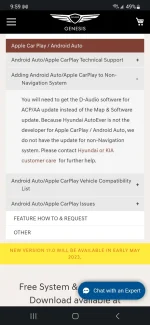
There must be since the FAQs on the website where you can order the update states that non-navigation models use that update.Are there any models without navigation?
XamnosiddA
Registered Member
- Joined
- Jan 16, 2023
- Messages
- 157
- Reaction score
- 65
- Points
- 28
- Location
- Orlando, FL
- Genesis Model Year
- 2019
- Genesis Model Type
- Genesis G70
Not sure. The owner's site recommended it for my vehicle and I have nav. I've never seen a Genesis without navigation but I could be wrong. Maybe I'll wait before I screw something up.There must be since the FAQs on the website where you can order the update states that non-navigation models use that update.
greenythebeast
New member
- Joined
- Dec 27, 2022
- Messages
- 23
- Reaction score
- 4
- Points
- 3
- Genesis Model Year
- 2021
- Genesis Model Type
- Genesis G70
See attachedNot sure. The owner's site recommended it for my vehicle and I have nav. I've never seen a Genesis without navigation but I could be wrong. Maybe I'll wait before I screw something up.
Attachments

XamnosiddA
Registered Member
- Joined
- Jan 16, 2023
- Messages
- 157
- Reaction score
- 65
- Points
- 28
- Location
- Orlando, FL
- Genesis Model Year
- 2019
- Genesis Model Type
- Genesis G70
But the update I posted about is for "Better remote access with seamless connectivity between the Display Audio System and the Genesis Connected Services server."See attached
It doesn't reference Apple Car Play / Android Auto. Anyway, someone will end up installing either one and report what it fixed/broke...
greenythebeast
New member
- Joined
- Dec 27, 2022
- Messages
- 23
- Reaction score
- 4
- Points
- 3
- Genesis Model Year
- 2021
- Genesis Model Type
- Genesis G70
Correct. The way I read it, the Display Audio update should make non-nav models communicate better with Genesis Connected Services. If you have a nav model, you should use the regular update, which will update your maps and the system. Of course, I could be wrong. The only real way to find out would be to contact Genesis.But the update I posted about is for "Better remote access with seamless connectivity between the Display Audio System and the Genesis Connected Services server."
It doesn't reference Apple Car Play / Android Auto. Anyway, someone will end up installing either one and report what it fixed/broke...

ExtremeFiretop
Registered Member
- Joined
- Apr 11, 2021
- Messages
- 44
- Reaction score
- 14
- Points
- 8
- Genesis Model Year
- 2021
- Genesis Model Type
- Genesis G70
New Genesis Map update available for download now: Notice | Official Genesis Navigation Update Website
00thvs
Registered Member
- Joined
- Mar 6, 2021
- Messages
- 233
- Reaction score
- 90
- Points
- 28
- Location
- Canada
- Genesis Model Year
- 2019
- Genesis Model Type
- Genesis G70
Nicee! Thanks for sharing !New Genesis Map update available for download now: Notice | Official Genesis Navigation Update Website
ExtremeFiretop
Registered Member
- Joined
- Apr 11, 2021
- Messages
- 44
- Reaction score
- 14
- Points
- 8
- Genesis Model Year
- 2021
- Genesis Model Type
- Genesis G70
From the update list doesn't seem like much is new if you don't have an EV? Unless some changes aren't listed
I realize that Genesis does do small updates to the UI and audio system, etc with the MAP updates, but I really only download it to update my Map lol.
I don't particularly care about the changelog myself.

Freds_GLife
Registered Member
- Joined
- Nov 13, 2022
- Messages
- 53
- Reaction score
- 36
- Points
- 18
- Genesis Model Year
- 2022
- Genesis Model Type
- Genesis G70
Getting the latest and greatest. Even if it's minor changes.

HallasanGreen3.3T
Registered Member
- Joined
- May 10, 2023
- Messages
- 40
- Reaction score
- 18
- Points
- 8
- Genesis Model Year
- 2023
- Genesis Model Type
- Genesis G70
I'm new to genesis so sorry for the dumb question. But where do you go to order the cable and get the updates? Thank you in advance.Unless it has changed, they are free to order for at least the three years. Just select bill to Genesis at the end of the order process.
joegr
SUSTAINING MEMBER
- Joined
- Feb 28, 2019
- Messages
- 4,652
- Reaction score
- 2,152
- Points
- 113
- Genesis Model Year
- 2018
- Genesis Model Type
- Genesis G80 Ultimate
When you say cable, do you really mean USB stick?I'm new to genesis so sorry for the dumb question. But where do you go to order the cable and get the updates? Thank you in advance.
Are you asking about getting the update mailed to you (at no charge) already on a USB stick?
Genesis Mapcare | Customer Login
Are are you asking about downloading the update to a USB stick that you already have?

Official Genesis Navigation Update Website
Welcome to the official Genesis navigation update website. You can update your navigation system to the latest version to access the latest traffic information
You really should set up an account on the Genesis Owner's site, as it explains all this and more.
Genesis Owners Homepage | MyGenesis
Welcome to the Genesis owners homepage. Discover exclusive online resources and information on the MyGenesis site.
 owners.genesis.com

Truck Norris
Registered Member
- Joined
- Aug 30, 2018
- Messages
- 475
- Reaction score
- 374
- Points
- 63
- Genesis Model Type
- Genesis G70
There are some kind people on this forum explaining things like this.
Sometimes it is good as well to know your limits and update through the dealer.
Sometimes it is good as well to know your limits and update through the dealer.
Great products:
- VIN Check
- Add more horsepower!
- Clean your leather!
- Safe Emergency Charging
- Windshield Repair Kit
- Chemical Guys HydroSpeed Ceramic Quick Detailer
- Chemical Guys HydroCharge High-Gloss Hydrophobic SI02 Ceramic Spray Coating
- Get a dash cam!
- Auto Buyers Market
- Read: PSYCHOPATHY
- VIN Check
- Add more horsepower!
- Clean your leather!
- Safe Emergency Charging
- Windshield Repair Kit
- Chemical Guys HydroSpeed Ceramic Quick Detailer
- Chemical Guys HydroCharge High-Gloss Hydrophobic SI02 Ceramic Spray Coating
- Get a dash cam!
- Auto Buyers Market
- Read: PSYCHOPATHY
 | ||||
 |  |  |  |  |
 |  | |||





Featured content
-

-
Thread 'Help us to keep helping you. Your support is essential to our survival.'
- Sal Collaziano
Replies: 32