

Same here. Still no OTA update. I seem to remember someone saying USB install maybe an hour??Still waiting for the OTA update on my 2025 GV80. Anyone in a 2025 do the OTA update via USB recently? Any problems? How long did your update take?
-

-
Hint: Use a descriptive title for your new message
If you're looking for help and want to draw people in who can assist you, use a descriptive subject title when posting your message. In other words, "I need help with my car" could be about anything and can easily be overlooked by people who can help. However, "I need help with my transmission" will draw interest from people who can help with a transmission specific issue. Be as descriptive as you can. Please also post in the appropriate forum. The "Lounge" is for introducing yourself. If you need help with your G70, please post in the G70 section - and so on... This message can be closed by clicking the X in the top right corner.
You are using an out of date browser. It may not display this or other websites correctly.
You should upgrade or use an alternative browser.
You should upgrade or use an alternative browser.
2025 OTA Problem - Wireless Carplay / Android Auto
- Thread author Goldmaes
- Start date

DaleNet
Registered Member
- Joined
- May 22, 2022
- Messages
- 1,779
- Reaction score
- 792
- Points
- 113
- Location
- Niceville, Florida
- Genesis Model Year
- 2023
- Genesis Model Type
- Genesis GV80
Yes, it takes about an hour.

djhuggy412
New member
- Joined
- Nov 15, 2024
- Messages
- 2
- Reaction score
- 0
- Points
- 1
- Genesis Model Year
- 2025
- Genesis Model Type
- Genesis GV80
Hi all, I'm a new member here and GV80 owner. I just wanted to chime in and provide some help for those still needing to update. I have a 2025 Coupe and ran into the same issues in this thread, never having received the OTA update. The good news is I got the update installed successfully using the manual method previously described by @DaleNet with some added help from a thread on FB.
The update for the 2025 GV80 is compatible with the 2025 GV80 Coupe.
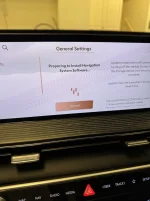
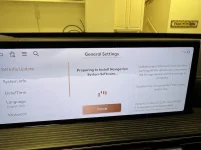
After you’ve created your USB installer, plug the drive into your vehicle, wait for the “start installation” pop-up, click 'start' and then wait for the “preparing to install” notification. Here’s where it gets confusing. The vehicle will show you a message saying “Update preparation will continue after turning off the vehicle”. This is false. You need to leave the vehicle on (U don’t have to run the engine). The instructions fail to tell you that while this message is on the screen, the vehicle is copying the software update from the USB drive to the vehicle. You know it's copying by the spinning circle in the top right-hand corner of the screen. Funnily enough, every time you obey the Genesis instructions and turn off the car, you’re actually interrupting the copying process, which takes about 1-2 hours. Once the installation files are copied over to the vehicle, you will get a new message saying "software update ready to install”. This is where you click 'ok/start' one final time and then turn off your vehicle.
Took about 5-10mins to do the actual installation. Voilà! You should now have a wireless connection.
PS. Apple maps on the cluster gauge is amazing.
The update for the 2025 GV80 is compatible with the 2025 GV80 Coupe.
After you’ve created your USB installer, plug the drive into your vehicle, wait for the “start installation” pop-up, click 'start' and then wait for the “preparing to install” notification. Here’s where it gets confusing. The vehicle will show you a message saying “Update preparation will continue after turning off the vehicle”. This is false. You need to leave the vehicle on (U don’t have to run the engine). The instructions fail to tell you that while this message is on the screen, the vehicle is copying the software update from the USB drive to the vehicle. You know it's copying by the spinning circle in the top right-hand corner of the screen. Funnily enough, every time you obey the Genesis instructions and turn off the car, you’re actually interrupting the copying process, which takes about 1-2 hours. Once the installation files are copied over to the vehicle, you will get a new message saying "software update ready to install”. This is where you click 'ok/start' one final time and then turn off your vehicle.
Took about 5-10mins to do the actual installation. Voilà! You should now have a wireless connection.
PS. Apple maps on the cluster gauge is amazing.

Speeder
Registered Member
- Joined
- Feb 9, 2019
- Messages
- 1,212
- Reaction score
- 567
- Points
- 113
- Location
- Quinton, NJ
- Genesis Model Year
- 2025
- Genesis Model Type
- Genesis GV80 Coupe
You can also go here <Genesis Mapcare | Customer Login>, create an account, order the latest update (according to you VIN) and Genesis will pay all the costs involved (~$45) then FedEx a 'stick' with the update on it.
fredriclight
New member
- Joined
- Nov 17, 2024
- Messages
- 1
- Reaction score
- 0
- Points
- 1
- Genesis Model Year
- 2025
- Genesis Model Type
- Genesis GV80
It appears that a downloadable version IS available for the 2025 GV80. I downloaded it BUT cannot get it to install. It keeps "saying" it will install, but nothing happens. For some reason, there is NO progress bar, NO indicator light showing what's going on, if anything. But... it still doesn't work. Very frustrating as I've literally spent several HOURS trying to figure this out. Kind of ridiculous for $81K!

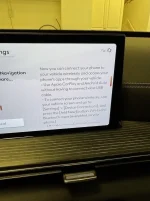
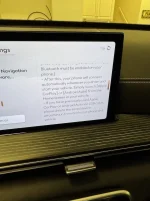
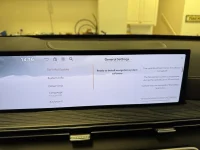
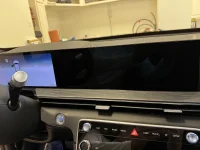
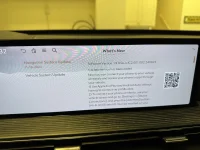
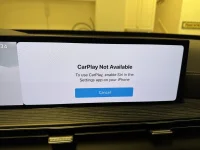
It’s a little confusing as the last guy said. I just finished and it good about 1.5hr. I started the car. Waited for everything to load up. Went to the settings screen for the software and then inserted the usbc thumb drive. The majority of the time was the “preparing to install system software” process. I have a few pics. After it was finished it said something like turn off car to finish. When it asked to install , there was also some box to check if you wanted something to automatically install from now on. I forgot to take a pic of that. I have to make the pics smaller in file size to upload and can’t do it now on phone. SorryIt appears that a downloadable version IS available for the 2025 GV80. I downloaded it BUT cannot get it to install. It keeps "saying" it will install, but nothing happens. For some reason, there is NO progress bar, NO indicator light showing what's going on, if anything. But... it still doesn't work. Very frustrating as I've literally spent several HOURS trying to figure this out. Kind of ridiculous for $81K!
DaleNet
Registered Member
- Joined
- May 22, 2022
- Messages
- 1,779
- Reaction score
- 792
- Points
- 113
- Location
- Niceville, Florida
- Genesis Model Year
- 2023
- Genesis Model Type
- Genesis GV80
Congratz on finally getting it done.
Here are some pics. I did forget to take was after the file transfer and I think before the install , the screen said something like , a box for auto updating something in the future - I just checked it yes as im tired of all this updating manually so maybe it'll do it automatically next time. The pics are in sequence and the ones that look like duplicates I just took because of the directions on the side for info. Also, afterwards I had to try and figure out how to enable Siri on my iPhone. I dont like it and dont use it, but had to enable it to get Apple car play to work.
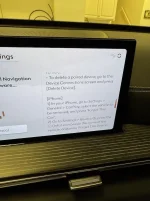
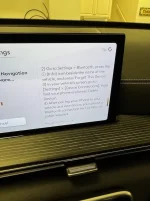
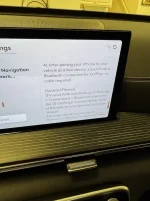
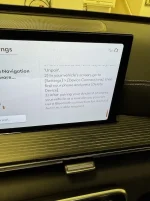
DaleNet
Registered Member
- Joined
- May 22, 2022
- Messages
- 1,779
- Reaction score
- 792
- Points
- 113
- Location
- Niceville, Florida
- Genesis Model Year
- 2023
- Genesis Model Type
- Genesis GV80
I can tell you that Android Auto works well with this update. Loads fast. I do not use it, but have it loaded just in case. I prefer to use the built-in navigation since it passes nav info to my HUD.
Speeder
Registered Member
- Joined
- Feb 9, 2019
- Messages
- 1,212
- Reaction score
- 567
- Points
- 113
- Location
- Quinton, NJ
- Genesis Model Year
- 2025
- Genesis Model Type
- Genesis GV80 Coupe
Maybe it's the hardware in the 2025's, the nav info from Waze & GMaps now shows in my HUD.I can tell you that Android Auto works well with this update. Loads fast. I do not use it, but have it loaded just in case. I prefer to use the built-in navigation since it passes nav info to my HUD.
DaleNet
Registered Member
- Joined
- May 22, 2022
- Messages
- 1,779
- Reaction score
- 792
- Points
- 113
- Location
- Niceville, Florida
- Genesis Model Year
- 2023
- Genesis Model Type
- Genesis GV80
That is so sweet. Wish mine did.
JohnnyBs25Prestige3.5T
Registered Member
- Joined
- Nov 19, 2024
- Messages
- 59
- Reaction score
- 29
- Points
- 18
- Location
- NE Indiana
- Genesis Model Year
- 2025
- Genesis Model Type
- Genesis GV80
Greetings, new GV80 owner here. Looks like this is the next thing on my "Learn To-Do" list. Wish me luck.
DaleNet
Registered Member
- Joined
- May 22, 2022
- Messages
- 1,779
- Reaction score
- 792
- Points
- 113
- Location
- Niceville, Florida
- Genesis Model Year
- 2023
- Genesis Model Type
- Genesis GV80
Good luck.
Looking to update and upgrade your Genesis luxury sport automobile? Look no further than right here in our own forum store - where orders are shipped immediately!
Speeder
Registered Member
- Joined
- Feb 9, 2019
- Messages
- 1,212
- Reaction score
- 567
- Points
- 113
- Location
- Quinton, NJ
- Genesis Model Year
- 2025
- Genesis Model Type
- Genesis GV80 Coupe
Use the search feature in this forum, lots of help available here!Greetings, new GV80 owner here. Looks like this is the next thing on my "Learn To-Do" list. Wish me luck.
dsecre
New member
- Joined
- May 28, 2024
- Messages
- 11
- Reaction score
- 5
- Points
- 3
- Genesis Model Year
- 2025
- Genesis Model Type
- Genesis GV80
Just complete my USB update on my 2025 GV80 and worked like a charm. Followed the instructions and left car running while uploading to car (took ~1 hour). Finally gave me a message that said it was ready to install. Shut off car for 15 mins and restarted and install complete. Had to delete Bluetooth connection on phone and car and then reconnect again at which time it told me wireless android auto was available. Works great.
djhuggy412
New member
- Joined
- Nov 15, 2024
- Messages
- 2
- Reaction score
- 0
- Points
- 1
- Genesis Model Year
- 2025
- Genesis Model Type
- Genesis GV80
Congrats! Glad it went smoothly for ya.Just complete my USB update on my 2025 GV80 and worked like a charm. Followed the instructions and left car running while uploading to car (took ~1 hour). Finally gave me a message that said it was ready to install. Shut off car for 15 mins and restarted and install complete. Had to delete Bluetooth connection on phone and car and then reconnect again at which time it told me wireless android auto was available. Works great.

- Joined
- Dec 27, 2010
- Messages
- 1,658
- Reaction score
- 636
- Points
- 113
- Location
- Middletown NY
- Genesis Model Year
- 2025
- Genesis Model Type
- Genesis GV80
My biggest takeaway with the OTA update was that now AA is reflected on my HUD. How cool is that? I like AA but that was always a sticking point with me. It works great.
- Joined
- May 17, 2017
- Messages
- 5,110
- Reaction score
- 1,526
- Points
- 113
- Location
- Los Angeles
- Genesis Model Year
- 2025
- Genesis Model Type
- Genesis GV80 Coupe
For the record, my coupe just did an OTA update from version 240816 (in September) to version 240823

gvjim
SUSTAINING MEMBER
- Joined
- Feb 7, 2024
- Messages
- 641
- Reaction score
- 515
- Points
- 93
- Genesis Model Year
- 2024
- Genesis Model Type
- Genesis GV60
I haven't had a chance to try it yet, but my iPhone just downloaded an update to ABRP (A Better Route Planner) that says that it now supports displaying maps in the cluster display and directions in the HUD. So that could be pretty awesome. There are some other interesting improvements as well. It's cool that ABRP is still getting frequent quality updates for non-Rivian vehicles. 
Great products:
- VIN Check
- Add more horsepower!
- Clean your leather!
- Safe Emergency Charging
- Windshield Repair Kit
- Chemical Guys HydroSpeed Ceramic Quick Detailer
- Chemical Guys HydroCharge High-Gloss Hydrophobic SI02 Ceramic Spray Coating
- Get a dash cam!
- Auto Buyers Market
- Read: PSYCHOPATHY
- VIN Check
- Add more horsepower!
- Clean your leather!
- Safe Emergency Charging
- Windshield Repair Kit
- Chemical Guys HydroSpeed Ceramic Quick Detailer
- Chemical Guys HydroCharge High-Gloss Hydrophobic SI02 Ceramic Spray Coating
- Get a dash cam!
- Auto Buyers Market
- Read: PSYCHOPATHY
 | ||||
 |  |  |  |  |
 |  | |||





Featured content
-

-
Thread 'Help us to keep helping you. Your support is essential to our survival.'
- Sal Collaziano
Replies: 32