• Car enthusiast? Join us on Cars Connected! iOS | Android | Desktop
  • Hint: Use a descriptive title for your new message
    If you're looking for help and want to draw people in who can assist you, use a descriptive subject title when posting your message. In other words, "I need help with my car" could be about anything and can easily be overlooked by people who can help. However, "I need help with my transmission" will draw interest from people who can help with a transmission specific issue. Be as descriptive as you can. Please also post in the appropriate forum. The "Lounge" is for introducing yourself. If you need help with your G70, please post in the G70 section - and so on... This message can be closed by clicking the X in the top right corner.

Cleaning The Nav Screen

santosonly

Getting familiar with the group...
Joined
Oct 19, 2008
Messages
51
Reaction score
1
Points
0
Someone touched my Nav screen to see if it was touch screen. All they had to do was ask. Can anyone suggest a good screen cleaner to remove the oily fingerprints?
 
I'd think a microfiber cloth would do the trick easily. I use one on my iPhone every morning, and have never needed any sort of cleaner or liquid.

Is this addressed in the manual?
 
I also would think a nice clean microfiber towel would do the trick. Since it isnt touch screen there is no need for a clear film protector but it does need to be cleaned every once in a while
 
At the Hyundai road shows one of the give aways was a little cloth to clean the screen. More like silk than microfiber. Very smooth. Similar stuff comes with all new eye glasses. What ever you do, DO NOT spray anything on the screen. For 'bad spots' you can use a barely damp paper towel to wipe the spot, but don't 'polish' the screen with it. Finish up with the smooth cloth. Treat it like you would a $2000 laptop. ;)
 
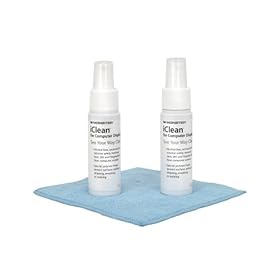
I recommend Monster iClean. It works wonders on PC Monitors, Notebooks, Blackberrys, LCD TVs, and iPhones.

[ame="http://www.amazon.com/Monster-ICLN-S-iClean-Screen-Cleaner/dp/B0006VJ7TI/ref=acc_glance_ce_ai_-2_1_tit"]http://www.amazon.com/Monster-ICLN-S-iClean-Screen-Cleaner/dp/B0006VJ7TI/ref=acc_glance_ce_ai_-2_1_tit[/ame]

31K3VBXYA0L._SL500_AA280_.jpg
 
Get the glass cleaning kit at your local costco. Works great - includes 2 cloths and unlimited refills.
 
I recommend Monster iClean. It works wonders on PC Monitors, Notebooks, Blackberrys, LCD TVs, and iPhones.

1
http://www.amazon.com/Monster-ICLN-S-iClean-Screen-Cleaner/dp/B0006VJ7TI/ref=acc_glance_ce_ai_-2_1_tit

Great find!!

Product Features

  • Alcohol-free, ammonia-free formula removes dust, dirt, and fingerprints without damaging your display's protective coating.
  • Liquid gel will not drip into delicate electronics.
  • Contains a special polymer to protect your display, while reducing static electricity that attracts dust.
  • Special MicroFiberTM cloth gently polishes your display without scratching it.
 
Looking to update and upgrade your Genesis luxury sport automobile? Look no further than right here in our own forum store - where orders are shipped immediately!
At the Hyundai road shows one of the give aways was a little cloth to clean the screen. More like silk than microfiber. Very smooth. Similar stuff comes with all new eye glasses. What ever you do, DO NOT spray anything on the screen. For 'bad spots' you can use a barely damp paper towel to wipe the spot, but don't 'polish' the screen with it. Finish up with the smooth cloth. Treat it like you would a $2000 laptop. ;)

I went to the Phoenix Motor Speedway event 6 weeks ago and I have about 8-9 of the Hyundai cloths.

The moderators come first to get one of these clothes and I will send one to the first 8 people to send me private mail.

Just send me private e-mail to get one and I will let those know who gets one.

And then to send me a SASE and I will get these in the mail to those who contact me as above.

:grouphug:
 
I just got my Genesis a couple days ago and already its a challenge to keep the information screen clean. I have tried a micro cloth but that tends to just move the dust to to a side or corner of the screen and from there its hard to remove. I am afraid to try any kind of sprays or cleaners. I tried a swiffer thing that barely touches the screen but is suppose to draw the dust to it. This then left some sort of smudge marks. I cleaned that with the micro fiber cloth but the dust problem was back so I went in a circle between the two problems.

I'm wondering about some kind of microfiber antistatic cloth that might actually lift the dust?? Also I am still reading the owners manuals. Is the proper cleaning method listed? This screen really shows the dust when its off but when on it doesn't show up much. I think the screen is a real dust and lint magnet. If anyone else has more good idea's about cleaning or keeping the screen clean I'm sure that many of us would be interested. Thank-you!
______________________________

Help support this site so it can continue supporting you!
 
If anyone else has more good idea's about cleaning or keeping the screen clean I'm sure that many of us would be interested. Thank-you!

I haven't tried this yet on my Gen, but....

For my home computer (LCD display), and for use on the plasma TV screen, I've purchased from Walmart a product called "Nice'nClean" Electronic Cleaning Wipes. They are listed as Anti-static/Alcohol Free. Essentially, they are a damp cloth, similar to a "Baby Wipe" type product, but with an ENTIRELY DIFFERENT set of chemicals that make it useful for this kind of application. They are packaged in a while cylindrical container with a medium blue lid...stands about 10" tall. I bought them earlier in the year, and if memory serves, paid about $5-$6 for the package, which holds 80 wipes. Labelling indicates the following:

* No alcohol formula is safe for most surfaces
* Surfaces stay cleaner longer
* Reduces dust and fog build-up
* Leaves no residue

Seems to work pretty well on in-house electronics. I imagine it would do the same in our cars.

Good luck--

Dan :>)
 
There have been some great ideas on getting the screen clean (getting oils from fingers off). I found a really cheap solution to the normal dust that appears. A long time ago, I started keeping a Swiffer Duster in the glove box (proof)---
picture.php

When I'm sitting at the bank drive through, a long light, etc., I pop it out and go over everything on the dash. Works best in strong sunlight of course. The SWIFFER duster seems to lock up anything in its path. Use it dry with nothing added to it.


BTW- the blue top spray bottles are Fabreze. Quick fresh smell when guests are about to ride :)
 
The swiffer is what I mentioned that created a big round smudge mark on my screen. Do you use a back and forth motion. I was genty spinning mine around and around. Then when I lifted it from the screen there was the big round smudge that was some what difficult to remove from the screen then using a microfiber cloth.

The thing I fear also is those of us who are very picky about keeping the screen clean will be constantly wiping it off. I assume the less you mess with it the better due to risking scratches. I hate dust!!!
 
The swiffer is what I mentioned that created a big round smudge mark on my screen. Do you use a back and forth motion. I was genty spinning mine around and around. Then when I lifted it from the screen there was the big round smudge that was some what difficult to remove from the screen then using a microfiber cloth.

The thing I fear also is those of us who are very picky about keeping the screen clean will be constantly wiping it off. I assume the less you mess with it the better due to risking scratches. I hate dust!!!

I read back over my post and I can see how I might not have been all that clear (sorry). For finger smudges, everyone else is 100% right. The monster cleaner, etc. that is designed for electronic screens is good. LCD and Plasma screens all have glass as the front line of defense. Some are glossy and some matte (like our Genesis cars). I used a CRT cleaner to get the oils from finger touches off, but then use the Swiffer to get the normal dust that collects on the horizontal surfaces. Once I got over the fact that the screen was not a touch screen and cleaned off the smudges, I've never had to do anything except dust it. I'm with you... I HATE DUST too!
 
Plexus + Lint Free Microfiber towel (do not use a regular microfiber towel). You can use it onl your flat screen TV, your laptop, your NAV screen, gauge cluster, headlights and tail lights. I also use mine on my stovetop and microwave to leave the finish smooth and free of streaks. If you have a black stovetop like me you know it can be hard to get a streak free surface. This stuff rocks!

I've used it for years and LOVE it. It can be hard to find, except online (try a motorcycle shop).

http://www.autogeek.net/plexplasclea.html?gclid=CLmchZnimpcCFQkiagod_Bg3JA
 
I am polishing imaginary prints on my nav screen daily. Thought it was just me!

I see lint/dust/streaks even after I clean it. I will try some of the products you mentioned.
 
Back
Top