

-
🔍 Like our community? You can tell Google to show you results from this site more often. Just Click Here and then click the empty checkbox on the right side of our name.
Genesis Forums - The Genesis Owners Group
What's on your mind?
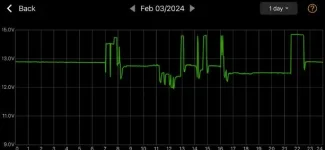
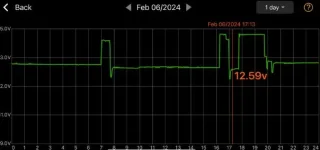
On the Ioniq5 and EV6 forums I've noticed a number of owners have had their 12 volt batteries fail prematurely.
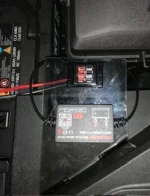
Someone suggested using a battery monitor similar to what I've attached below as an inexpensive way to provide an early warning that the battery is failing.
I'm thinking that all something like this would do is indicate the 12 volt battery is not fully charged. Also, isn't this just going to tend to run down the charge in the battery especially if the car sits for a few days unused? Or is the 12 volt plug in our cars "switched" so that the power to the plug is turned off when the car is turned off?
Thoughts? TIA.
Someone suggested using a battery monitor similar to what I've attached below as an inexpensive way to provide an early warning that the battery is failing.
I'm thinking that all something like this would do is indicate the 12 volt battery is not fully charged. Also, isn't this just going to tend to run down the charge in the battery especially if the car sits for a few days unused? Or is the 12 volt plug in our cars "switched" so that the power to the plug is turned off when the car is turned off?
Thoughts? TIA.
3 Replies
·
621 views




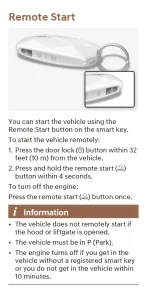
Anyone have any ideas as to why I can not get the remote start to work using my key fob? Remote start does work with the App using climate feature.
Car is locked. Standing near by-5ft. When pressing and holding the remote start button, key fob flashes once and then nothing happens.
Brand new car. 200 miles
Car is locked. Standing near by-5ft. When pressing and holding the remote start button, key fob flashes once and then nothing happens.
Brand new car. 200 miles
2 Replies
·
36 views


Had the AC running yesterday and halfway home the temp gauge started climbing.
I turned the AC off and the gauge went down to just above normal.
Popped the hood at home and fan was running and no hissing leaking sounds
Any thoughts/advice?
2013 Sedan 3.8l v6
I turned the AC off and the gauge went down to just above normal.
Popped the hood at home and fan was running and no hissing leaking sounds
Any thoughts/advice?
2013 Sedan 3.8l v6
1 Replies
·
31 views


Hello everyone:
Please stay hydrated!
So the other day, heading back to the castle after a full morning of passing the pundits and errands, I came up behind a gray 5.0.
She looked like she could use a little TLC, maybe starting simply with a good wash. Then it hit me; this car had Hyundai badging, not Genesis. I’d never seen this before. Is this common? I’m guessing it’s a real early 2015, as my 2015 doesn’t have these badges.
Do tell.
Thank you.
Best.
SJ
PS - What’s with this PITA pop up ads? Yikes!
Please stay hydrated!
So the other day, heading back to the castle after a full morning of passing the pundits and errands, I came up behind a gray 5.0.
She looked like she could use a little TLC, maybe starting simply with a good wash. Then it hit me; this car had Hyundai badging, not Genesis. I’d never seen this before. Is this common? I’m guessing it’s a real early 2015, as my 2015 doesn’t have these badges.
Do tell.
Thank you.
Best.
SJ
PS - What’s with this PITA pop up ads? Yikes!
2 Replies
·
30 views


For the last couple of days, I have been getting notifications about charging completion, climate start/stop, etc for non-Genesis vehicles - ie Ioniq6 that I dont own.
When I open the app, I have a badge for alerts, but when I go to my alerts, there isn't anything there...
Seems like the latest update is a bit glitchy
When I open the app, I have a badge for alerts, but when I go to my alerts, there isn't anything there...
Seems like the latest update is a bit glitchy
0 Replies
·
34 views

I need help, in more ways than one, but I'll limit it to my car.
Does anybody know how to completely turn off the speed camera warning?
Every time I come home from my daughter's, I go through a school zone where the normal speed is 25 mph. There is a speed camera installed. During school hours the speed drops to 20 mph. The car sees the 20 mph and doesn't care if it's midnight, the weekend, or summer break; it thinks the speed limit is 20 mph, not 25. So when I drive 25, I have to listen to that #!**!@! warning bong for the better part of a minute until I pass the camera.
Please help me. Anybody? Anybody? Beuller?
Does anybody know how to completely turn off the speed camera warning?
Every time I come home from my daughter's, I go through a school zone where the normal speed is 25 mph. There is a speed camera installed. During school hours the speed drops to 20 mph. The car sees the 20 mph and doesn't care if it's midnight, the weekend, or summer break; it thinks the speed limit is 20 mph, not 25. So when I drive 25, I have to listen to that #!**!@! warning bong for the better part of a minute until I pass the camera.
Please help me. Anybody? Anybody? Beuller?
19 Replies
·
524 views
And you don’t have to give all your information up to the data mining overlords of Genesis.

 mykeypremium.com
Genesis G90 (2017-2019) Remote Start Kit – Plug & Play
Remote start your 2017-2019 Genesis G90 with your OEM key fob. True plug & play, no wire cutting, no dealer programming required. Ships from New York.
mykeypremium.com
3 Replies
·
625 views

Hi guys, I have a 2019 Genesis G70 3.3 T with 68,000 miles on it. For the last week or so I have noticed a coolant smell after a drive. The coolant reservoir is only slightly low. I wasn’t too worried about that because I had to add a touch of coolant to it last summer. Today I was driving normally when the warning light came on saying the engine was overheating and the temperature gauge was almost to the red so I pulled over and I put my hand in front of the radiator and it was blowing cool air against my hand like it wasn’t circulating the coolant properly. Right before the warning came on I noticed the air conditioner stopped blowing cold. So I had the car towed home. I’ve looked over the engine, and I cannot see any drips anywhere. Any advice would be appreciated.
5 Replies
·
210 views
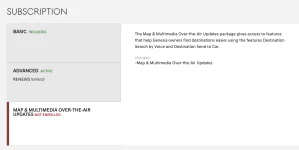
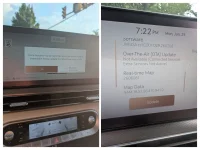
As the subject says - getting attached messages after manually updating (May maps/update) the car. I let the Maps/MM OTA expire, b/c I don't mind doing this manually and I see little value in paying for it - but NOW, with this latest update, it seems to indicate that it uses online only and falls back to off-line maps only for connectivity issues... and even though (I checked) the Map OTA subscription doesn't say anything about this feature, I'm wondering - anyone else see these msgs? Or, am I the only one who let the Maps OTA subscription lapse? I _did_ dbl-check with the USB, says it's the same version as to what I have.
3 Replies
·
127 views

I’ve been looking at upgrading my older G80 to a 2026 model, and while I love almost everything about the refresh, I’m really torn on the new interior layout.
Specifically, the huge 27" OLED screen that runs across the entire dashboard.
I know the reviews are raving about it looking futuristic, but to me, it feels like Genesis is falling into the same trap as everyone else by just slapping a giant screen on the dash. I always loved how the older models had the infotainment screen beautifully recessed into the dashboard. It felt classy, minimalist, and very integrated.
This new one feels like it just sits on top of the dash like an afterthought. It doesn't feel right to me. Plus, for those who already have it, how bad is the glare on sunny days? Do you find yourself constantly wiping fingerprints off the passenger side of the glass?
Curious to hear if anyone else actually prefers the older, more traditional luxury look, or if I'm just being old fashioned.
Specifically, the huge 27" OLED screen that runs across the entire dashboard.
I know the reviews are raving about it looking futuristic, but to me, it feels like Genesis is falling into the same trap as everyone else by just slapping a giant screen on the dash. I always loved how the older models had the infotainment screen beautifully recessed into the dashboard. It felt classy, minimalist, and very integrated.
This new one feels like it just sits on top of the dash like an afterthought. It doesn't feel right to me. Plus, for those who already have it, how bad is the glare on sunny days? Do you find yourself constantly wiping fingerprints off the passenger side of the glass?
Curious to hear if anyone else actually prefers the older, more traditional luxury look, or if I'm just being old fashioned.
13 Replies
·
706 views


Does anyone know how to remove the side skirt on a 2023 G80? I am having trouble with area under the doors. I have the bottom edge loose, but I do not see how to get the top edge of the skirt loose under the doors.
0 Replies
·
43 views
Great products:
- VIN Check
- Add more horsepower!
- Clean your leather!
- Safe Emergency Charging
- Windshield Repair Kit
- Chemical Guys HydroSpeed Ceramic Quick Detailer
- Chemical Guys HydroCharge High-Gloss Hydrophobic SI02 Ceramic Spray Coating
- Get a dash cam!
- Auto Buyers Market
- Read: PSYCHOPATHY
- VIN Check
- Add more horsepower!
- Clean your leather!
- Safe Emergency Charging
- Windshield Repair Kit
- Chemical Guys HydroSpeed Ceramic Quick Detailer
- Chemical Guys HydroCharge High-Gloss Hydrophobic SI02 Ceramic Spray Coating
- Get a dash cam!
- Auto Buyers Market
- Read: PSYCHOPATHY

