• Car enthusiast? Join us on Cars Connected! iOS | Android | Desktop
  • Hint: Use a descriptive title for your new message
    If you're looking for help and want to draw people in who can assist you, use a descriptive subject title when posting your message. In other words, "I need help with my car" could be about anything and can easily be overlooked by people who can help. However, "I need help with my transmission" will draw interest from people who can help with a transmission specific issue. Be as descriptive as you can. Please also post in the appropriate forum. The "Lounge" is for introducing yourself. If you need help with your G70, please post in the G70 section - and so on... This message can be closed by clicking the X in the top right corner.

2025 OTA Problem - Wireless Carplay / Android Auto

I have read that as well. And of course there is no official notification of this anywhere as to let the people left out what is going on. (At least to my knowledge)
Lets keep them in the dark.
Next week, I pick up my 2025 GV80 Coupe here in Canada. If anyone here in Canada has the new Coupe and has updated the software so it now has Wireless Carplay please let me know if they have installed it and some of the features. I understand that in USA this update came by way of OTA but in Canada we do not have this feature. Also If anyone did the update in Canada to wireless, is Waze nav can be displayed the HUD.
 
I purchased a new 2025 GV80 and the dealer has no clue how to fix the wireless CarPlay feature. I also have a terrible vibration which I think is the tire/tires out of balance. Not very happy with my $74k purchase so far.
 
Next week, I pick up my 2025 GV80 Coupe here in Canada. If anyone here in Canada has the new Coupe and has updated the software so it now has Wireless Carplay please let me know if they have installed it and some of the features. I understand that in USA this update came by way of OTA but in Canada we do not have this feature. Also If anyone did the update in Canada to wireless, is Waze nav can be displayed the HUD.
An update, I picked up my 2025 GV80 Coupe 3.5T with E-SC, 3 days ago. The dealer had updated the software that morning (Genesis Canada) supplied them with new software and now have Wireless Carplay. Here in Canada we have never had OTA updates BUT when I was going through all the menus, just playing around, I saw a menu item called "OTA". Don't ask me where I found it, but there is now a title called "OTA".

Interesting new 27 inch screen and software, it will definitely take some time to completely understand if ever. One interesting setting and I don't necessarily use or need it, I can have Apple Maps in the background on the left (drivers side) of the screen, and Genesis maps on the right side, again just fooling around.

Something I have to get use to, on the steering wheel, all the buttons that were left side (channel changing /volume /mute etc) are now on the right side. On my old GV80 (2021) the cruise control was on the right side, now on the left side, something very small but sometimes taxes my old brain.

If you thought the GV80 (2021-2024) had a lot of menus etc, the 2025 is a whole new challenge. I am in my mid 80's and love this new fight.

If anyone has found some interesting new functions etc, let me/us know.

The 2025 GV80 Coupe is a major improvement over my 2021, much quieter, smoother and definitely more powerful. I think the E-SC spreads the power band out, far more response at lower RPMs. It took the twin turbos time to spool up, but the supercharger helps at these lower RPMs.
 
During the download on my 2025 gv80 about 20 minutes into it it stopped and I received a 0 error. Any suggestions on what this means?
Thanks.
 
During the download on my 2025 gv80 about 20 minutes into it it stopped and I received a 0 error. Any suggestions on what this means?
Thanks.
I couldn't get the OTA to update but I did install it via a USB C drive and using the Downloadable updater. Note that the instructions tell you that you can shut your car off while the update prepares but that is not correct. You need to let it run until it says it is ready to restart. It took nearly an hour for the update to get to that point. Once it was the final shut down and power off for the infotainment took maybe 5-10 more minutes. Next start up I cleared my phone from BT Connections and forgot the car on the phone in the CarPlay settings and repaired the phone by plugging it into the USBC port for CarPlay. It asked if I wanted to use wireless car play and I was good to go.
 
As far as I know it is out for all year model Genesis vehicles. Looking right now, the 2025 G90 is not listed, but it shows the 2024 has a newer software than the 2025 GV80.
 
Yes, I did look it up and edited my response. Like I said, the 2024 has a newer software version than the 2025 GV80. So, not sure if the 2024 G90 has wireless AA/CP and if you do not, not sure when you would get an update. Next cycle is supposed to be in May 2025.
 
Yes, I did look it up and edited my response. Like I said, the 2024 has a newer software version than the 2025 GV80. So, not sure if the 2024 G90 has wireless AA/CP and if you do not, not sure when you would get an update. Next cycle is supposed to be in May 2025.
got it. my response & your edit must have passed each other in the cloud:)
______________________________

Help support this site so it can continue supporting you!
 
Picked up my GV80 a few weeks ago, I pressed up the dealer to make certain all software updates were done prior to pick up.

Dealer didn't do it, claimed that they couldn't do it.

The dealer says that the car will update on its own OTA.

Is this correct?
 
I just bought a brand new GV80 coupe it also doesn't have wireless CarPlay.

How can I get this update?
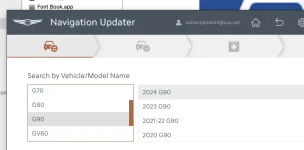
You can look in your settings to see if one is available to download and install over the air, or you can go to your Genesis owners page on the internet (Not the phone app) and it should be available for downloading to a usb stick and installing yourself. There is some software you need to install on your computer and then follow the step by step instructions. It pretty easy. I am in my 70's had have done it several times for different updates.
I am assuming that your set up your account on the Genesis owners website. If not, you should do that first.
You dealer should have updated everything for you before you got the car, but they are is such a rush to get them out the door that they probably did not.
Good luck with the car.
 
Picked up my GV80 a few weeks ago, I pressed up the dealer to make certain all software updates were done prior to pick up.

Dealer didn't do it, claimed that they couldn't do it.
Dont believe that part….l

The dealer says that the car will update on its own OTA.

Is this correct
Maybe, maybe not is our experience.
 
Picked up my GV80 a few weeks ago, I pressed up the dealer to make certain all software updates were done prior to pick up.

Dealer didn't do it, claimed that they couldn't do it.

The dealer says that the car will update on its own OTA.

Is this correct?
I bought a 2025 G70 in January that did not have the latest update. Once I set up connected services I was able to initiate an over the air update from the touch screen in the car.
 
I bought a 2025 G70 in January that did not have the latest update. Once I set up connected services I was able to initiate an over the air update from the touch screen in the car.
Please explain steps to initiate OTA….
 
No way to initiate in our 2025 GV80 coupe or G90 per dealer and genesis NA
 
No way to initiate in our 2025 GV80 coupe or G90 per dealer and genesis NA
You can't force Genesis to send the update to your car as they send them out in waves to avoid overloading their servers with everyone downloading at once. In my car, a 21, The update might be ready to download and you just don't know it you might have missed the notification. You can check in the settings to see if any update is ready to install. Now, I will repeat, I have a 21 not a 25 so what you say is probably right, But It looks like David-R checked his setting and it was there, and he was able to install it. He has a 25. It is worth a peek in your settings to see if one is ready to download.
Good luck to you all with this issue. I am one of the lucky ones that has never hand any issues with connective services with the exception of when their servers go down.
 
Please explain steps to initiate OTA….
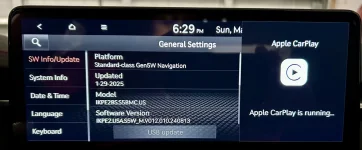
In my G70:
- Press the setup button under the touch screen
- Select “general settings” on the touch screen
- At that point I see the screen in the picture below

In my picture, where you see USB update, which is actually grayed out, you will see it say “Update Available” and it will not be grayed out. I tapped on it and the update started. It took a couple of hours to complete it.

IMG_3595.webp
 
Looking to update and upgrade your Genesis luxury sport automobile? Look no further than right here in our own forum store - where orders are shipped immediately!
Back
Top