• Car enthusiast? Join us on Cars Connected! iOS | Android | Desktop
  • Hint: Use a descriptive title for your new message
    If you're looking for help and want to draw people in who can assist you, use a descriptive subject title when posting your message. In other words, "I need help with my car" could be about anything and can easily be overlooked by people who can help. However, "I need help with my transmission" will draw interest from people who can help with a transmission specific issue. Be as descriptive as you can. Please also post in the appropriate forum. The "Lounge" is for introducing yourself. If you need help with your G70, please post in the G70 section - and so on... This message can be closed by clicking the X in the top right corner.

Cruise Control - Smart or Not? Has anyone mastered it?

I feel I'm a master at using the "Adaptive (aka Smart) Cruise Control" on the GV70

  • Yes - It quells before me and performs wonderous things. I use it regularly.

    Votes: 42 89.4%
  • No - Damn thing is clueless and overly complex. Instructions suck. I tried it and now avoid it.

    Votes: 5 10.6%
  • Huh? - It has cruise control? I've actually never tried it.

    Votes: 0 0.0%

  • Total voters
    47

deilenberger

Registered Member
Joined
Feb 25, 2024
Messages
137
Reaction score
86
Points
28
Genesis Model Year
2024
Genesis Model Type
Genesis GV70
I'd first like to find out how many people have tried the cruise control, and how many feel they can control it. And a discussion will follow..
 
Cruise control on any car is not perfect and has limits. The Smart Cruise is excellent though. On a long trip, especially with HDA, I can get in another couple hundred miles in a day.

You still have to look out the window once in a while though.
 
Looking to update and upgrade your Genesis luxury sport automobile? Look no further than right here in our own forum store - where orders are shipped immediately!
I'm growing increasingly frustrated in trying to bend the cruise control to my will (and desires.) Perhaps I'm spoiled, but using the Porsche Adaptive Cruise Control is damn near intuitive. Using the GV70 - well - I've yet to use it where it didn't do something I expected it to do, or it did something unexpected.

I've tried reading the Quick Guide, the on-board help system (clips from that below) and the full GV70 owners, The section on "Smart Cruise Control" (AKA "SCC") starts on page 7-76 of the owner's manual. It goes until 7-95, when we get into "Navigation-based Smart Cruise Control" (AKA "NSCC")

Unfortunately, I haven't been able to get screen captures or photos of the dashboard when I'm trying to use the cruise control, I felt that might be a bit unsafe, and NJ is on a no-handheld-cell-phones while moving campaign at the moment (not a bad thing at all.) And - in NONE of the manuals appear explanations for some of the symbols that somewhat randomly appear on the screen when I'm trying to use the system.

I hate to bring the Porsche system up - but it's bone simple to use. Everything for it is on a stalk on the steering column (left side). You arm the system by pressing a button on the end of the stalk, a green speedometer thing lights up on the dashboard. You engage it by pushing the shaft forward. You disengage it by pulling the shaft back. You can increase the set speed (1 MPH, then 5MPH) by pushing the stalk up, or lower the set speed by pulling the stalk down. When you initially engage it - it presets to 4 car lengths following distance. There is a small lever sort of switch on the surfaces of the stalk facing the driver - you can change the following distance using that small lever. And that's it. It just works. It displays on the dash when the radar unit is reading a vehicle in front of the car, or tells you when it has gone back to a passive system since there was no vehicle to follow in front of the car.

I had hoped the Genesis system would be similar in operation. It doesn't appear to be. More on that in the next post- I see there are responses already.
 
Cruise control on any car is not perfect and has limits. The Smart Cruise is excellent though. On a long trip, especially with HDA, I can get in another couple hundred miles in a day.

You still have to look out the window once in a while though.
Ed,

That's great - hopefully, you can guide me out of the confusion and frustration I'm having with the system (or maybe mine just isn't working right..) I've had experiences as you described with the Porsche system, I've driven most of the way from NJ to CA on cruise control, and then back.. several times.

Example - today - urban street, speed limit 25mph. Radar speed signs tell you what speed you're going. 27mph indicated in the Genny=25mph real speed (just like a Porsche actually.)

I press the button to turn on the cruise control. There is NO car in front of me. The system then seems to be asking me to set the following distance (doesn't have a default?) before it will activate. At this point, the speed I set it to is displayed but flashing and the cruise control isn't active. The little car icon has a red nose and is spitting out green goobers. There is a line across the display that changes position if I press the following distance button. After a while - the little car icon turns green and blue dots are coming out of it. The speed display of the speed I selected goes solid white. At that point (and only after all that) - the cruise control engages.

Or

I press the button to turn on the cruise control. There IS a car in front of me. The display again shows the bar for the following distance, and that moves if I toggle through the distance button. Eventually, the little car on the display has a blue nose and green dots between me and the vehicle in front of me - and the system engages.

The first scenario is the puzzling one to me, since it takes a considerable amount of time, and distance for it to decide there is no vehicle in front of me so it's OK to go the speed I have it set to. And there doesn't seem to be any way to tell it there is no vehicle in front of me.

The second scenario is simple enough - the system located a car in front of me, then it asks how close I want to be, and after I go through all the distance settings it eventually decides I mean some distance and it engages. Again, there is a significant delay in engagement. I think if it had a default following distance, or just remembered the last following distance used it would work like the Porsche system.

So any ideas about what I'm doing wrong?
 
Ed,

That's great - hopefully, you can guide me out of the confusion and frustration I'm having with the system (or maybe mine just isn't working right..) I've had experiences as you described with the Porsche system, I've driven most of the way from NJ to CA on cruise control, and then back.. several times.

Example - today - urban street, speed limit 25mph. Radar speed signs tell you what speed you're going. 27mph indicated in the Genny=25mph real speed (just like a Porsche actually.)

I press the button to turn on the cruise control. There is NO car in front of me. The system then seems to be asking me to set the following distance (doesn't have a default?) before it will activate. At this point, the speed I set it to is displayed but flashing and the cruise control isn't active. The little car icon has a red nose and is spitting out green goobers. There is a line across the display that changes position if I press the following distance button. After a while - the little car icon turns green and blue dots are coming out of it. The speed display of the speed I selected goes solid white. At that point (and only after all that) - the cruise control engages.

Or

I press the button to turn on the cruise control. There IS a car in front of me. The display again shows the bar for the following distance, and that moves if I toggle through the distance button. Eventually, the little car on the display has a blue nose and green dots between me and the vehicle in front of me - and the system engages.

The first scenario is the puzzling one to me, since it takes a considerable amount of time, and distance for it to decide there is no vehicle in front of me so it's OK to go the speed I have it set to. And there doesn't seem to be any way to tell it there is no vehicle in front of me.

The second scenario is simple enough - the system located a car in front of me, then it asks how close I want to be, and after I go through all the distance settings it eventually decides I mean some distance and it engages. Again, there is a significant delay in engagement. I think if it had a default following distance, or just remembered the last following distance used it would work like the Porsche system.

So any ideas about what I'm doing wrong?
Sounds like the new version is different. The distance I set once and it defaults to it every time. I don't get blue nose, green dots, or other entertainment.
 
Sounds like the new version is different. The distance I set once and it defaults to it every time. I don't get blue nose, green dots, or other entertainment.
Uggh. I'm sorry to hear that. It's probably something that changed with HDA-2 being turned on (it's an integral part of HDA-2..)

Oh well - maybe someone else can offer suggestions..
 
I find it very easy. Use it all the time both in the city and on the highway. It is basically the same to operate as you said the Porsche is just on the wheel not a stalk. I have turned off the navigation based feature. Like my previous Mercedes it slows down too much for corners.
 
I find it very easy. Use it all the time both in the city and on the highway. It is basically the same to operate as you said the Porsche is just on the wheel not a stalk. I have turned off the navigation based feature. Like my previous Mercedes it slows down too much for corners.
I believe - from what I've read here - that the '23 models have HDA-1, not HDA-2. I could be wrong about that.. does your car do automated lane changes? Put on the turn-signal and it changes to the desired lane by itself?
 
Is this helpful?

 
Cruise control on any car is not perfect and has limits. The Smart Cruise is excellent though. On a long trip, especially with HDA, I can get in another couple hundred miles in a day.

You still have to look out the window once in a while though.
I have had it for many years...first on my BMWs and now on my Genesis GV60P. I love it. I have a buddy who 15 years ago bought a loaded Infinity and still had it. He doesn't drive that much and saw no real need to upgrade. Then he did an extended test drive of the Lucid Air...and suddenly he loved having adaptive cruise control and he did want an EV. Not very much later, last week, he bought a Lucid Air.

Incidentally, my 2023 GV60P only has HDA I, not II. I like it set to closest distance and it retains that setting.
______________________________

Help support this site so it can continue supporting you!
 
I find it very easy. Use it all the time both in the city and on the highway. It is basically the same to operate as you said the Porsche is just on the wheel not a stalk. I have turned off the navigation based feature. Like my previous Mercedes it slows down too much for corners.
On my car there is a setting to have the car do this or not do this...I have mine set to NOT do this. I would rather make those decisions myself on the fly as I drive.
 
I think it's becoming obvious (at least to me) that there is a big difference in how the ACC works on HDA-1 and HDA-2 cars.. On the HDA-2 cars more inputs are being looked at and I feel they haven't quite sorted out what to do with them.

Anyone have a 2024? (HDA-2)?
 
Is this helpful?

This is literally how it worked all the way back to 2015. Exact same buttons - exact same functions. Nothing different as far as just using SCC. Since you can disable all the rest and just use this - I would do that to begin with and work on incrementally adding them as you become more comfortable and familiar.
 
This is literally how it worked all the way back to 2015. Exact same buttons - exact same functions. Nothing different as far as just using SCC. Since you can disable all the rest and just use this - I would do that to begin with and work on incrementally adding them as you become more comfortable and familiar.
I'm not sure how to disable the rest - perhaps if I disable the active steering it will behave more like a real cruise control.. I'll have to give that a try when I can pry it away from my wife.
 
Is this helpful?

I saw this - and it's actually probably better than the Genesis channel's two videos on using the ACC - I get a kick out of:

1712186200902.webp

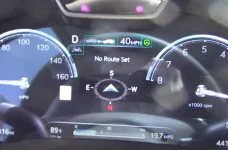
All of those mean something . So far what I see there - left box = not green, has not centered itself in the lane yet. 2nd box = has aquired the car in front of it, 3rd box - cruise control speed = 40MPH, final box - active steering is turned on, the car is supposed to be capable of steering itself, IF it can find the middle of the lane it's in (whiich it hasn't done yet in this spot in the video.)

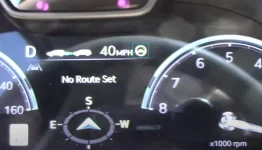
This next one - he's lost the active assist (steering wheel went white) because he went through an intersection. Lane markers still not green. Not sure what that means at this point. It probably means something but the manual is somewhat unclear about that. He's a bit unclear too.

1712186600170.webp

So he gets a bit more along, and at one point had to manually brake when the vehicle didn't see traffic cones forcing all the traffic from the right lane into the left lane - after reingaging - the system showed:

1712187322763.webp

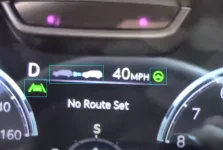
So we now have the lane-departure system working - (lines besides vehicle) it's lit up green - but the car in front hasn't been captured - and the lane control assist is working (green steering wheel). He never comments on the errant behavior of the lane-departure warning system.

At 12:06 in his video - he announces not to depend on the ACC to stop the car if the car in front stops that "it's not meant to detect stationary objects" - which negates what was said earlier about using it in stop and go traffic.

At that point - I decided he was as confused as I was, and I was getting more confused watching his video.

More later..
 
You have quite a few things wrong there...have you not read the manual?
 
You have quite a few things wrong there...have you not read the manual?
Please refer me to the pages showing these icons and what they mean... thanks!

And yes - I've read all of Section-7 in the manual, where what is missing is a layout drawing of the dash symbols - and what they indicate under what conditions. Did you find one I overlooked?
 
Left Box (car between the lines image) - Lane Keep Assist. Turned on and off with a long hold of lane assist button on steering wheel. Turns on just over 40 mph and reactively pulls you back into your lane if you drift over a line. Can be set to just warning, if wanted.

Steering Wheel image - Lane Follow Assist. Proactively steers for you keeping you centered in your lane. Needs to see actual lanes to work. Turned on and off with a quick push of the lane assist button. It comes on automatically when you turn on cruise control on a major freeway (part of Highway Driving Assist). And again, you have the freedom to turn it off and stay in cruise control.

The image of the 2 cars. Adaptive Cruise. I believe I've only seen the dots blue, but regardless, the operation is the same. 4 presets distances, reducing as you push the button.

The speed in the picture is the speed that you have set for cruise control. It's adjusted with the toggle on right side of your steering wheel.

Here's a video I made going over everything on your car.
 
Left Box (car between the lines image) - Lane Keep Assist. Turned on and off with a long hold of lane assist button on steering wheel. Turns on just over 40 mph and reactively pulls you back into your lane if you drift over a line. Can be set to just warning, if wanted.

Steering Wheel image - Lane Follow Assist. Proactively steers for you keeping you centered in your lane. Needs to see actual lanes to work. Turned on and off with a quick push of the lane assist button. It comes on automatically when you turn on cruise control on a major freeway (part of Highway Driving Assist). And again, you have the freedom to turn it off and stay in cruise control.

The image of the 2 cars. Adaptive Cruise. I believe I've only seen the dots blue, but regardless, the operation is the same. 4 presets distances, reducing as you push the button.

The speed in the picture is the speed that you have set for cruise control. It's adjusted with the toggle on right side of your steering wheel.

Here's a video I made going over everything on your car.
Thank you thank you thank you! I can't wait to get out and borrow the wife's car for a few hours..

I'll probably learn even more as I watch your video. Looks like the good stuff starts at 18:56 - I'm going to return to that in the AM, it's almost 1AM, and I have one episode of the Three Body Problem to watch before bed. THANK YOU. Maybe you should send a copy of your video to Genesis.. give them an idea of how a handover should be done.
 
I think it's becoming obvious (at least to me) that there is a big difference in how the ACC works on HDA-1 and HDA-2 cars.. On the HDA-2 cars more inputs are being looked at and I feel they haven't quite sorted out what to do with them.

Anyone have a 2024? (HDA-2)?
I have a 2024 and I use the adaptive cruise all the time. I set the distance once. The system uses this as the default. I have lane keep and steering assist on. I turn on cruise, set my speed and bobs your uncle. If a car cuts in front or is slower than my set speed the car slows to maintain my set distance. I signal a lane change, the car moves to the new lane and accelerates to my set speed. I get an alert after about two minutes to make sure my hands on the steering wheel. Just give it a tug and on we go. Love it, great for long hauls.
 
Back
Top