• Car enthusiast? Join us on Cars Connected! iOS | Android | Desktop
  • Hint: Use a descriptive title for your new message
    If you're looking for help and want to draw people in who can assist you, use a descriptive subject title when posting your message. In other words, "I need help with my car" could be about anything and can easily be overlooked by people who can help. However, "I need help with my transmission" will draw interest from people who can help with a transmission specific issue. Be as descriptive as you can. Please also post in the appropriate forum. The "Lounge" is for introducing yourself. If you need help with your G70, please post in the G70 section - and so on... This message can be closed by clicking the X in the top right corner.

Folders copied to Jukebox?

My music folders from within the USB all seem to be working alright now. I am also able to play project videos on the 12 inch screen as well which is a nice feature, and the sound is great! One thing I find odd is that when I add still images to my UBS drive within their own project folders the system mixes them all up with tons of little images from the album art with no way to keep them within their respective folders which makes it useless. Does anyone have any thoughts on this?
 
My music folders from within the USB all seem to be working alright now. I am also able to play project videos on the 12 inch screen as well which is a nice feature, and the sound is great! One thing I find odd is that when I add still images to my UBS drive within their own project folders the system mixes them all up with tons of little images from the album art with no way to keep them within their respective folders which makes it useless. Does anyone have any thoughts on this?

Let me think about that one I rarely do pictures. I do have a few videos though. While you are moving you can still listen to the video but there is no picture.
 
Yes, my videos are fine and the picture goes away while in gear but my still pictures are a mess due to the fact that each album in my music folders has album art (little images relating to the artist and album} that get mixed in with my folders containing still images. It makes sense that it would do this because the system is looking at the entire usb drive for image files when it's in the image mode and apparently does not have the ability to look for pictures within a given folder only. That said, if this is life's biggest problem I'm still doing okay :)
 
Looking to update and upgrade your Genesis luxury sport automobile? Look no further than right here in our own forum store - where orders are shipped immediately!
Yes, my videos are fine and the picture goes away while in gear but my still pictures are a mess due to the fact that each album in my music folders has album art (little images relating to the artist and album} that get mixed in with my folders containing still images. It makes sense that it would do this because the system is looking at the entire usb drive for image files when it's in the image mode and apparently does not have the ability to look for pictures within a given folder only. That said, if this is life's biggest problem I'm still doing okay :)

Yes I checked and mine does the same thing mixing pictures with album art. The video and songs are a lot of fun though.
 
at least I am not suffering alone. It's been nice communicating with you and I am so glad you got me off to a good start with my sound system. I have a 64 GB thumb drive with lots of great music for those fantastic road trips in my beautiful silver G90. I am old, I have had them all and I can say without hesitation that this is the car to own.
 
I am exactly in the same boat (car) and the same place in life as you. Great car! I will say that for road trips I find audible books to be the best. Plays through the car’s audio system via Bluetooth from your phone.
 
I am looking forward to that too. So many miles so little time.
 
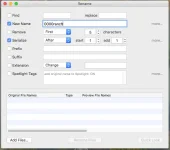
I found a little work-around for the photo issue that we were discussing above, just in case you'd like to have some images of your favorite people, places or things for viewing on your G90 screen. If you use one of the popular "renaming" software programs that we were discussing it is very easy to make this an acceptable alternative to the mess that is otherwise created. Here is what I did: I used the software to rename my images so that they are numbered with that number beginning with 3 zeros. I'll explain. When you attempt to look at images that are on your usb drive and that same usb drive also has albums, the album art images will be mixed in with your personal images which makes a mess of things. If you can modify the number of your images so that they start with several zeros this will (in all likelihood) place those images at the top of the list in your car's system for viewing so that all of the album art junk it beneath (but still in the list). I started all of titles for my ranch images to begin with "000 and then have the software follow up with 01-02-03, etc. at the end. So, they look like this: 000ranch001.jpg then 000ranch002.jpg, and so on. Then when I renumbered my images for some other subject I did the same thing but I started those numbers with 4 zeros so that they would be separated from the previous batch, and so forth. It literally took me 2 minutes to do this with hundreds of images in several batches because the software does all of the hard work, you just add a zero here and there. I used a free app called "Rename". I use it on my Mac but it may also be available for PC, not sure. While this might all seem a little silly (depending on who you are what your particular needs are) there are those who could make good use of this. For a realtor who may want to have some images of their premiere properties this would be great, and the cool factor of having this stuff show while sitting in the comfort of this beautiful car is also a plus. I know, this is probably more than most people want to know, but there it is. I hope this helps :)Screenshot 2018-04-12 10.23.21.webp
 
I found a little work-around for the photo issue that we were discussing above, just in case you'd like to have some images of your favorite people, places or things for viewing on your G90 screen. If you use one of the popular "renaming" software programs that we were discussing it is very easy to make this an acceptable alternative to the mess that is otherwise created. Here is what I did: I used the software to rename my images so that they are numbered with that number beginning with 3 zeros. I'll explain. When you attempt to look at images that are on your usb drive and that same usb drive also has albums, the album art images will be mixed in with your personal images which makes a mess of things. If you can modify the number of your images so that they start with several zeros this will (in all likelihood) place those images at the top of the list in your car's system for viewing so that all of the album art junk it beneath (but still in the list). I started all of titles for my ranch images to begin with "000 and then have the software follow up with 01-02-03, etc. at the end. So, they look like this: 000ranch001.jpg then 000ranch002.jpg, and so on. Then when I renumbered my images for some other subject I did the same thing but I started those numbers with 4 zeros so that they would be separated from the previous batch, and so forth. It literally took me 2 minutes to do this with hundreds of images in several batches because the software does all of the hard work, you just add a zero here and there. I used a free app called "Rename". I use it on my Mac but it may also be available for PC, not sure. While this might all seem a little silly (depending on who you are what your particular needs are) there are those who could make good use of this. For a realtor who may want to have some images of their premiere properties this would be great, and the cool factor of having this stuff show while sitting in the comfort of this beautiful car is also a plus. I know, this is probably more than most people want to know, but there it is. I hope this helps :)View attachment 13339

Very clever. I am going to give it a try. Simple and elegant solution. Good thinking.
 
As far as I know, the jukebox reads the tags on each mp3 to classify them by name, artist, album, etc. I use a program called mp3tag to arrange all the songs by album. Then the songs are read by alphabetical order. If you prefer to keep the album order, mp3tag will rename the files as track-name and play the music in the right order.
 
As far as I know, the jukebox reads the tags on each mp3 to classify them by name, artist, album, etc. I use a program called mp3tag to arrange all the songs by album. Then the songs are read by alphabetical order. If you prefer to keep the album order, mp3tag will rename the files as track-name and play the music in the right order.

That's a great tip. Thanks!
 
Is there a way to copy Folders from a USB to the Jukebox? I have all folders on my USB stick. I would love to have the folders copy over so it is easy to get to different types of music. I did copy all the music to the Jukebox, but there are no folders to sort by. Having to go through 2000+ songs alphabetically, by artist or Genre is not acceptable to me. My folders are like playlists. I guess if it is not possible, I will just have to leave my thumb drive in there as I can search by folders using that method. Thanks in advance!
I'm with you on trying to figure this out! Using a USB obstructs the space allotted to charging my Iphone. It would be a choice; either use the USB drive to do our music via folders (like mine or my husbands favorite songs) OR charge our phone! Not room for both! GENESIS - you must fix this. We need folders.
 
I'd like to know what Jukebox does that is better than just plugging in a thumdrive. ????
RIGHT! can't do USB and charge phone at the same time! No room to do both!
 
cigarette lighter to usb adapter, cheap fix. I have one in the center console for my phone, as wife uses the in dash charger for her phone.
 
RIGHT! can't do USB and charge phone at the same time! No room to do both!

Charge the phone via the cigarette lighter plug. Then you can do both.
 
RIGHT! can't do USB and charge phone at the same time! No room to do both!

you do know there is a power only USB port in the console right? it even has a little notch to lead the wire out at the front on both sides so you don't crimp the wire.
 
Of course, that makes sense. I found a free software called Rename that does this perfectly. I know this has been a long standing problem for people who create playlists in a specific order only to have their devices play them back in alphabetical order. I'll get into it. Thankyou!

- - - Updated - - -

I had great success! I also learned that pressing the 'menu' button while in the music mode brings up all those great choices and then choosing 'search' allows me to open individual folders with separate albums (yup, I'm new to this). The great news for me is that this system will actually play lossless FLAC files too which surprised the hell out of me. I have been trying to relocate all of my music and replace the files in FLAC so this is good news. I think a lot of people seem disappointed by this system with their comments about how all of their music files seem to appear in one long list, which they do in some windows, but if you dig deeper as I have mentioned above you can pretty much organize your music anyway you like and this simple little FREE "Rename" program keeps everything in order and is VERY easy and to use. You can rename your files very quickly. Thanks again to Mcc for the inspiration to get into all of this.
Thank you so much for this info, It was very frustrating trying to figure the Album, Artist etc... info out on my Genesis. I'm cruising the city/highways now. Thank you again!
 
Is there a way to copy Folders from a USB to the Jukebox? I have all folders on my USB stick. I would love to have the folders copy over so it is easy to get to different types of music. I did copy all the music to the Jukebox, but there are no folders to sort by. Having to go through 2000+ songs alphabetically, by artist or Genre is not acceptable to me. My folders are like playlists. I guess if it is not possible, I will just have to leave my thumb drive in there as I can search by folders using that method. Thanks in advance!
I don't know if you found the answer yet, but, if not click on the following link for the answer to your question:
 
Messing around with the jukebox and saved several songs and images. Now I cannot seem to delete a file, the delete selection is grayed out.

So far, I think it would be easiest to just use a thumb drive and not copy to the jukebox hard drive. This interface definitely needs some improvement.
 
Last edited by a moderator:
Back
Top