• Car enthusiast? Join us on Cars Connected! iOS | Android | Desktop
  • Hint: Use a descriptive title for your new message
    If you're looking for help and want to draw people in who can assist you, use a descriptive subject title when posting your message. In other words, "I need help with my car" could be about anything and can easily be overlooked by people who can help. However, "I need help with my transmission" will draw interest from people who can help with a transmission specific issue. Be as descriptive as you can. Please also post in the appropriate forum. The "Lounge" is for introducing yourself. If you need help with your G70, please post in the G70 section - and so on... This message can be closed by clicking the X in the top right corner.

G70 Dash Cam Installation: BlackVue DR900S-2CH

Ruissimo

Registered Member
Joined
Aug 22, 2010
Messages
1,665
Reaction score
217
Points
63
Genesis Model Type
Genesis G70
I decided to replace my nearly-7 year-old 1080P single channel Itronics ITB-100HD dash cam with a newer model from BlackVue. At the time I bought it, the ITB went head-to-head with the equivalent model from BlackVue, but I went with the ITB based on heat-dissipation reviews.

I was not disappointed. The camera never EVER failed me in all these years, but new car... new tech! Time to upgrade to 4K! And my brother gets “old reliable” for freeeeee...

21364
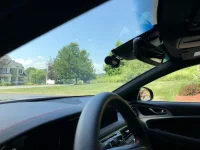
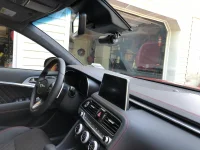
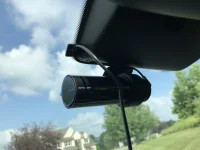
The front camera is MASSIVE. It definitely does not pass the "Stealth" test...

INSTALLATION DETAILS:

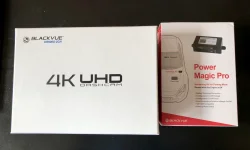
Materials Needed: One (1) BlackVue DR900S-2CH Dash Cam Kit, with front-facing head unit camera, rear camera, power cable, camera-connecting cable and two mounts, One (1) BlackVue Power Magic Pro Kit
21354

21355
Top left: rear (small) and front (large) cameras; Top right: Power Magic Pro unit and hardwire power cables
Bottom left: cam-to-cam connecting cable and power cable; Bottom right: Memory Card, 3M cable clips and wire tool;


Tools Needed: Wire Crimper/Stripper, Phillips Screwdriver, LED Flashlight, BlackVue Wire Tool (included with kit above), Needle-Nose pliers or Fuse Removal Tool, Paper Towels, Some Patience

Time Required: Approximately 2 Hours with 2 People or ~ 3 Hours Solo

Steps:

1) Clean installation area with glass wipe. Ensure glass is dry. Best done when glass is not cold (hint, a hairdryer can warm the area up as needed).

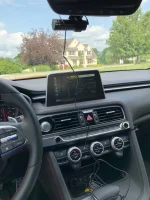
2) Place mount behind rearview mirror. Affix to windshield. The one picture I didn’t take was to show you how you can’t place the camera in front of the sunlight/rain sensor below the windshield, so I placed it slightly to the left of that. I think there is a way to flip the unit upside down which would center it a bit... but I didn’t play with the settings that invert the image. Someone should try this.

3) Attach Head unit (the big’un) to mount.
21408

4) Insert cigarette lighter (power) cable into left side power hole on the main unit.
21357

5) Use 3M clips as needed to keep cables neat and as out of sight as possible.

21358

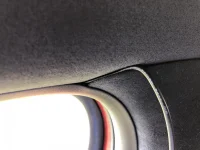
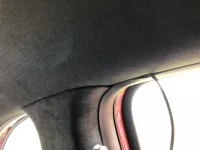
6) Run cable inside the roof liner carefully; use plastic wire tool to assist with hiding the cable as you go left along the roof liner.

21359

7) Run the cable in the space between the roof liner and A pillar. The tool definitely helps with this part!
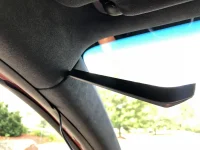
21360

8) This part is a little tricky: I ran the cable down the A pillar, but was careful to just hide it below the rubber seal, and not push the cable into the A pillar itself - I hope this is enough to keep it from interfering with the airbag, should it deploy... someone may have a better way, which likely involves removing the pillar cover completely and tucking the cable behind the airbag. Ain't nobody got time for that.

21361

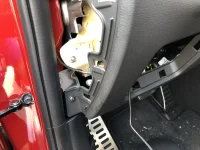
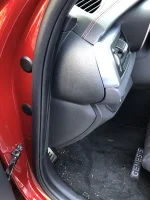
9) Now, you've come to the hard part: using the tool, and being careful not to exhort too much pressure, hide the cable all the way down the left side. Use the tool to remove the panel below, which will make things a lot easier for you:
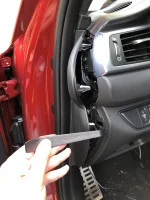
21362
 
Last edited:
10) Onto the steps that scare people off! Now that the left panel is off, remove the fuse box cover as well. Run the cable through the left panel and through the front fuse box hole so you can work on connecting the Power Magic Pro unit and power cables.

IMPORTANT: THIS IS A GOOD TIME TO PLUG IN YOUR FRONT UNIT TO THE CIGARETTE LIGHTER, so you can test if it is working properly.

21365

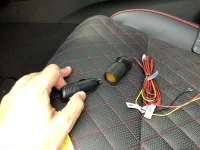
11) Connect the cigarette lighter cable into the female connector attached to the hardwire cables.

21366

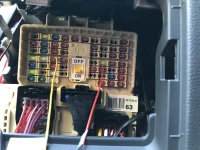
12) Learn the three cables! Yellow goes to a fuse for something that is NOT critical but always on (I chose the trunk release fuse). Red goes to a fuse that only gets power when the ignition is on (I chose the armrest charger fuse). Black is the ground.

21367

13) Cheat sheet on the back of your fuse box door. I've circled the fuses I tapped.

21368

14) And here are the actual fuses I tapped into. If someone thinks I could have chosen better ones, please let me know ;)

21369

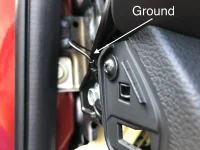
15) Attach the ground cable to a metal bolt. I chose this one. Make sure it's tight by pulling on it slightly.

21370

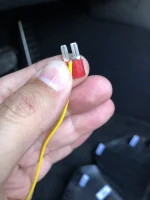
16) Using needle-nose pliers or a fuse removal tool, remove the always-on fuse. Wrap the yellow power cable around the right tooth like such:

21371

17) Plug the fuse back into its home. Make sure it goes all the way in.

21372

18) Repeat steps 16 and 17 for the ignition-only fuse.

21373

19) I apologize for the lack of photos in the next few steps. Once the three power cables are hardwired, connect the big yellow plug at the other end into the Power Magic Pro (PMP) box.

20) Set the PMP switch to ON.

21) Set your switches for hours and voltage according to the instruction manual and your preferences. I chose UP on everything (6 hours, 12 volts).

22) Wrap your PMP unit and cables neatly and place them in the fuse box area, to the right, but make sure they don't interfere with the steering column!

21374
 
Last edited:
23) Replace the left side cover. You're all done with this part!

21375

24) Back to the head unit with ya! Plug the camera-to-camera long cable into the head unit. Remember, the L shaped connector goes into the left hole and into the fuse box; the straight edge cable goes into the right hole and to the rear camera.

21376

25) Run the wire up the center and up to the roof liner. Run it along the roof liner to the right A pillar. Use copies amounts of clips, and the plastic wire tool.

21377

26) You get the idea. Run the cable through the top of the A pillar. This time, however, you're not going down, you're going up and over the front passenger door roof liner.

21378

27) When you get to the B pillar (behind the passenger door), just keep going.

21379

28) Keep going over the rear passenger door.

21380

29) When you clear the rear passenger door, put the cable down on the rear seat and switch your focus to the rear camera. I placed mine slightly to the left of the center line, and down a few millimeters (it's okay, I'm European).

30) Plug in the cam-to-cam cable and run the wire up to the roof liner. NOTE: I didn't place a 3M clip here, but I'm probably going to that just that tomorrow.

21381

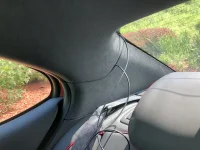
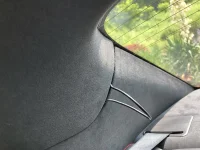
31) Run the cable from the rear unit to the left rear pillar. Both ends of the cable you are running should meet here. There's a lot of real estate in there... and you're gonna need a whole lot of it to tuck the wires all in.

21382

32) Almost gone!

21383

33) All gone!

21384
 
Last edited:
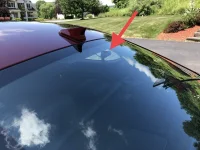
34) You are basically done at this point. Nothing left now but to aim those bad boys properly.

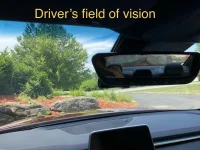
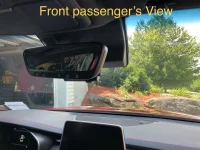
35) Download your BlackVue app and connect your phone to the head unit. I was able to stream a live video to the phone using the app, and was able to aim both cameras to my liking. NOTE: the sharp lines of both the windshield and rear window make this car look MINT... but some of the vents/speakers really play a number on you in the form of some nasty reflections in most lighting. A small price to pay, and it doesn't interfere too much with the practicality of this dash cam model.

ENJOY YOUR NEW DASH CAM!

21385
View from outside driver's door

21386
Front view

21388
View from outside front passenger door

21389

21390

21391
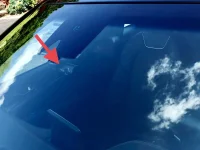
Can you see it in the front windshield?

21392
View from rear left passenger door

21393
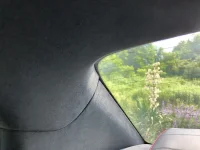
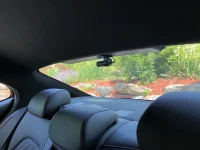
Can you see the rear camera?
 
Last edited:
Final thoughts:

The install took about 3 hours, but I had a TON of distractions (4 kids and a dog, mostly). The addition of the Magic Pro definitely made things a bit more difficult than a direct install without parking mode, but not terribly more difficult.

The addition of the rear camera was probably another 15-20 minutes added to the install time, if you're interested in that.

The camera is great so far - the videos are a bit dark, but a) today was very cloudy/t-stormy and b) I haven't played with the brightness setting on the camera. I am recording in 4K @ 30fps in the front and 1080P @ 30 fps in the back.

Here is a video (back and front, same scene. Apologies for the music). Kids in the car... and they wanted Hits 1. When I'm alone, I play 5.1 surround sound flac files of good stuff (Beatles, Marvin Gaye, Lynyrd Skynyrd, etc). Back video looks similar in quality as my ITB camera, maybe slightly better, since it's 7 or 8 years' worth of new tech.


I'll post some sunny videos soon, as well as night mode. I still haven't driven this car at night for some reason! WEIRD.
 
Last edited:
Awesome install + write-up!
Thanks! I’ll post a video or two shortly. I forgot to mention, I didn’t use the 16GB card they included with the camera. Instead I bought one of these guys:

Samsung 256GB 100MB/s (U3) MicroSDXC EVO Select Memory Card with Adapter (MB-ME256GA/AM)

https://www.amazon.com/dp/B072HRDM55/ref=cm_sw_r_cp_api_i_UjuiDbJ9WR25B

Worked like a charm all day.

I’m a little hesitant about keeping the camera on parking mode all night tonight until I get my jumper cables tomorrow, so I’m unplugging the power cord. I’ll test parking mode tomorrow night and let you all know my findings.
 
Outstanding write up! Thank you for taking the time to do this. Very well done.
 
[UPDATE] I decided to leave parking mode on last night before going to bed.

I’m happy to report that:

1) the battery didn’t die
2) the unit shut itself off (probably after 6 hrs, since that’s the setting I kept it on)
3) parking mode is sweet! I walked in front of both cameras last night, and the videos recorded perfectly

I’m gonna keep the setting at 6 hrs for a week, since I usually go out for lunch at work around noon anyway... but I may try to set it to 12 one of these days.

If you have money to burn, I recommend getting one or two BlackVue batteries instead of the Power Magic Pro, especially if you’re worried about your car battery. But so far, so good!
 
Last edited:
Bridge video:

FRONT:


BACK:


And I *STILL* haven't driven my car at night!!!
 
Nice job. I installed my front only one today. I just pulled the trim cover off the forward camera and put a small notch and ran the wires inside along with factory wires for the lane camera and mirror.
 

Attachments

  • 5E5AC044-3D57-4BBD-9506-8D4598EEB165.webp
    5E5AC044-3D57-4BBD-9506-8D4598EEB165.webp
    90.1 KB · Views: 109
Very nice!
 
So this happened:


And luckily, it didn't dent! So I won't be parking there again.
 
Looking to update and upgrade your Genesis luxury sport automobile? Look no further than right here in our own forum store - where orders are shipped immediately!
I forgot to mention, I didn’t use the 16GB card they included with the camera. Instead I bought one of these guys:

Samsung 256GB 100MB/s (U3) MicroSDXC EVO Select Memory Card with Adapter (MB-ME256GA/AM)

https://www.amazon.com/dp/B072HRDM55/ref=cm_sw_r_cp_api_i_UjuiDbJ9WR25B
About the micro SD card. So does that plug in somewhere into the front camera and it records both front and rear? What do you use to edit the "clips"? Is that something blackvue does for you? Or do you remove SD card and plug into a PC to edit?

Great job and great write up!
 
About the micro SD card. So does that plug in somewhere into the front camera and it records both front and rear? What do you use to edit the "clips"? Is that something blackvue does for you? Or do you remove SD card and plug into a PC to edit?

Great job and great write up!
The SD card goes in the front camera and records both video feeds. Each minute is one file, you get a front file and a rear file per minute. Moving vs parking mode is also easy to distinguish.

I edit using Movie Maker on the PC but any video editing tool will work.

256GB card is good for about 16 hrs of recording.

When someone touches/hits your car while in parking mode, the camera lets you know when you start the car.

Loving it so far!

I put the card in my computer, but you can connect your phone to the camera via WIFI. I find that interface slow and clunky.
 
Final thoughts:

The install took about 3 hours, but I had a TON of distractions (4 kids and a dog, mostly). The addition of the Magic Pro definitely made things a bit more difficult than a direct install without parking mode, but not terribly more difficult.

The addition of the rear camera was probably another 15-20 minutes added to the install time, if you're interested in that.

The camera is great so far - the videos are a bit dark, but a) today was very cloudy/t-stormy and b) I haven't played with the brightness setting on the camera. I am recording in 4K @ 30fps in the front and 1080P @ 30 fps in the back.

Here is a video (back and front, same scene. Apologies for the music). Kids in the car... and they wanted Hits 1. When I'm alone, I play 5.1 surround sound flac files of good stuff (Beatles, Marvin Gaye, Lynyrd Skynyrd, etc). Back video looks similar in quality as my ITB camera, maybe slightly better, since it's 7 or 8 years' worth of new tech.


I'll post some sunny videos soon, as well as night mode. I still haven't driven this car at night for some reason! WEIRD.

Man that has to be the best install step-by-step I’ve seen! You’ve inspired me to do a reinstall of some of my wiring! Thank you!
 
Does anyone know if there are 2-wire hardwiring kits that have an adjustable cutoff range like the power magic pro or the kit from Viofo? I am looking to hardwire in for 24/7 power but the only 2-wire kits that I could find have a cut-off range of 12V-11.6V...obviously that is risking killing the battery.

Thanks in advance
 
Final thoughts:

The install took about 3 hours, but I had a TON of distractions (4 kids and a dog, mostly). The addition of the Magic Pro definitely made things a bit more difficult than a direct install without parking mode, but not terribly more difficult.

The addition of the rear camera was probably another 15-20 minutes added to the install time, if you're interested in that.

The camera is great so far - the videos are a bit dark, but a) today was very cloudy/t-stormy and b) I haven't played with the brightness setting on the camera. I am recording in 4K @ 30fps in the front and 1080P @ 30 fps in the back.

Here is a video (back and front, same scene. Apologies for the music). Kids in the car... and they wanted Hits 1. When I'm alone, I play 5.1 surround sound flac files of good stuff (Beatles, Marvin Gaye, Lynyrd Skynyrd, etc). Back video looks similar in quality as my ITB camera, maybe slightly better, since it's 7 or 8 years' worth of new tech.


I'll post some sunny videos soon, as well as night mode. I still haven't driven this car at night for some reason! WEIRD.

Thanks for this write up. Saved a lot of time. I followed the instructions you gave but now my trunk won’t open. Tried all the buttons - one on the truck, in the car and on the fob. Also tried the auto trunk but it didn’t work. Any idea on what I may have done wrong?
 
Thanks for this write up. Saved a lot of time. I followed the instructions you gave but now my trunk won’t open. Tried all the buttons - one on the truck, in the car and on the fob. Also tried the auto trunk but it didn’t work. Any idea on what I may have done wrong?
Most likely fuse
 
Back
Top