ZedsterTheMyuu
Registered Member
- Joined
- May 24, 2022
- Messages
- 89
- Reaction score
- 47
- Points
- 18
- Genesis Model Year
- 2023
- Genesis Model Type
- Genesis GV60
The car lovers social network
Automotive components
Create videos that captivate
Automotive Hot or Not
Vehicle hacker protection
Genesis parts & accessories
Advertise with us!
The car lovers social network
Automotive components
Create videos that captivate
Automotive Hot or Not
Vehicle hacker protection
Genesis parts & accessories
Advertise with us!


We've touched on this in a separate thread. There are a couple of us that have done the install. IIRC, there was a ground point very near the fusebox under the dash.Has anybody successfully installed a dashcam by getting power from the fusebox? I bought a multimeter and everything, but can't seem to find a ground point, and the dashcam just isn't getting enough power...
Granted, I don't have much experience with this...
Yup, I got a multimeter since our last correspondence but I can't seem to find a ground... do you happen to know which screw and can explain in detail, or are able to take a picture? Or if the thread goes into detail, do you have a link to it?We've touched on this in a separate thread. There are a couple of us that have done the install. IIRC, there was a ground point very near the fusebox under the dash.
I know there is an adapter I could buy to tap in, but I kind of also want the dashcam to be able to continue recording when it's not powered on... also I already have the fuse kit lolI would just tap into the wires that feed the rear view mirror. I did that with my old Stinger.

Will try to remember to grab a photo for you tomorrow. Did you find fuses to tap into? I had a hell of a time trying to find suitable constant and switched fuses.Yup, I got a multimeter since our last correspondence but I can't seem to find a ground... do you happen to know which screw and can explain in detail, or are able to take a picture? Or if the thread goes into detail, do you have a link to it?
Yeah, I believe the a/c, seats, and power button are all usable... I used the power button in my old car, so probably still going to use that, but will play around when I can finally get power to the dashcamWill try to remember to grab a photo for you tomorrow. Did you find fuses to tap into? I had a hell of a time trying to find suitable constant and switched fuses.
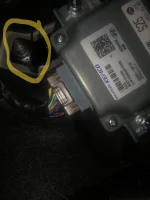
Here's the ground I used. Easily accessible and just below the fuse box.Yeah, I believe the a/c, seats, and power button are all usable... I used the power button in my old car, so probably still going to use that, but will play around when I can finally get power to the dashcam
Which thread are you referring to? Can't find anything on hardwired dash cam installs besides that Garmin mini using the rear view mirror dongerWe've touched on this in a separate thread. There are a couple of us that have done the install. IIRC, there was a ground point very near the fusebox under the dash.

What, specifically are you wanting to know?Which thread are you referring to? Can't find anything on hardwired dash cam installs besides that Garmin mini using the rear view mirror donger
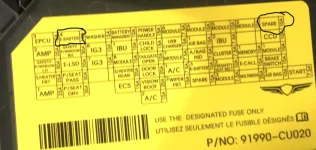
I'm lost on which fuse we need to use on the fuse tap for hardwire. Not sure what amp I need to use in the slot for the dashcam (closest to wires). I have a Blackvue DR750x Plus + PMP. It says it requires fuses 1A or 2A max. So I've been looking for a 1A micro 2A fuses, but can't find one neither of those micro 2s fuses. Now I'm wondering if the 1A is the 10/red fuse. Watching installation vids on the PMP and a different model of a Blackvue, there's a video that just mounts the fusebox fuse to the tap w/out using a fuse for the dash. And then another that uses both fusebox fuse and the 10/red fuse. Sorry, hope this makes sense, trying my to best explain this lol.What, specifically are you wanting to know?

I'm lost on which fuse we need to use on the fuse tap for hardwire. Not sure what amp I need to use in the slot for the dashcam (closest to wires). I have a Blackvue DR750x Plus + PMP. It says it requires fuses 1A or 2A max. So I've been looking for a 1A micro 2A fuses, but can't find one neither of those micro 2s fuses. Now I'm wondering if the 1A is the 10/red fuse. Watching installation vids on the PMP and a different model of a Blackvue, there's a video that just mounts the fusebox fuse to the tap w/out using a fuse for the dash. And then another that uses both fusebox fuse and the 10/red fuse. Sorry, hope this makes sense, trying my to best explain this lol.
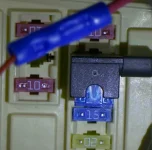
View attachment 47853
single fusebox fuse
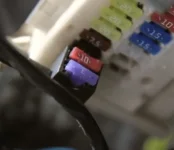
View attachment 47854
fusebox fuse + 10amp fuse
Awesome ty! Do you run your cam in parking mode without a battery pack? My logic is telling me that the gv60 would require it as it's constantly charging the battery on the daily.The hardwire kit should have two fuse slots. One for the wire/device you are adding, and one for the original device being fused. You would use a 2A fuse on the wire side (to protect the PMP), and then use the fuse taken from the fusebox in the fusebox location (for whatever is being fused by the car).
The red one is 10A, the purple one is 3A.
Would this work?
Awesome ty! Do you run your cam in parking mode without a battery pack? My logic is telling me that the gv60 would require it as it's constantly charging the battery on the daily.
Does the pmp reactivate once it voltage is up above to the set cutoff?I do use parking mode - but beware, the recharging of the 12V battery seems inconsistent. I've had the battery drain 2-3 times, but the car has been consistently recharging it at 12.6V for about a month now.
I did it!!! Dash cam is now wired and powered up using the exact screw you showed me, and the other side is connected to the a/c fuse and it definitely works when the vehicle is powered off. Thank you so much!!!Here's the ground I used. Easily accessible and just below the fuse box.
 | ||||
 |  |  |  |  |
 |  | |||