G
G-39480
I can share my sd card image (2015 Genesis 5.0). I already helped a few Genesis 3.8 owners.
Thanks for the downloadable file. Once I've downloaded it, what do I need to do to convert it from the .img file to the SD card?
The car lovers social network
Automotive components
Create videos that captivate
Automotive Hot or Not
Vehicle hacker protection
Genesis parts & accessories
Advertise with us!
The car lovers social network
Automotive components
Create videos that captivate
Automotive Hot or Not
Vehicle hacker protection
Genesis parts & accessories
Advertise with us!

I can share my sd card image (2015 Genesis 5.0). I already helped a few Genesis 3.8 owners.
***DO THIS AT YOUR OWN RISK****Thanks for the downloadable file. Once I've downloaded it, what do I need to do to convert it from the .img file to the SD card?
I can share my sd card image (2015 Genesis 5.0). I already helped a few Genesis 3.8 owners.

Yes you do unfortunatelyDo you have to pay for the update to the SD card to get carplay?

I put the original SD card Back in slot and the “failed to authenticate navigation” error went away. All is well.Thanks to all for the software and guidance on this. my experience updating on my new-to-me '15 Genesis 5.0 has been this:
S/W VER. ST.DH.USA.E451.140905 to verision ST.DH.USA.E509.160420
- downloaded software and used Win32DiskImager to copy onto a blank 32GB SD card. while the copying went fine, using the "verify" function on the WIN32 software always returned an error (Verification failed at sector: 40960). I tried many things to try and fix this including downloading the file again, trying another SD card, buying and trying another SD card reader, using a USB stick instead, but every time I got the same error. after googling that it may be a software flaw in the WIN32DiskImager software itself, I used it as is.
- installed "as-is" software and updated Head Unit and software. the installation went fine and I now have usable CarPlay and Android Auto, however, Navigation is now giving me a "Failed to Authenticate Navigation" error. updating again a second time did not fix that problem. I moved the unit from/to these versions:
FIRMWARE VER. MICOM.ST.DH.USA.01450.140716 and SUBM.ST.DH.BD5.1042.140425 to version MICOM.ST.DH.USA.Q150.160517 and SUBM.SP.DH.BD5.1047.151002
NAVI APP VER. ST4.NAM.HMC.140822061725 to version <BLANK>
MAP VER. NAM.07.47.65.501..001 to version <BLANK>
My thoughts on fixing this to get NAV working again are:
any other suggestions from the crew? again, I appreciate the support
- do nothing but wait. does the NAV need time to re-authenticate (like Blue Link did?)?
- try updating again, this time using the USB port rather than the SD card port. more of a shot in the dark than a thought that it would change things.
- buying the update on Mapnsoft. I'm sure that this would work, but as it would be $145, it's the option of last hope.
JL
I can share my sd card image (2015 Genesis 5.0). I already helped a few Genesis 3.8 owners.
Anyone have the latest update for the 2016 Genesis(touch only) model?
I’m not sure how to do it, can you give us a run through?Plus one. Just did mine.. Thanks crackzz!
Thanks to all for the software and guidance on this. my experience updating on my new-to-me '15 Genesis 5.0 has been this:
S/W VER. ST.DH.USA.E451.140905 to verision ST.DH.USA.E509.160420
- downloaded software and used Win32DiskImager to copy onto a blank 32GB SD card. while the copying went fine, using the "verify" function on the WIN32 software always returned an error (Verification failed at sector: 40960). I tried many things to try and fix this including downloading the file again, trying another SD card, buying and trying another SD card reader, using a USB stick instead, but every time I got the same error. after googling that it may be a software flaw in the WIN32DiskImager software itself, I used it as is.
- installed "as-is" software and updated Head Unit and software. the installation went fine and I now have usable CarPlay and Android Auto, however, Navigation is now giving me a "Failed to Authenticate Navigation" error. updating again a second time did not fix that problem. I moved the unit from/to these versions:
FIRMWARE VER. MICOM.ST.DH.USA.01450.140716 and SUBM.ST.DH.BD5.1042.140425 to version MICOM.ST.DH.USA.Q150.160517 and SUBM.SP.DH.BD5.1047.151002
NAVI APP VER. ST4.NAM.HMC.140822061725 to version <BLANK>
MAP VER. NAM.07.47.65.501..001 to version <BLANK>
My thoughts on fixing this to get NAV working again are:
any other suggestions from the crew? again, I appreciate the support
- do nothing but wait. does the NAV need time to re-authenticate (like Blue Link did?)?
- try updating again, this time using the USB port rather than the SD card port. more of a shot in the dark than a thought that it would change things.
- buying the update on Mapnsoft. I'm sure that this would work, but as it would be $145, it's the option of last hope.
JL
Step 1. Download the image fileI’m not sure how to do it, can you give us a run through?
Hey did you have to download it on the SD card or can you use a USB drive. My vehicle doesn’t have the SD card slotJust dealt with this for two weeks. They don't allow it to be downloaded anymore. It is not allowed to even get access to the download.
I bought the MapNSoft update for $145 and now have Carplay in my 2016 Genesis (Touch only)
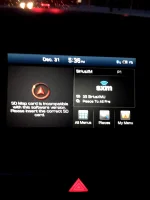
when I tried that, it gave me the error: "SD Map card is incompatible with this software version. Please insert the correct SD card." So, the old card no longer works, but the new card won't activate navigation.
I'm going to buy the mapnsoft update once 14.0 is released later this month. I'm thinking that should fix unit Nav, unit app, and GPS time availability issues that are presently broken. Mainly, i just can't stand the error message on every start and want it back AND keep CarPlay.Same. CarPlay now working, so that's a trade-off I can live with, but if anyone knows how to fix the map card compatibility error, or has a replacement file that is functional that they can clone and share, it would be appreciated!
Late to the game here. I have a 3.8 Touch Only. If I order the latest mapnsoft, do I automatically get AC as part of the map update? Thanks.I'm going to buy the mapnsoft update once 14.0 is released later this month. I'm thinking that should fix unit Nav, unit app, and GPS time availability issues that are presently broken. Mainly, i just can't stand the error message on every start and want it back AND keep CarPlay.
 | ||||
 |  |  |  |  |
 |  | |||